Day-Sketch
Development build of main. It can be unstable. Get the 0.1.3 release instead b21086d
About
A vector drawing editor with drag handles, layers, and unlimited undo, built with Day in one Rust codebase and rendered with the platform’s own widgets on Mac, iPhone, Android, Windows, Linux, HarmonyOS, and the web. Every drawing is a plain SQLite file you can copy, share, and inspect.
Run it in one command
Install the day CLI, then let it clone, build, and launch the app for your desktop:
cargo install day-cli
day launch --git https://github.com/daybrite/Day-Sketch.git
day doctor lists what your platform’s toolkit needs and prints the install command for anything
missing. The launch prints where it put the checkout, so you can open the code and change it.
What you get
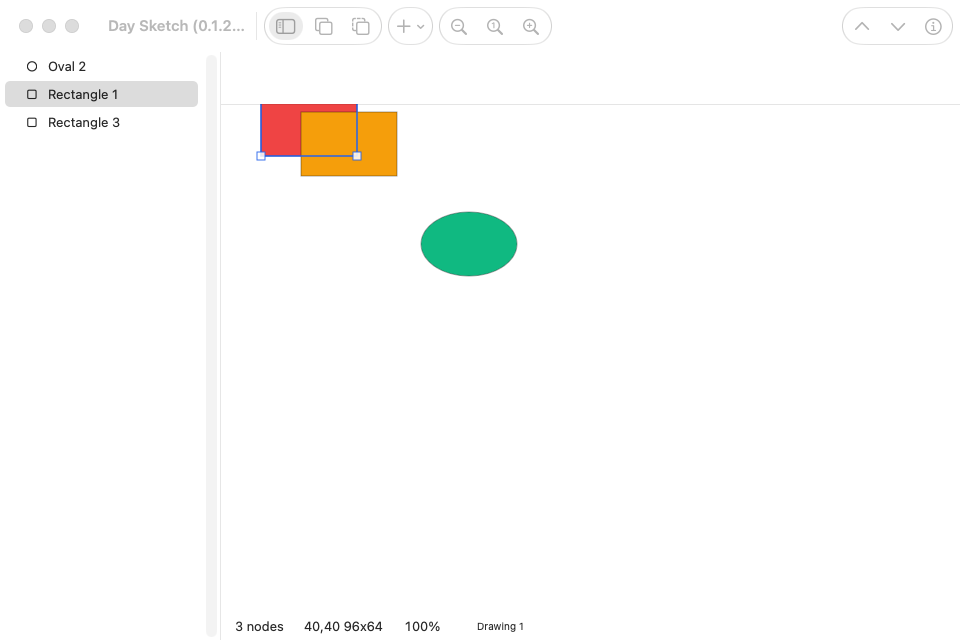
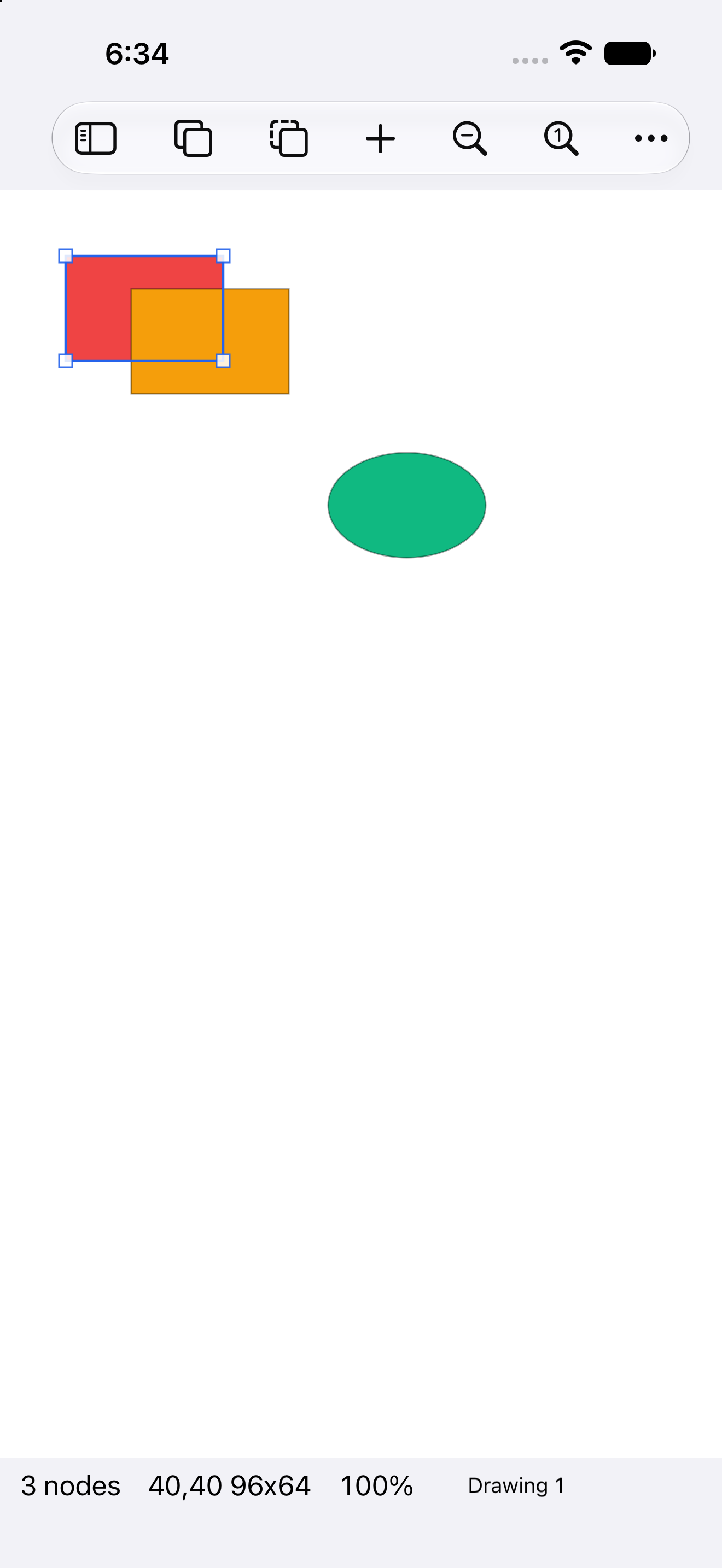
Place rectangles, ovals, lines, and text, drag them around, resize them by their handles, turn them, group them, and arrange the layers. A text node is a line of type in any font the platform lists, sized by its handles. Alignment guides appear as you drag, and a shape snaps onto a neighbor’s edge or center when it comes within a few pixels of lining up (a preference turns the snapping off). Every operation is one undoable turn, fronted by the platform’s own undo system where it has one, so ⌘Z on a Mac and the shake gesture on an iPhone both work the way their platform expects.
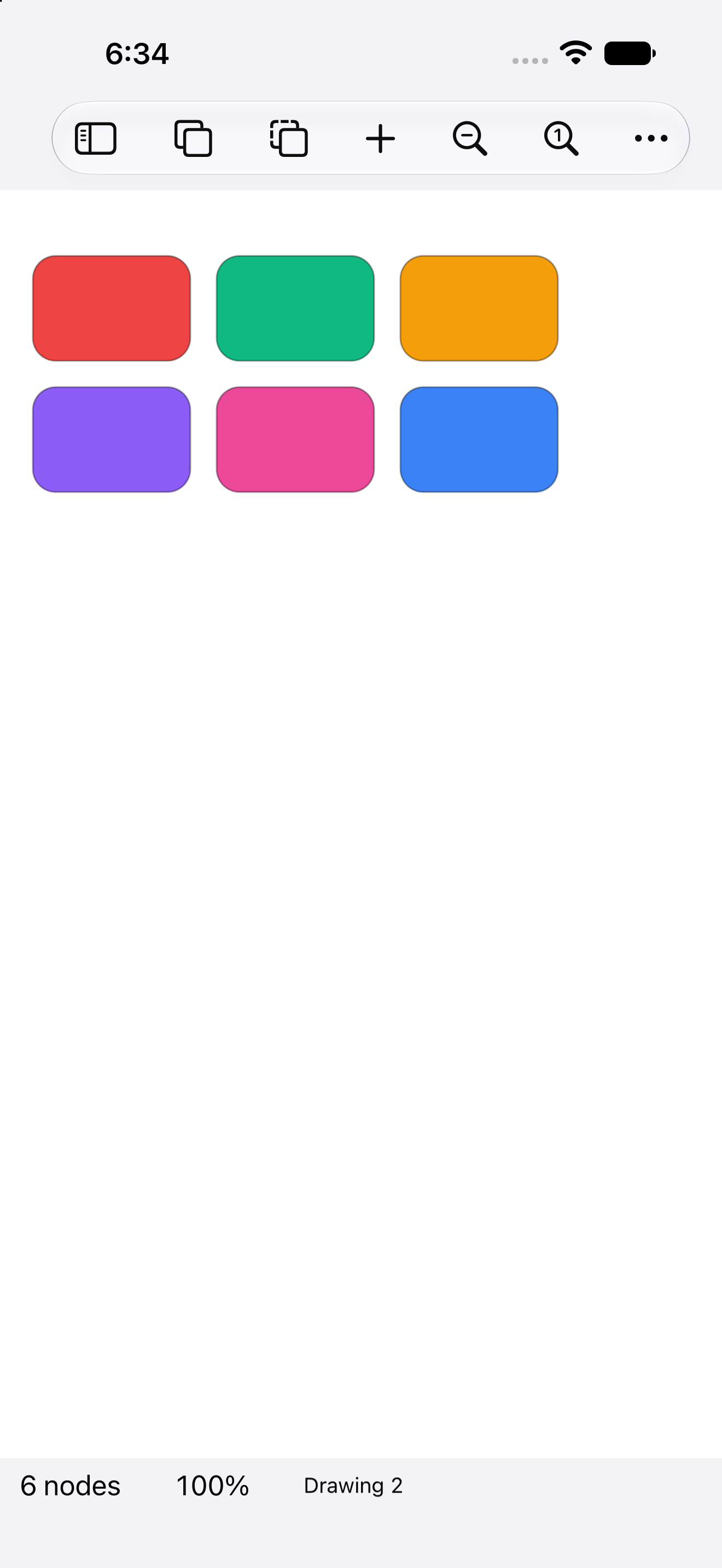
The editor on iPhone The palette on iPhone A fan of rotated shapes on Android Three translucent circles on Android


Under the canvas, a drawing is one observable table in a SQLite file. A drag edits it live through a preview session, and the committed result is a row change, which is what makes undo a matter of replaying turns. The app was the stress test the day-model and day-persistence design was drafted against. Native Export a Copy first saves pending edits, then uses a separate database worker for the consistent SQLite snapshot and file read. Export does not hold the UI thread through the backup; the drawing’s small interactive edits retain their UI-owned model and undo.
The same code on every platform
These captures come from the app’s own CI, which runs the walkthrough on every target and publishes the results to the gallery.
| Windows · XAML | Linux · GTK | Linux · Qt |
|---|---|---|
| The editor on Windows | The editor on GTK | The editor on Qt |

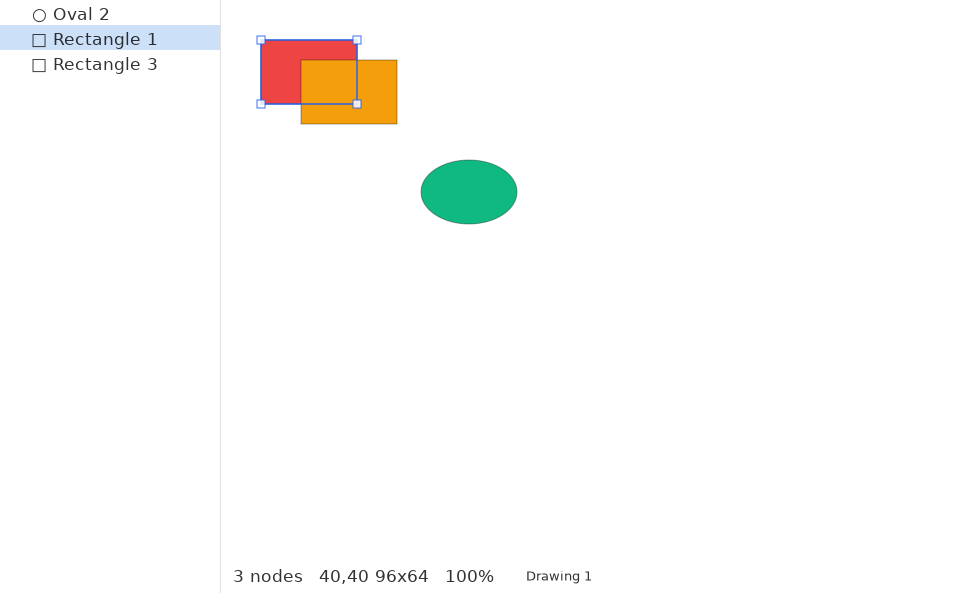
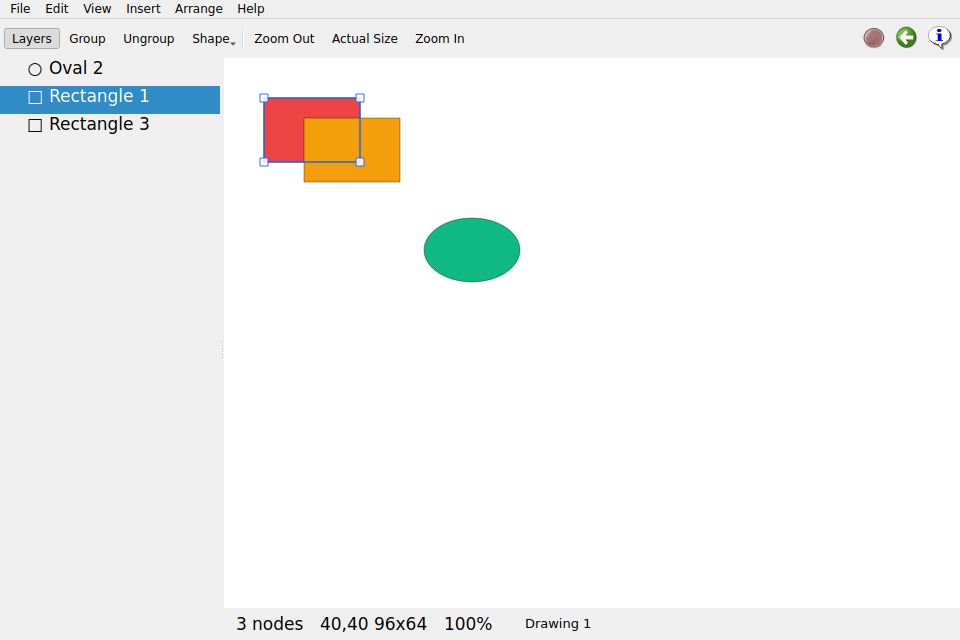
| Web · DOM | macOS · outlines | macOS · a group, turned |
|---|---|---|
| The editor in the browser | Outline-only shapes on macOS | A grouped body rotated as one on macOS |
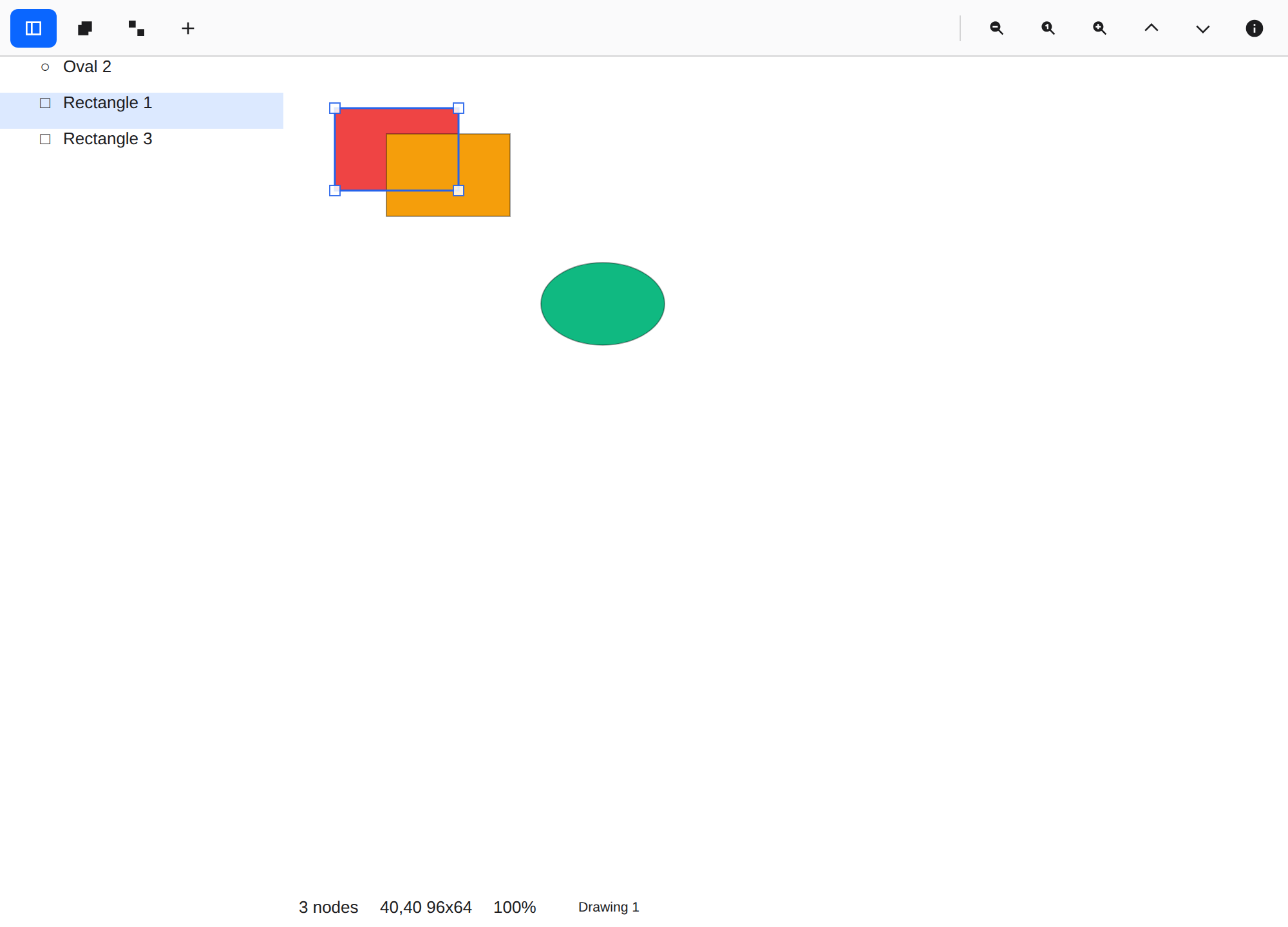
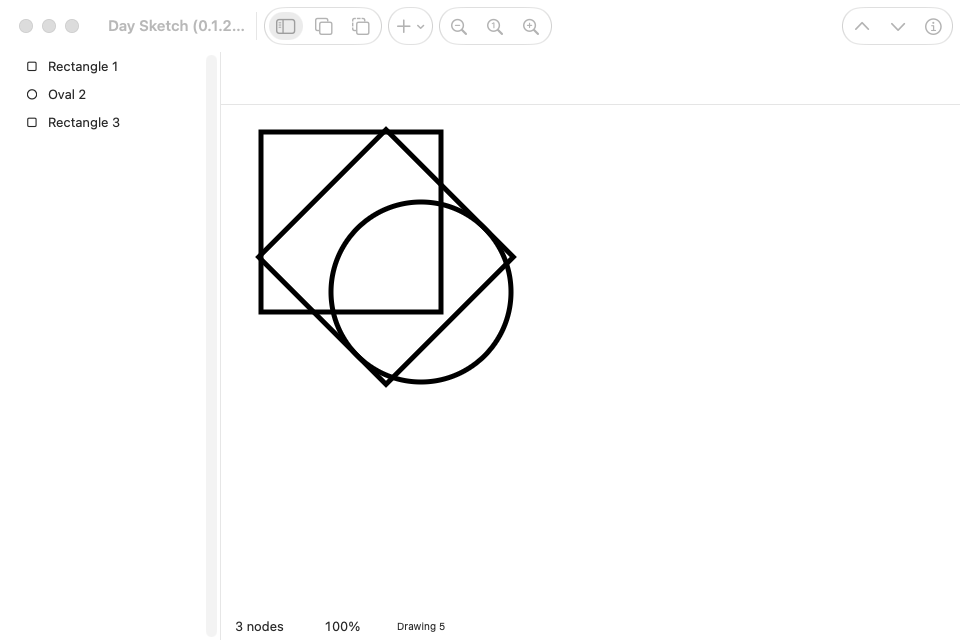
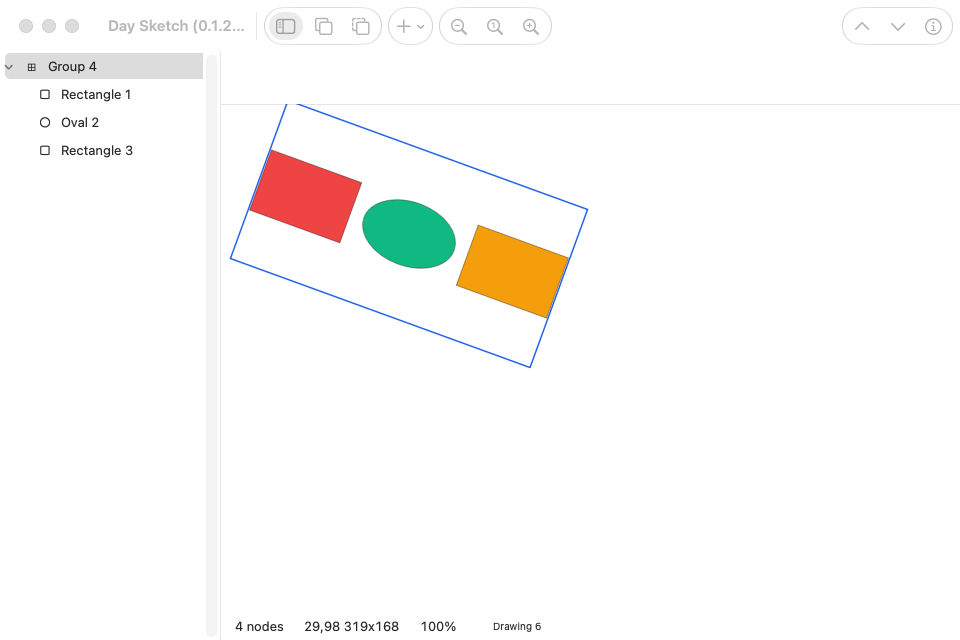
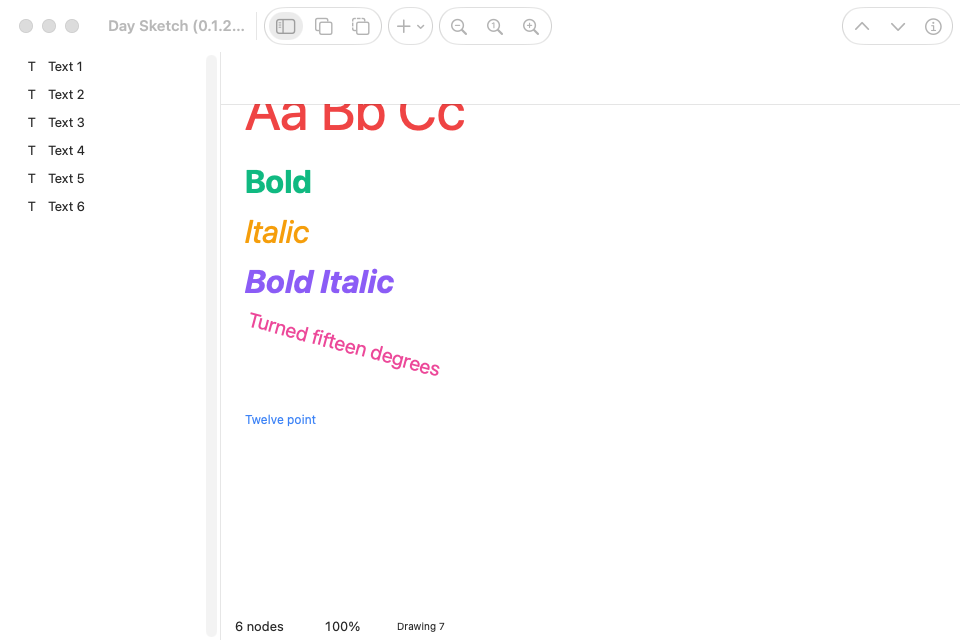
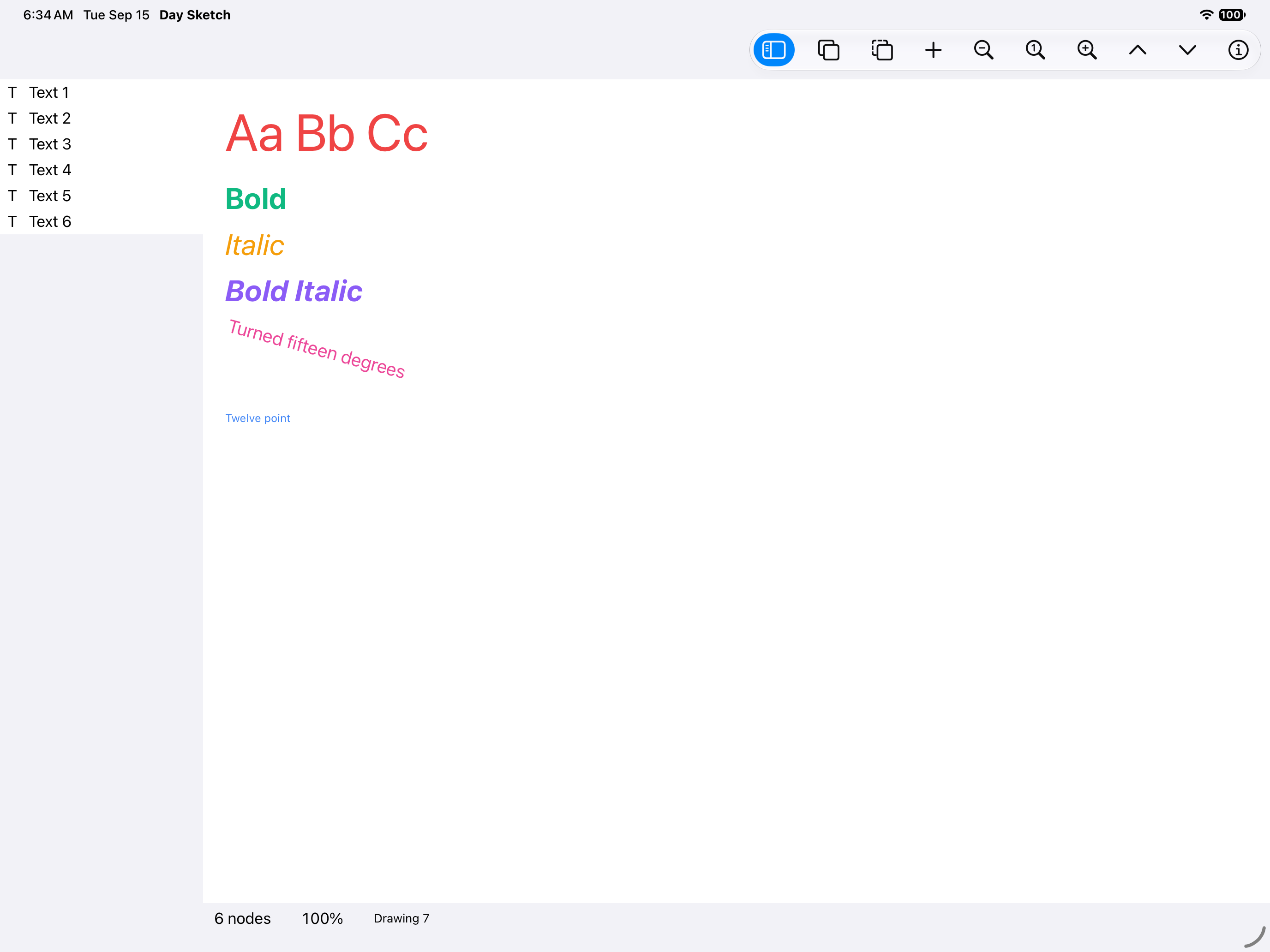
| macOS · type specimen | iPad · type specimen | Android tablet · type specimen |
|---|---|---|
| Six lines of type in four styles on macOS | The type specimen on iPad | The type specimen on an Android tablet |

Build from a clone
Day compiles one toolkit backend per binary, so name a target when you build or launch. Every
target the app ships is listed in Day.toml.
day doctor                       # toolchains present and missing, with fixes
day launch -t macos-appkit       # build + run
day launch -t ios-uikit          # needs a booted Simulator
day launch -t android-material        # needs a JDK and a running emulator or device
day launch -t web-dom            # serves the WebAssembly build locally
A bare cargo build uses the crate’s default mock backend, which is what lets rust-analyzer and
cargo check work with no flags. To pick a toolkit from plain cargo, turn the default off first:
cargo build --no-default-features --features appkit # or gtk / qt / uikit / material / xaml / dom
dayscript/demo.yaml is a dayscript that draws, arranges,
undoes, and screenshots along the way. It is the app’s UI test and the script CI runs on every
target to produce the gallery:
day launch -t macos-appkit --script dayscript/demo.yaml
Windows CI also runs the focused resize, duplicate-drag, layers-tree, image, clipboard-image, and export walkthroughs. The main demo checks native canvas keyboard nudging and ensures that arrow keys in an inspector field do not move the selection. PNG/PDF drawing export is not yet supported by WinUI, so those export operations remain explicitly skipped.
To build against a local day checkout instead of the pinned git revision, let the CLI write and
verify the patch table:
day patch --local /path/to/day
Inside the code
src/lib.rsisroot(): the window shell, the menus with localized shortcuts, and the Settings and About declaration (appearance, language, and the snapping preference).src/canvas.rsis the drawing surface: hit testing, handles, drag preview sessions, and the shape rendering.src/inspector.rsis the side panel: the palette, the layer list, and arrangement.src/model.rsis the scene as a day-model table, persisted to SQLite through day-persistence, with every edit as one undoable turn.resource/locales/en/app.ftlcarries every user-facing string.platform/holds app-owned Apple host sources and any native resource customizations. Day generates the build projects underbuild/.
day lint checks routes, element ids, and locale coverage.
Day Sketch is open source under the Apache-2.0 license.
Images
Insert → Image… (also in the toolbar’s + menu) opens the platform file picker. The image lands centered in the current view, sized to fit without upscaling. Move or resize it with the canvas handles or Geometry fields; Rotation and Opacity work like other node properties. Images participate in grouping, layer order, undo/redo, duplication, and SVG clipboard copy/paste.
The drawing stores the original encoded file in a SQLite image_bytes BLOB. It does
not depend on the source path after insertion. Decoded native bitmaps are cached for
the lifetime of each canvas and released when their nodes disappear. Opening an older
drawing adds the BLOB column with empty values for its existing shapes.
The insertion command requires Day’s image decoder and file-picker capabilities. Windows provides both, using its native WinRT file picker.
For the desktop image walkthrough, run
day launch -t windows-winui --script dayscript/images.yaml (or choose another desktop
target). The script uses the bundled resource/images/app_logo.png and writes its
round-trip drawing under build/day. The screenshots verify
upright rendering, non-square resizing, rotation, opacity, and SQLite reopen. The
ordinary editor walkthrough remains dayscript/demo.yaml.
The browser counterpart is scripts/web-image-check.mjs: after a web build, run it
with DAY_WEB_DRIVER_PLAYWRIGHT pointing to a directory containing
node_modules/playwright. It uses a real file picker, waits for decoded canvas pixels,
edits the image, then reloads the page to verify restoration from SQLite in OPFS.
Use a Day CLI built from the same framework revision for web builds: its bundled
shim.js must include the new image decoder imports.
Hold Shift while dragging a canvas resize handle to preserve the starting aspect ratio. You can press or release Shift during the drag. The opposite corner stays fixed, including on rotated nodes; line endpoints keep their direction and text continues to scale its font proportionally. Independent edge snapping pauses while Shift constrains the resize.
Start dragging a selected node while holding Option on macOS or Alt on other platforms to drag a copy. Multiple selected nodes and groups are copied together, without an initial offset. Releasing the modifier continues dragging the copies; one Undo removes the copies and one Redo restores their final positions.
Copy/Paste now exchanges image bytes through the system clipboard. A single copied image also offers PNG (converting when needed), and editable SVG retains its original bytes and node properties for a Day-Sketch round trip. Pasting a screenshot or other supported raster image creates a new embedded Image node. Cut removes nodes only after clipboard publication succeeds. Text fields keep their normal text clipboard behavior.
Run dayscript/clipboard-images.yaml with the bundled image fixture described above, or
scripts/web-clipboard-check.mjs for a real browser clipboard/persistence check. The native
binary probe lives in day/crates/day-part-clipboard/examples/binary_clipboard.rs.
Generated native projects
Use a Day CLI with automatic native project generation; Apple builds require Xcode 27
or newer. Xcode project documents, Android Gradle files, and HarmonyOS hvigor files are
created under build/ by day prepare, day build, and day launch. Open the selected
project with day open -t <target>; edits to generated files are disposable. Apple Swift
sources, plists and .xcconfig files, and any Android resource overlays, remain app-owned
under platform/. For additional native configuration, use
day project add-target <target> --persist-native-project to create a persistent override.
Download — iOS (UIKit)
Packed by the last CI run and signed for development.
Screenshots
iOS
iPhone


iPad


Permissions
iOS
No declared permissions.
About
A vector drawing editor with drag handles, layers, and unlimited undo, built with Day in one Rust codebase and rendered with the platform’s own widgets on Mac, iPhone, Android, Windows, Linux, HarmonyOS, and the web. Every drawing is a plain SQLite file you can copy, share, and inspect.
Run it in one command
Install the day CLI, then let it clone, build, and launch the app for your desktop:
cargo install day-cli
day launch --git https://github.com/daybrite/Day-Sketch.git
day doctor lists what your platform’s toolkit needs and prints the install command for anything
missing. The launch prints where it put the checkout, so you can open the code and change it.
What you get
Place rectangles, ovals, lines, and text, drag them around, resize them by their handles, turn them, group them, and arrange the layers. A text node is a line of type in any font the platform lists, sized by its handles. Alignment guides appear as you drag, and a shape snaps onto a neighbor’s edge or center when it comes within a few pixels of lining up (a preference turns the snapping off). Every operation is one undoable turn, fronted by the platform’s own undo system where it has one, so ⌘Z on a Mac and the shake gesture on an iPhone both work the way their platform expects.
The editor on iPhone The palette on iPhone A fan of rotated shapes on Android Three translucent circles on Android
Under the canvas, a drawing is one observable table in a SQLite file. A drag edits it live through a preview session, and the committed result is a row change, which is what makes undo a matter of replaying turns. The app was the stress test the day-model and day-persistence design was drafted against. Native Export a Copy first saves pending edits, then uses a separate database worker for the consistent SQLite snapshot and file read. Export does not hold the UI thread through the backup; the drawing’s small interactive edits retain their UI-owned model and undo.
The same code on every platform
These captures come from the app’s own CI, which runs the walkthrough on every target and publishes the results to the gallery.
| Windows · XAML | Linux · GTK | Linux · Qt |
|---|---|---|
| The editor on Windows | The editor on GTK | The editor on Qt |
| Web · DOM | macOS · outlines | macOS · a group, turned |
|---|---|---|
| The editor in the browser | Outline-only shapes on macOS | A grouped body rotated as one on macOS |
| macOS · type specimen | iPad · type specimen | Android tablet · type specimen |
|---|---|---|
| Six lines of type in four styles on macOS | The type specimen on iPad | The type specimen on an Android tablet |
Build from a clone
Day compiles one toolkit backend per binary, so name a target when you build or launch. Every
target the app ships is listed in Day.toml.
day doctor                       # toolchains present and missing, with fixes
day launch -t macos-appkit       # build + run
day launch -t ios-uikit          # needs a booted Simulator
day launch -t android-material        # needs a JDK and a running emulator or device
day launch -t web-dom            # serves the WebAssembly build locally
A bare cargo build uses the crate’s default mock backend, which is what lets rust-analyzer and
cargo check work with no flags. To pick a toolkit from plain cargo, turn the default off first:
cargo build --no-default-features --features appkit # or gtk / qt / uikit / material / xaml / dom
dayscript/demo.yaml is a dayscript that draws, arranges,
undoes, and screenshots along the way. It is the app’s UI test and the script CI runs on every
target to produce the gallery:
day launch -t macos-appkit --script dayscript/demo.yaml
Windows CI also runs the focused resize, duplicate-drag, layers-tree, image, clipboard-image, and export walkthroughs. The main demo checks native canvas keyboard nudging and ensures that arrow keys in an inspector field do not move the selection. PNG/PDF drawing export is not yet supported by WinUI, so those export operations remain explicitly skipped.
To build against a local day checkout instead of the pinned git revision, let the CLI write and
verify the patch table:
day patch --local /path/to/day
Inside the code
src/lib.rsisroot(): the window shell, the menus with localized shortcuts, and the Settings and About declaration (appearance, language, and the snapping preference).src/canvas.rsis the drawing surface: hit testing, handles, drag preview sessions, and the shape rendering.src/inspector.rsis the side panel: the palette, the layer list, and arrangement.src/model.rsis the scene as a day-model table, persisted to SQLite through day-persistence, with every edit as one undoable turn.resource/locales/en/app.ftlcarries every user-facing string.platform/holds app-owned Apple host sources and any native resource customizations. Day generates the build projects underbuild/.
day lint checks routes, element ids, and locale coverage.
Day Sketch is open source under the Apache-2.0 license.
Images
Insert → Image… (also in the toolbar’s + menu) opens the platform file picker. The image lands centered in the current view, sized to fit without upscaling. Move or resize it with the canvas handles or Geometry fields; Rotation and Opacity work like other node properties. Images participate in grouping, layer order, undo/redo, duplication, and SVG clipboard copy/paste.
The drawing stores the original encoded file in a SQLite image_bytes BLOB. It does
not depend on the source path after insertion. Decoded native bitmaps are cached for
the lifetime of each canvas and released when their nodes disappear. Opening an older
drawing adds the BLOB column with empty values for its existing shapes.
The insertion command requires Day’s image decoder and file-picker capabilities. Windows provides both, using its native WinRT file picker.
For the desktop image walkthrough, run
day launch -t windows-winui --script dayscript/images.yaml (or choose another desktop
target). The script uses the bundled resource/images/app_logo.png and writes its
round-trip drawing under build/day. The screenshots verify
upright rendering, non-square resizing, rotation, opacity, and SQLite reopen. The
ordinary editor walkthrough remains dayscript/demo.yaml.
The browser counterpart is scripts/web-image-check.mjs: after a web build, run it
with DAY_WEB_DRIVER_PLAYWRIGHT pointing to a directory containing
node_modules/playwright. It uses a real file picker, waits for decoded canvas pixels,
edits the image, then reloads the page to verify restoration from SQLite in OPFS.
Use a Day CLI built from the same framework revision for web builds: its bundled
shim.js must include the new image decoder imports.
Hold Shift while dragging a canvas resize handle to preserve the starting aspect ratio. You can press or release Shift during the drag. The opposite corner stays fixed, including on rotated nodes; line endpoints keep their direction and text continues to scale its font proportionally. Independent edge snapping pauses while Shift constrains the resize.
Start dragging a selected node while holding Option on macOS or Alt on other platforms to drag a copy. Multiple selected nodes and groups are copied together, without an initial offset. Releasing the modifier continues dragging the copies; one Undo removes the copies and one Redo restores their final positions.
Copy/Paste now exchanges image bytes through the system clipboard. A single copied image also offers PNG (converting when needed), and editable SVG retains its original bytes and node properties for a Day-Sketch round trip. Pasting a screenshot or other supported raster image creates a new embedded Image node. Cut removes nodes only after clipboard publication succeeds. Text fields keep their normal text clipboard behavior.
Run dayscript/clipboard-images.yaml with the bundled image fixture described above, or
scripts/web-clipboard-check.mjs for a real browser clipboard/persistence check. The native
binary probe lives in day/crates/day-part-clipboard/examples/binary_clipboard.rs.
Generated native projects
Use a Day CLI with automatic native project generation; Apple builds require Xcode 27
or newer. Xcode project documents, Android Gradle files, and HarmonyOS hvigor files are
created under build/ by day prepare, day build, and day launch. Open the selected
project with day open -t <target>; edits to generated files are disposable. Apple Swift
sources, plists and .xcconfig files, and any Android resource overlays, remain app-owned
under platform/. For additional native configuration, use
day project add-target <target> --persist-native-project to create a persistent override.
Download — Android (Material)
Packed by the last CI run and signed for development.
Screenshots
Android
Handset


Tablet


Permissions
Android
No declared permissions.
About
A vector drawing editor with drag handles, layers, and unlimited undo, built with Day in one Rust codebase and rendered with the platform’s own widgets on Mac, iPhone, Android, Windows, Linux, HarmonyOS, and the web. Every drawing is a plain SQLite file you can copy, share, and inspect.
Run it in one command
Install the day CLI, then let it clone, build, and launch the app for your desktop:
cargo install day-cli
day launch --git https://github.com/daybrite/Day-Sketch.git
day doctor lists what your platform’s toolkit needs and prints the install command for anything
missing. The launch prints where it put the checkout, so you can open the code and change it.
What you get
Place rectangles, ovals, lines, and text, drag them around, resize them by their handles, turn them, group them, and arrange the layers. A text node is a line of type in any font the platform lists, sized by its handles. Alignment guides appear as you drag, and a shape snaps onto a neighbor’s edge or center when it comes within a few pixels of lining up (a preference turns the snapping off). Every operation is one undoable turn, fronted by the platform’s own undo system where it has one, so ⌘Z on a Mac and the shake gesture on an iPhone both work the way their platform expects.
The editor on iPhone The palette on iPhone A fan of rotated shapes on Android Three translucent circles on Android
Under the canvas, a drawing is one observable table in a SQLite file. A drag edits it live through a preview session, and the committed result is a row change, which is what makes undo a matter of replaying turns. The app was the stress test the day-model and day-persistence design was drafted against. Native Export a Copy first saves pending edits, then uses a separate database worker for the consistent SQLite snapshot and file read. Export does not hold the UI thread through the backup; the drawing’s small interactive edits retain their UI-owned model and undo.
The same code on every platform
These captures come from the app’s own CI, which runs the walkthrough on every target and publishes the results to the gallery.
| Windows · XAML | Linux · GTK | Linux · Qt |
|---|---|---|
| The editor on Windows | The editor on GTK | The editor on Qt |
| Web · DOM | macOS · outlines | macOS · a group, turned |
|---|---|---|
| The editor in the browser | Outline-only shapes on macOS | A grouped body rotated as one on macOS |
| macOS · type specimen | iPad · type specimen | Android tablet · type specimen |
|---|---|---|
| Six lines of type in four styles on macOS | The type specimen on iPad | The type specimen on an Android tablet |
Build from a clone
Day compiles one toolkit backend per binary, so name a target when you build or launch. Every
target the app ships is listed in Day.toml.
day doctor                       # toolchains present and missing, with fixes
day launch -t macos-appkit       # build + run
day launch -t ios-uikit          # needs a booted Simulator
day launch -t android-material        # needs a JDK and a running emulator or device
day launch -t web-dom            # serves the WebAssembly build locally
A bare cargo build uses the crate’s default mock backend, which is what lets rust-analyzer and
cargo check work with no flags. To pick a toolkit from plain cargo, turn the default off first:
cargo build --no-default-features --features appkit # or gtk / qt / uikit / material / xaml / dom
dayscript/demo.yaml is a dayscript that draws, arranges,
undoes, and screenshots along the way. It is the app’s UI test and the script CI runs on every
target to produce the gallery:
day launch -t macos-appkit --script dayscript/demo.yaml
Windows CI also runs the focused resize, duplicate-drag, layers-tree, image, clipboard-image, and export walkthroughs. The main demo checks native canvas keyboard nudging and ensures that arrow keys in an inspector field do not move the selection. PNG/PDF drawing export is not yet supported by WinUI, so those export operations remain explicitly skipped.
To build against a local day checkout instead of the pinned git revision, let the CLI write and
verify the patch table:
day patch --local /path/to/day
Inside the code
src/lib.rsisroot(): the window shell, the menus with localized shortcuts, and the Settings and About declaration (appearance, language, and the snapping preference).src/canvas.rsis the drawing surface: hit testing, handles, drag preview sessions, and the shape rendering.src/inspector.rsis the side panel: the palette, the layer list, and arrangement.src/model.rsis the scene as a day-model table, persisted to SQLite through day-persistence, with every edit as one undoable turn.resource/locales/en/app.ftlcarries every user-facing string.platform/holds app-owned Apple host sources and any native resource customizations. Day generates the build projects underbuild/.
day lint checks routes, element ids, and locale coverage.
Day Sketch is open source under the Apache-2.0 license.
Images
Insert → Image… (also in the toolbar’s + menu) opens the platform file picker. The image lands centered in the current view, sized to fit without upscaling. Move or resize it with the canvas handles or Geometry fields; Rotation and Opacity work like other node properties. Images participate in grouping, layer order, undo/redo, duplication, and SVG clipboard copy/paste.
The drawing stores the original encoded file in a SQLite image_bytes BLOB. It does
not depend on the source path after insertion. Decoded native bitmaps are cached for
the lifetime of each canvas and released when their nodes disappear. Opening an older
drawing adds the BLOB column with empty values for its existing shapes.
The insertion command requires Day’s image decoder and file-picker capabilities. Windows provides both, using its native WinRT file picker.
For the desktop image walkthrough, run
day launch -t windows-winui --script dayscript/images.yaml (or choose another desktop
target). The script uses the bundled resource/images/app_logo.png and writes its
round-trip drawing under build/day. The screenshots verify
upright rendering, non-square resizing, rotation, opacity, and SQLite reopen. The
ordinary editor walkthrough remains dayscript/demo.yaml.
The browser counterpart is scripts/web-image-check.mjs: after a web build, run it
with DAY_WEB_DRIVER_PLAYWRIGHT pointing to a directory containing
node_modules/playwright. It uses a real file picker, waits for decoded canvas pixels,
edits the image, then reloads the page to verify restoration from SQLite in OPFS.
Use a Day CLI built from the same framework revision for web builds: its bundled
shim.js must include the new image decoder imports.
Hold Shift while dragging a canvas resize handle to preserve the starting aspect ratio. You can press or release Shift during the drag. The opposite corner stays fixed, including on rotated nodes; line endpoints keep their direction and text continues to scale its font proportionally. Independent edge snapping pauses while Shift constrains the resize.
Start dragging a selected node while holding Option on macOS or Alt on other platforms to drag a copy. Multiple selected nodes and groups are copied together, without an initial offset. Releasing the modifier continues dragging the copies; one Undo removes the copies and one Redo restores their final positions.
Copy/Paste now exchanges image bytes through the system clipboard. A single copied image also offers PNG (converting when needed), and editable SVG retains its original bytes and node properties for a Day-Sketch round trip. Pasting a screenshot or other supported raster image creates a new embedded Image node. Cut removes nodes only after clipboard publication succeeds. Text fields keep their normal text clipboard behavior.
Run dayscript/clipboard-images.yaml with the bundled image fixture described above, or
scripts/web-clipboard-check.mjs for a real browser clipboard/persistence check. The native
binary probe lives in day/crates/day-part-clipboard/examples/binary_clipboard.rs.
Generated native projects
Use a Day CLI with automatic native project generation; Apple builds require Xcode 27
or newer. Xcode project documents, Android Gradle files, and HarmonyOS hvigor files are
created under build/ by day prepare, day build, and day launch. Open the selected
project with day open -t <target>; edits to generated files are disposable. Apple Swift
sources, plists and .xcconfig files, and any Android resource overlays, remain app-owned
under platform/. For additional native configuration, use
day project add-target <target> --persist-native-project to create a persistent override.
Download — HarmonyOS (ArkUI)
Packed by the last CI run and signed for development.
Screenshots
HarmonyOS
Handset


Tablet


Permissions
HarmonyOS
No declared permissions.
About
A vector drawing editor with drag handles, layers, and unlimited undo, built with Day in one Rust codebase and rendered with the platform’s own widgets on Mac, iPhone, Android, Windows, Linux, HarmonyOS, and the web. Every drawing is a plain SQLite file you can copy, share, and inspect.
Run it in one command
Install the day CLI, then let it clone, build, and launch the app for your desktop:
cargo install day-cli
day launch --git https://github.com/daybrite/Day-Sketch.git
day doctor lists what your platform’s toolkit needs and prints the install command for anything
missing. The launch prints where it put the checkout, so you can open the code and change it.
What you get
Place rectangles, ovals, lines, and text, drag them around, resize them by their handles, turn them, group them, and arrange the layers. A text node is a line of type in any font the platform lists, sized by its handles. Alignment guides appear as you drag, and a shape snaps onto a neighbor’s edge or center when it comes within a few pixels of lining up (a preference turns the snapping off). Every operation is one undoable turn, fronted by the platform’s own undo system where it has one, so ⌘Z on a Mac and the shake gesture on an iPhone both work the way their platform expects.
The editor on iPhone The palette on iPhone A fan of rotated shapes on Android Three translucent circles on Android
Under the canvas, a drawing is one observable table in a SQLite file. A drag edits it live through a preview session, and the committed result is a row change, which is what makes undo a matter of replaying turns. The app was the stress test the day-model and day-persistence design was drafted against. Native Export a Copy first saves pending edits, then uses a separate database worker for the consistent SQLite snapshot and file read. Export does not hold the UI thread through the backup; the drawing’s small interactive edits retain their UI-owned model and undo.
The same code on every platform
These captures come from the app’s own CI, which runs the walkthrough on every target and publishes the results to the gallery.
| Windows · XAML | Linux · GTK | Linux · Qt |
|---|---|---|
| The editor on Windows | The editor on GTK | The editor on Qt |
| Web · DOM | macOS · outlines | macOS · a group, turned |
|---|---|---|
| The editor in the browser | Outline-only shapes on macOS | A grouped body rotated as one on macOS |
| macOS · type specimen | iPad · type specimen | Android tablet · type specimen |
|---|---|---|
| Six lines of type in four styles on macOS | The type specimen on iPad | The type specimen on an Android tablet |
Build from a clone
Day compiles one toolkit backend per binary, so name a target when you build or launch. Every
target the app ships is listed in Day.toml.
day doctor                       # toolchains present and missing, with fixes
day launch -t macos-appkit       # build + run
day launch -t ios-uikit          # needs a booted Simulator
day launch -t android-material        # needs a JDK and a running emulator or device
day launch -t web-dom            # serves the WebAssembly build locally
A bare cargo build uses the crate’s default mock backend, which is what lets rust-analyzer and
cargo check work with no flags. To pick a toolkit from plain cargo, turn the default off first:
cargo build --no-default-features --features appkit # or gtk / qt / uikit / material / xaml / dom
dayscript/demo.yaml is a dayscript that draws, arranges,
undoes, and screenshots along the way. It is the app’s UI test and the script CI runs on every
target to produce the gallery:
day launch -t macos-appkit --script dayscript/demo.yaml
Windows CI also runs the focused resize, duplicate-drag, layers-tree, image, clipboard-image, and export walkthroughs. The main demo checks native canvas keyboard nudging and ensures that arrow keys in an inspector field do not move the selection. PNG/PDF drawing export is not yet supported by WinUI, so those export operations remain explicitly skipped.
To build against a local day checkout instead of the pinned git revision, let the CLI write and
verify the patch table:
day patch --local /path/to/day
Inside the code
src/lib.rsisroot(): the window shell, the menus with localized shortcuts, and the Settings and About declaration (appearance, language, and the snapping preference).src/canvas.rsis the drawing surface: hit testing, handles, drag preview sessions, and the shape rendering.src/inspector.rsis the side panel: the palette, the layer list, and arrangement.src/model.rsis the scene as a day-model table, persisted to SQLite through day-persistence, with every edit as one undoable turn.resource/locales/en/app.ftlcarries every user-facing string.platform/holds app-owned Apple host sources and any native resource customizations. Day generates the build projects underbuild/.
day lint checks routes, element ids, and locale coverage.
Day Sketch is open source under the Apache-2.0 license.
Images
Insert → Image… (also in the toolbar’s + menu) opens the platform file picker. The image lands centered in the current view, sized to fit without upscaling. Move or resize it with the canvas handles or Geometry fields; Rotation and Opacity work like other node properties. Images participate in grouping, layer order, undo/redo, duplication, and SVG clipboard copy/paste.
The drawing stores the original encoded file in a SQLite image_bytes BLOB. It does
not depend on the source path after insertion. Decoded native bitmaps are cached for
the lifetime of each canvas and released when their nodes disappear. Opening an older
drawing adds the BLOB column with empty values for its existing shapes.
The insertion command requires Day’s image decoder and file-picker capabilities. Windows provides both, using its native WinRT file picker.
For the desktop image walkthrough, run
day launch -t windows-winui --script dayscript/images.yaml (or choose another desktop
target). The script uses the bundled resource/images/app_logo.png and writes its
round-trip drawing under build/day. The screenshots verify
upright rendering, non-square resizing, rotation, opacity, and SQLite reopen. The
ordinary editor walkthrough remains dayscript/demo.yaml.
The browser counterpart is scripts/web-image-check.mjs: after a web build, run it
with DAY_WEB_DRIVER_PLAYWRIGHT pointing to a directory containing
node_modules/playwright. It uses a real file picker, waits for decoded canvas pixels,
edits the image, then reloads the page to verify restoration from SQLite in OPFS.
Use a Day CLI built from the same framework revision for web builds: its bundled
shim.js must include the new image decoder imports.
Hold Shift while dragging a canvas resize handle to preserve the starting aspect ratio. You can press or release Shift during the drag. The opposite corner stays fixed, including on rotated nodes; line endpoints keep their direction and text continues to scale its font proportionally. Independent edge snapping pauses while Shift constrains the resize.
Start dragging a selected node while holding Option on macOS or Alt on other platforms to drag a copy. Multiple selected nodes and groups are copied together, without an initial offset. Releasing the modifier continues dragging the copies; one Undo removes the copies and one Redo restores their final positions.
Copy/Paste now exchanges image bytes through the system clipboard. A single copied image also offers PNG (converting when needed), and editable SVG retains its original bytes and node properties for a Day-Sketch round trip. Pasting a screenshot or other supported raster image creates a new embedded Image node. Cut removes nodes only after clipboard publication succeeds. Text fields keep their normal text clipboard behavior.
Run dayscript/clipboard-images.yaml with the bundled image fixture described above, or
scripts/web-clipboard-check.mjs for a real browser clipboard/persistence check. The native
binary probe lives in day/crates/day-part-clipboard/examples/binary_clipboard.rs.
Generated native projects
Use a Day CLI with automatic native project generation; Apple builds require Xcode 27
or newer. Xcode project documents, Android Gradle files, and HarmonyOS hvigor files are
created under build/ by day prepare, day build, and day launch. Open the selected
project with day open -t <target>; edits to generated files are disposable. Apple Swift
sources, plists and .xcconfig files, and any Android resource overlays, remain app-owned
under platform/. For additional native configuration, use
day project add-target <target> --persist-native-project to create a persistent override.
Download — macOS (AppKit)
Packed by the last CI run and signed for development.
Screenshots
macOS


Permissions
macOS
No declared permissions.
About
A vector drawing editor with drag handles, layers, and unlimited undo, built with Day in one Rust codebase and rendered with the platform’s own widgets on Mac, iPhone, Android, Windows, Linux, HarmonyOS, and the web. Every drawing is a plain SQLite file you can copy, share, and inspect.
Run it in one command
Install the day CLI, then let it clone, build, and launch the app for your desktop:
cargo install day-cli
day launch --git https://github.com/daybrite/Day-Sketch.git
day doctor lists what your platform’s toolkit needs and prints the install command for anything
missing. The launch prints where it put the checkout, so you can open the code and change it.
What you get
Place rectangles, ovals, lines, and text, drag them around, resize them by their handles, turn them, group them, and arrange the layers. A text node is a line of type in any font the platform lists, sized by its handles. Alignment guides appear as you drag, and a shape snaps onto a neighbor’s edge or center when it comes within a few pixels of lining up (a preference turns the snapping off). Every operation is one undoable turn, fronted by the platform’s own undo system where it has one, so ⌘Z on a Mac and the shake gesture on an iPhone both work the way their platform expects.
The editor on iPhone The palette on iPhone A fan of rotated shapes on Android Three translucent circles on Android
Under the canvas, a drawing is one observable table in a SQLite file. A drag edits it live through a preview session, and the committed result is a row change, which is what makes undo a matter of replaying turns. The app was the stress test the day-model and day-persistence design was drafted against. Native Export a Copy first saves pending edits, then uses a separate database worker for the consistent SQLite snapshot and file read. Export does not hold the UI thread through the backup; the drawing’s small interactive edits retain their UI-owned model and undo.
The same code on every platform
These captures come from the app’s own CI, which runs the walkthrough on every target and publishes the results to the gallery.
| Windows · XAML | Linux · GTK | Linux · Qt |
|---|---|---|
| The editor on Windows | The editor on GTK | The editor on Qt |
| Web · DOM | macOS · outlines | macOS · a group, turned |
|---|---|---|
| The editor in the browser | Outline-only shapes on macOS | A grouped body rotated as one on macOS |
| macOS · type specimen | iPad · type specimen | Android tablet · type specimen |
|---|---|---|
| Six lines of type in four styles on macOS | The type specimen on iPad | The type specimen on an Android tablet |
Build from a clone
Day compiles one toolkit backend per binary, so name a target when you build or launch. Every
target the app ships is listed in Day.toml.
day doctor                       # toolchains present and missing, with fixes
day launch -t macos-appkit       # build + run
day launch -t ios-uikit          # needs a booted Simulator
day launch -t android-material        # needs a JDK and a running emulator or device
day launch -t web-dom            # serves the WebAssembly build locally
A bare cargo build uses the crate’s default mock backend, which is what lets rust-analyzer and
cargo check work with no flags. To pick a toolkit from plain cargo, turn the default off first:
cargo build --no-default-features --features appkit # or gtk / qt / uikit / material / xaml / dom
dayscript/demo.yaml is a dayscript that draws, arranges,
undoes, and screenshots along the way. It is the app’s UI test and the script CI runs on every
target to produce the gallery:
day launch -t macos-appkit --script dayscript/demo.yaml
Windows CI also runs the focused resize, duplicate-drag, layers-tree, image, clipboard-image, and export walkthroughs. The main demo checks native canvas keyboard nudging and ensures that arrow keys in an inspector field do not move the selection. PNG/PDF drawing export is not yet supported by WinUI, so those export operations remain explicitly skipped.
To build against a local day checkout instead of the pinned git revision, let the CLI write and
verify the patch table:
day patch --local /path/to/day
Inside the code
src/lib.rsisroot(): the window shell, the menus with localized shortcuts, and the Settings and About declaration (appearance, language, and the snapping preference).src/canvas.rsis the drawing surface: hit testing, handles, drag preview sessions, and the shape rendering.src/inspector.rsis the side panel: the palette, the layer list, and arrangement.src/model.rsis the scene as a day-model table, persisted to SQLite through day-persistence, with every edit as one undoable turn.resource/locales/en/app.ftlcarries every user-facing string.platform/holds app-owned Apple host sources and any native resource customizations. Day generates the build projects underbuild/.
day lint checks routes, element ids, and locale coverage.
Day Sketch is open source under the Apache-2.0 license.
Images
Insert → Image… (also in the toolbar’s + menu) opens the platform file picker. The image lands centered in the current view, sized to fit without upscaling. Move or resize it with the canvas handles or Geometry fields; Rotation and Opacity work like other node properties. Images participate in grouping, layer order, undo/redo, duplication, and SVG clipboard copy/paste.
The drawing stores the original encoded file in a SQLite image_bytes BLOB. It does
not depend on the source path after insertion. Decoded native bitmaps are cached for
the lifetime of each canvas and released when their nodes disappear. Opening an older
drawing adds the BLOB column with empty values for its existing shapes.
The insertion command requires Day’s image decoder and file-picker capabilities. Windows provides both, using its native WinRT file picker.
For the desktop image walkthrough, run
day launch -t windows-winui --script dayscript/images.yaml (or choose another desktop
target). The script uses the bundled resource/images/app_logo.png and writes its
round-trip drawing under build/day. The screenshots verify
upright rendering, non-square resizing, rotation, opacity, and SQLite reopen. The
ordinary editor walkthrough remains dayscript/demo.yaml.
The browser counterpart is scripts/web-image-check.mjs: after a web build, run it
with DAY_WEB_DRIVER_PLAYWRIGHT pointing to a directory containing
node_modules/playwright. It uses a real file picker, waits for decoded canvas pixels,
edits the image, then reloads the page to verify restoration from SQLite in OPFS.
Use a Day CLI built from the same framework revision for web builds: its bundled
shim.js must include the new image decoder imports.
Hold Shift while dragging a canvas resize handle to preserve the starting aspect ratio. You can press or release Shift during the drag. The opposite corner stays fixed, including on rotated nodes; line endpoints keep their direction and text continues to scale its font proportionally. Independent edge snapping pauses while Shift constrains the resize.
Start dragging a selected node while holding Option on macOS or Alt on other platforms to drag a copy. Multiple selected nodes and groups are copied together, without an initial offset. Releasing the modifier continues dragging the copies; one Undo removes the copies and one Redo restores their final positions.
Copy/Paste now exchanges image bytes through the system clipboard. A single copied image also offers PNG (converting when needed), and editable SVG retains its original bytes and node properties for a Day-Sketch round trip. Pasting a screenshot or other supported raster image creates a new embedded Image node. Cut removes nodes only after clipboard publication succeeds. Text fields keep their normal text clipboard behavior.
Run dayscript/clipboard-images.yaml with the bundled image fixture described above, or
scripts/web-clipboard-check.mjs for a real browser clipboard/persistence check. The native
binary probe lives in day/crates/day-part-clipboard/examples/binary_clipboard.rs.
Generated native projects
Use a Day CLI with automatic native project generation; Apple builds require Xcode 27
or newer. Xcode project documents, Android Gradle files, and HarmonyOS hvigor files are
created under build/ by day prepare, day build, and day launch. Open the selected
project with day open -t <target>; edits to generated files are disposable. Apple Swift
sources, plists and .xcconfig files, and any Android resource overlays, remain app-owned
under platform/. For additional native configuration, use
day project add-target <target> --persist-native-project to create a persistent override.
Download — Linux (GTK 4 / GNOME)
Packed by the last CI run and signed for development.
Screenshots
GNOME


Permissions
GNOME
No declared permissions.
About
A vector drawing editor with drag handles, layers, and unlimited undo, built with Day in one Rust codebase and rendered with the platform’s own widgets on Mac, iPhone, Android, Windows, Linux, HarmonyOS, and the web. Every drawing is a plain SQLite file you can copy, share, and inspect.
Run it in one command
Install the day CLI, then let it clone, build, and launch the app for your desktop:
cargo install day-cli
day launch --git https://github.com/daybrite/Day-Sketch.git
day doctor lists what your platform’s toolkit needs and prints the install command for anything
missing. The launch prints where it put the checkout, so you can open the code and change it.
What you get
Place rectangles, ovals, lines, and text, drag them around, resize them by their handles, turn them, group them, and arrange the layers. A text node is a line of type in any font the platform lists, sized by its handles. Alignment guides appear as you drag, and a shape snaps onto a neighbor’s edge or center when it comes within a few pixels of lining up (a preference turns the snapping off). Every operation is one undoable turn, fronted by the platform’s own undo system where it has one, so ⌘Z on a Mac and the shake gesture on an iPhone both work the way their platform expects.
The editor on iPhone The palette on iPhone A fan of rotated shapes on Android Three translucent circles on Android
Under the canvas, a drawing is one observable table in a SQLite file. A drag edits it live through a preview session, and the committed result is a row change, which is what makes undo a matter of replaying turns. The app was the stress test the day-model and day-persistence design was drafted against. Native Export a Copy first saves pending edits, then uses a separate database worker for the consistent SQLite snapshot and file read. Export does not hold the UI thread through the backup; the drawing’s small interactive edits retain their UI-owned model and undo.
The same code on every platform
These captures come from the app’s own CI, which runs the walkthrough on every target and publishes the results to the gallery.
| Windows · XAML | Linux · GTK | Linux · Qt |
|---|---|---|
| The editor on Windows | The editor on GTK | The editor on Qt |
| Web · DOM | macOS · outlines | macOS · a group, turned |
|---|---|---|
| The editor in the browser | Outline-only shapes on macOS | A grouped body rotated as one on macOS |
| macOS · type specimen | iPad · type specimen | Android tablet · type specimen |
|---|---|---|
| Six lines of type in four styles on macOS | The type specimen on iPad | The type specimen on an Android tablet |
Build from a clone
Day compiles one toolkit backend per binary, so name a target when you build or launch. Every
target the app ships is listed in Day.toml.
day doctor                       # toolchains present and missing, with fixes
day launch -t macos-appkit       # build + run
day launch -t ios-uikit          # needs a booted Simulator
day launch -t android-material        # needs a JDK and a running emulator or device
day launch -t web-dom            # serves the WebAssembly build locally
A bare cargo build uses the crate’s default mock backend, which is what lets rust-analyzer and
cargo check work with no flags. To pick a toolkit from plain cargo, turn the default off first:
cargo build --no-default-features --features appkit # or gtk / qt / uikit / material / xaml / dom
dayscript/demo.yaml is a dayscript that draws, arranges,
undoes, and screenshots along the way. It is the app’s UI test and the script CI runs on every
target to produce the gallery:
day launch -t macos-appkit --script dayscript/demo.yaml
Windows CI also runs the focused resize, duplicate-drag, layers-tree, image, clipboard-image, and export walkthroughs. The main demo checks native canvas keyboard nudging and ensures that arrow keys in an inspector field do not move the selection. PNG/PDF drawing export is not yet supported by WinUI, so those export operations remain explicitly skipped.
To build against a local day checkout instead of the pinned git revision, let the CLI write and
verify the patch table:
day patch --local /path/to/day
Inside the code
src/lib.rsisroot(): the window shell, the menus with localized shortcuts, and the Settings and About declaration (appearance, language, and the snapping preference).src/canvas.rsis the drawing surface: hit testing, handles, drag preview sessions, and the shape rendering.src/inspector.rsis the side panel: the palette, the layer list, and arrangement.src/model.rsis the scene as a day-model table, persisted to SQLite through day-persistence, with every edit as one undoable turn.resource/locales/en/app.ftlcarries every user-facing string.platform/holds app-owned Apple host sources and any native resource customizations. Day generates the build projects underbuild/.
day lint checks routes, element ids, and locale coverage.
Day Sketch is open source under the Apache-2.0 license.
Images
Insert → Image… (also in the toolbar’s + menu) opens the platform file picker. The image lands centered in the current view, sized to fit without upscaling. Move or resize it with the canvas handles or Geometry fields; Rotation and Opacity work like other node properties. Images participate in grouping, layer order, undo/redo, duplication, and SVG clipboard copy/paste.
The drawing stores the original encoded file in a SQLite image_bytes BLOB. It does
not depend on the source path after insertion. Decoded native bitmaps are cached for
the lifetime of each canvas and released when their nodes disappear. Opening an older
drawing adds the BLOB column with empty values for its existing shapes.
The insertion command requires Day’s image decoder and file-picker capabilities. Windows provides both, using its native WinRT file picker.
For the desktop image walkthrough, run
day launch -t windows-winui --script dayscript/images.yaml (or choose another desktop
target). The script uses the bundled resource/images/app_logo.png and writes its
round-trip drawing under build/day. The screenshots verify
upright rendering, non-square resizing, rotation, opacity, and SQLite reopen. The
ordinary editor walkthrough remains dayscript/demo.yaml.
The browser counterpart is scripts/web-image-check.mjs: after a web build, run it
with DAY_WEB_DRIVER_PLAYWRIGHT pointing to a directory containing
node_modules/playwright. It uses a real file picker, waits for decoded canvas pixels,
edits the image, then reloads the page to verify restoration from SQLite in OPFS.
Use a Day CLI built from the same framework revision for web builds: its bundled
shim.js must include the new image decoder imports.
Hold Shift while dragging a canvas resize handle to preserve the starting aspect ratio. You can press or release Shift during the drag. The opposite corner stays fixed, including on rotated nodes; line endpoints keep their direction and text continues to scale its font proportionally. Independent edge snapping pauses while Shift constrains the resize.
Start dragging a selected node while holding Option on macOS or Alt on other platforms to drag a copy. Multiple selected nodes and groups are copied together, without an initial offset. Releasing the modifier continues dragging the copies; one Undo removes the copies and one Redo restores their final positions.
Copy/Paste now exchanges image bytes through the system clipboard. A single copied image also offers PNG (converting when needed), and editable SVG retains its original bytes and node properties for a Day-Sketch round trip. Pasting a screenshot or other supported raster image creates a new embedded Image node. Cut removes nodes only after clipboard publication succeeds. Text fields keep their normal text clipboard behavior.
Run dayscript/clipboard-images.yaml with the bundled image fixture described above, or
scripts/web-clipboard-check.mjs for a real browser clipboard/persistence check. The native
binary probe lives in day/crates/day-part-clipboard/examples/binary_clipboard.rs.
Generated native projects
Use a Day CLI with automatic native project generation; Apple builds require Xcode 27
or newer. Xcode project documents, Android Gradle files, and HarmonyOS hvigor files are
created under build/ by day prepare, day build, and day launch. Open the selected
project with day open -t <target>; edits to generated files are disposable. Apple Swift
sources, plists and .xcconfig files, and any Android resource overlays, remain app-owned
under platform/. For additional native configuration, use
day project add-target <target> --persist-native-project to create a persistent override.
Download — Linux (Qt 6 / KDE)
Packed by the last CI run and signed for development.
Screenshots
KDE


Permissions
KDE
No declared permissions.
About
A vector drawing editor with drag handles, layers, and unlimited undo, built with Day in one Rust codebase and rendered with the platform’s own widgets on Mac, iPhone, Android, Windows, Linux, HarmonyOS, and the web. Every drawing is a plain SQLite file you can copy, share, and inspect.
Run it in one command
Install the day CLI, then let it clone, build, and launch the app for your desktop:
cargo install day-cli
day launch --git https://github.com/daybrite/Day-Sketch.git
day doctor lists what your platform’s toolkit needs and prints the install command for anything
missing. The launch prints where it put the checkout, so you can open the code and change it.
What you get
Place rectangles, ovals, lines, and text, drag them around, resize them by their handles, turn them, group them, and arrange the layers. A text node is a line of type in any font the platform lists, sized by its handles. Alignment guides appear as you drag, and a shape snaps onto a neighbor’s edge or center when it comes within a few pixels of lining up (a preference turns the snapping off). Every operation is one undoable turn, fronted by the platform’s own undo system where it has one, so ⌘Z on a Mac and the shake gesture on an iPhone both work the way their platform expects.
The editor on iPhone The palette on iPhone A fan of rotated shapes on Android Three translucent circles on Android
Under the canvas, a drawing is one observable table in a SQLite file. A drag edits it live through a preview session, and the committed result is a row change, which is what makes undo a matter of replaying turns. The app was the stress test the day-model and day-persistence design was drafted against. Native Export a Copy first saves pending edits, then uses a separate database worker for the consistent SQLite snapshot and file read. Export does not hold the UI thread through the backup; the drawing’s small interactive edits retain their UI-owned model and undo.
The same code on every platform
These captures come from the app’s own CI, which runs the walkthrough on every target and publishes the results to the gallery.
| Windows · XAML | Linux · GTK | Linux · Qt |
|---|---|---|
| The editor on Windows | The editor on GTK | The editor on Qt |
| Web · DOM | macOS · outlines | macOS · a group, turned |
|---|---|---|
| The editor in the browser | Outline-only shapes on macOS | A grouped body rotated as one on macOS |
| macOS · type specimen | iPad · type specimen | Android tablet · type specimen |
|---|---|---|
| Six lines of type in four styles on macOS | The type specimen on iPad | The type specimen on an Android tablet |
Build from a clone
Day compiles one toolkit backend per binary, so name a target when you build or launch. Every
target the app ships is listed in Day.toml.
day doctor                       # toolchains present and missing, with fixes
day launch -t macos-appkit       # build + run
day launch -t ios-uikit          # needs a booted Simulator
day launch -t android-material        # needs a JDK and a running emulator or device
day launch -t web-dom            # serves the WebAssembly build locally
A bare cargo build uses the crate’s default mock backend, which is what lets rust-analyzer and
cargo check work with no flags. To pick a toolkit from plain cargo, turn the default off first:
cargo build --no-default-features --features appkit # or gtk / qt / uikit / material / xaml / dom
dayscript/demo.yaml is a dayscript that draws, arranges,
undoes, and screenshots along the way. It is the app’s UI test and the script CI runs on every
target to produce the gallery:
day launch -t macos-appkit --script dayscript/demo.yaml
Windows CI also runs the focused resize, duplicate-drag, layers-tree, image, clipboard-image, and export walkthroughs. The main demo checks native canvas keyboard nudging and ensures that arrow keys in an inspector field do not move the selection. PNG/PDF drawing export is not yet supported by WinUI, so those export operations remain explicitly skipped.
To build against a local day checkout instead of the pinned git revision, let the CLI write and
verify the patch table:
day patch --local /path/to/day
Inside the code
src/lib.rsisroot(): the window shell, the menus with localized shortcuts, and the Settings and About declaration (appearance, language, and the snapping preference).src/canvas.rsis the drawing surface: hit testing, handles, drag preview sessions, and the shape rendering.src/inspector.rsis the side panel: the palette, the layer list, and arrangement.src/model.rsis the scene as a day-model table, persisted to SQLite through day-persistence, with every edit as one undoable turn.resource/locales/en/app.ftlcarries every user-facing string.platform/holds app-owned Apple host sources and any native resource customizations. Day generates the build projects underbuild/.
day lint checks routes, element ids, and locale coverage.
Day Sketch is open source under the Apache-2.0 license.
Images
Insert → Image… (also in the toolbar’s + menu) opens the platform file picker. The image lands centered in the current view, sized to fit without upscaling. Move or resize it with the canvas handles or Geometry fields; Rotation and Opacity work like other node properties. Images participate in grouping, layer order, undo/redo, duplication, and SVG clipboard copy/paste.
The drawing stores the original encoded file in a SQLite image_bytes BLOB. It does
not depend on the source path after insertion. Decoded native bitmaps are cached for
the lifetime of each canvas and released when their nodes disappear. Opening an older
drawing adds the BLOB column with empty values for its existing shapes.
The insertion command requires Day’s image decoder and file-picker capabilities. Windows provides both, using its native WinRT file picker.
For the desktop image walkthrough, run
day launch -t windows-winui --script dayscript/images.yaml (or choose another desktop
target). The script uses the bundled resource/images/app_logo.png and writes its
round-trip drawing under build/day. The screenshots verify
upright rendering, non-square resizing, rotation, opacity, and SQLite reopen. The
ordinary editor walkthrough remains dayscript/demo.yaml.
The browser counterpart is scripts/web-image-check.mjs: after a web build, run it
with DAY_WEB_DRIVER_PLAYWRIGHT pointing to a directory containing
node_modules/playwright. It uses a real file picker, waits for decoded canvas pixels,
edits the image, then reloads the page to verify restoration from SQLite in OPFS.
Use a Day CLI built from the same framework revision for web builds: its bundled
shim.js must include the new image decoder imports.
Hold Shift while dragging a canvas resize handle to preserve the starting aspect ratio. You can press or release Shift during the drag. The opposite corner stays fixed, including on rotated nodes; line endpoints keep their direction and text continues to scale its font proportionally. Independent edge snapping pauses while Shift constrains the resize.
Start dragging a selected node while holding Option on macOS or Alt on other platforms to drag a copy. Multiple selected nodes and groups are copied together, without an initial offset. Releasing the modifier continues dragging the copies; one Undo removes the copies and one Redo restores their final positions.
Copy/Paste now exchanges image bytes through the system clipboard. A single copied image also offers PNG (converting when needed), and editable SVG retains its original bytes and node properties for a Day-Sketch round trip. Pasting a screenshot or other supported raster image creates a new embedded Image node. Cut removes nodes only after clipboard publication succeeds. Text fields keep their normal text clipboard behavior.
Run dayscript/clipboard-images.yaml with the bundled image fixture described above, or
scripts/web-clipboard-check.mjs for a real browser clipboard/persistence check. The native
binary probe lives in day/crates/day-part-clipboard/examples/binary_clipboard.rs.
Generated native projects
Use a Day CLI with automatic native project generation; Apple builds require Xcode 27
or newer. Xcode project documents, Android Gradle files, and HarmonyOS hvigor files are
created under build/ by day prepare, day build, and day launch. Open the selected
project with day open -t <target>; edits to generated files are disposable. Apple Swift
sources, plists and .xcconfig files, and any Android resource overlays, remain app-owned
under platform/. For additional native configuration, use
day project add-target <target> --persist-native-project to create a persistent override.
Download — Windows (WinUI 3)
Packed by the last CI run and signed for development.
Screenshots
Windows


Permissions
Windows
No declared permissions.
About
A vector drawing editor with drag handles, layers, and unlimited undo, built with Day in one Rust codebase and rendered with the platform’s own widgets on Mac, iPhone, Android, Windows, Linux, HarmonyOS, and the web. Every drawing is a plain SQLite file you can copy, share, and inspect.
Run it in one command
Install the day CLI, then let it clone, build, and launch the app for your desktop:
cargo install day-cli
day launch --git https://github.com/daybrite/Day-Sketch.git
day doctor lists what your platform’s toolkit needs and prints the install command for anything
missing. The launch prints where it put the checkout, so you can open the code and change it.
What you get
Place rectangles, ovals, lines, and text, drag them around, resize them by their handles, turn them, group them, and arrange the layers. A text node is a line of type in any font the platform lists, sized by its handles. Alignment guides appear as you drag, and a shape snaps onto a neighbor’s edge or center when it comes within a few pixels of lining up (a preference turns the snapping off). Every operation is one undoable turn, fronted by the platform’s own undo system where it has one, so ⌘Z on a Mac and the shake gesture on an iPhone both work the way their platform expects.
The editor on iPhone The palette on iPhone A fan of rotated shapes on Android Three translucent circles on Android
Under the canvas, a drawing is one observable table in a SQLite file. A drag edits it live through a preview session, and the committed result is a row change, which is what makes undo a matter of replaying turns. The app was the stress test the day-model and day-persistence design was drafted against. Native Export a Copy first saves pending edits, then uses a separate database worker for the consistent SQLite snapshot and file read. Export does not hold the UI thread through the backup; the drawing’s small interactive edits retain their UI-owned model and undo.
The same code on every platform
These captures come from the app’s own CI, which runs the walkthrough on every target and publishes the results to the gallery.
| Windows · XAML | Linux · GTK | Linux · Qt |
|---|---|---|
| The editor on Windows | The editor on GTK | The editor on Qt |
| Web · DOM | macOS · outlines | macOS · a group, turned |
|---|---|---|
| The editor in the browser | Outline-only shapes on macOS | A grouped body rotated as one on macOS |
| macOS · type specimen | iPad · type specimen | Android tablet · type specimen |
|---|---|---|
| Six lines of type in four styles on macOS | The type specimen on iPad | The type specimen on an Android tablet |
Build from a clone
Day compiles one toolkit backend per binary, so name a target when you build or launch. Every
target the app ships is listed in Day.toml.
day doctor                       # toolchains present and missing, with fixes
day launch -t macos-appkit       # build + run
day launch -t ios-uikit          # needs a booted Simulator
day launch -t android-material        # needs a JDK and a running emulator or device
day launch -t web-dom            # serves the WebAssembly build locally
A bare cargo build uses the crate’s default mock backend, which is what lets rust-analyzer and
cargo check work with no flags. To pick a toolkit from plain cargo, turn the default off first:
cargo build --no-default-features --features appkit # or gtk / qt / uikit / material / xaml / dom
dayscript/demo.yaml is a dayscript that draws, arranges,
undoes, and screenshots along the way. It is the app’s UI test and the script CI runs on every
target to produce the gallery:
day launch -t macos-appkit --script dayscript/demo.yaml
Windows CI also runs the focused resize, duplicate-drag, layers-tree, image, clipboard-image, and export walkthroughs. The main demo checks native canvas keyboard nudging and ensures that arrow keys in an inspector field do not move the selection. PNG/PDF drawing export is not yet supported by WinUI, so those export operations remain explicitly skipped.
To build against a local day checkout instead of the pinned git revision, let the CLI write and
verify the patch table:
day patch --local /path/to/day
Inside the code
src/lib.rsisroot(): the window shell, the menus with localized shortcuts, and the Settings and About declaration (appearance, language, and the snapping preference).src/canvas.rsis the drawing surface: hit testing, handles, drag preview sessions, and the shape rendering.src/inspector.rsis the side panel: the palette, the layer list, and arrangement.src/model.rsis the scene as a day-model table, persisted to SQLite through day-persistence, with every edit as one undoable turn.resource/locales/en/app.ftlcarries every user-facing string.platform/holds app-owned Apple host sources and any native resource customizations. Day generates the build projects underbuild/.
day lint checks routes, element ids, and locale coverage.
Day Sketch is open source under the Apache-2.0 license.
Images
Insert → Image… (also in the toolbar’s + menu) opens the platform file picker. The image lands centered in the current view, sized to fit without upscaling. Move or resize it with the canvas handles or Geometry fields; Rotation and Opacity work like other node properties. Images participate in grouping, layer order, undo/redo, duplication, and SVG clipboard copy/paste.
The drawing stores the original encoded file in a SQLite image_bytes BLOB. It does
not depend on the source path after insertion. Decoded native bitmaps are cached for
the lifetime of each canvas and released when their nodes disappear. Opening an older
drawing adds the BLOB column with empty values for its existing shapes.
The insertion command requires Day’s image decoder and file-picker capabilities. Windows provides both, using its native WinRT file picker.
For the desktop image walkthrough, run
day launch -t windows-winui --script dayscript/images.yaml (or choose another desktop
target). The script uses the bundled resource/images/app_logo.png and writes its
round-trip drawing under build/day. The screenshots verify
upright rendering, non-square resizing, rotation, opacity, and SQLite reopen. The
ordinary editor walkthrough remains dayscript/demo.yaml.
The browser counterpart is scripts/web-image-check.mjs: after a web build, run it
with DAY_WEB_DRIVER_PLAYWRIGHT pointing to a directory containing
node_modules/playwright. It uses a real file picker, waits for decoded canvas pixels,
edits the image, then reloads the page to verify restoration from SQLite in OPFS.
Use a Day CLI built from the same framework revision for web builds: its bundled
shim.js must include the new image decoder imports.
Hold Shift while dragging a canvas resize handle to preserve the starting aspect ratio. You can press or release Shift during the drag. The opposite corner stays fixed, including on rotated nodes; line endpoints keep their direction and text continues to scale its font proportionally. Independent edge snapping pauses while Shift constrains the resize.
Start dragging a selected node while holding Option on macOS or Alt on other platforms to drag a copy. Multiple selected nodes and groups are copied together, without an initial offset. Releasing the modifier continues dragging the copies; one Undo removes the copies and one Redo restores their final positions.
Copy/Paste now exchanges image bytes through the system clipboard. A single copied image also offers PNG (converting when needed), and editable SVG retains its original bytes and node properties for a Day-Sketch round trip. Pasting a screenshot or other supported raster image creates a new embedded Image node. Cut removes nodes only after clipboard publication succeeds. Text fields keep their normal text clipboard behavior.
Run dayscript/clipboard-images.yaml with the bundled image fixture described above, or
scripts/web-clipboard-check.mjs for a real browser clipboard/persistence check. The native
binary probe lives in day/crates/day-part-clipboard/examples/binary_clipboard.rs.
Generated native projects
Use a Day CLI with automatic native project generation; Apple builds require Xcode 27
or newer. Xcode project documents, Android Gradle files, and HarmonyOS hvigor files are
created under build/ by day prepare, day build, and day launch. Open the selected
project with day open -t <target>; edits to generated files are disposable. Apple Swift
sources, plists and .xcconfig files, and any Android resource overlays, remain app-owned
under platform/. For additional native configuration, use
day project add-target <target> --persist-native-project to create a persistent override.
Open — Web (DOM)
Open it in any browser
Screenshots
Web


Permissions
Web
No declared permissions.