Day-Skies
إصدار تطويري من main. قد يكون غير مستقر. احصل على الإصدار 0.1.7 بدلاً من ذلك dbfc758
حول التطبيق
A weather app that draws each city under a sky that matches its forecast, built with Day in one Rust codebase and rendered with the platform’s own widgets on iPhone, Android, Mac, Windows, Linux, HarmonyOS, and the web.
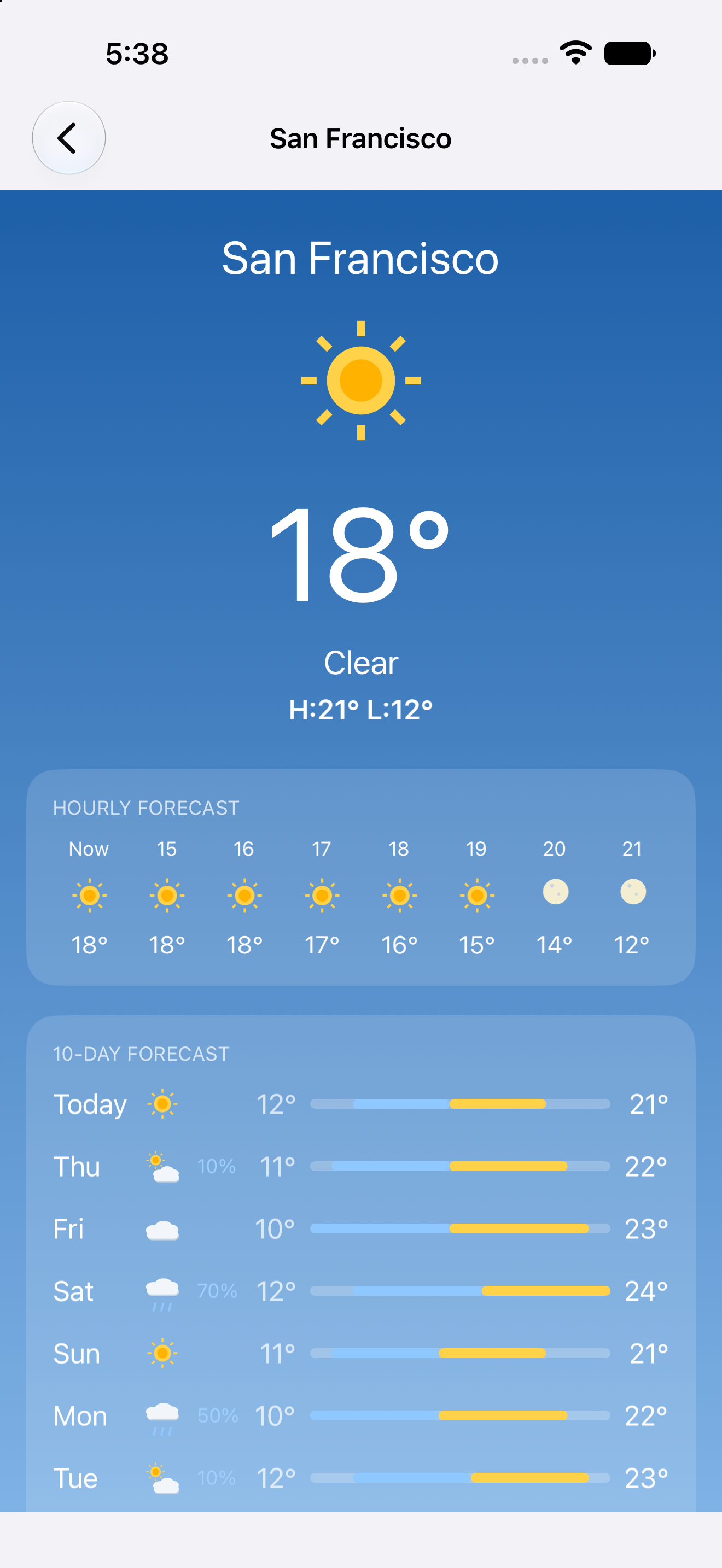
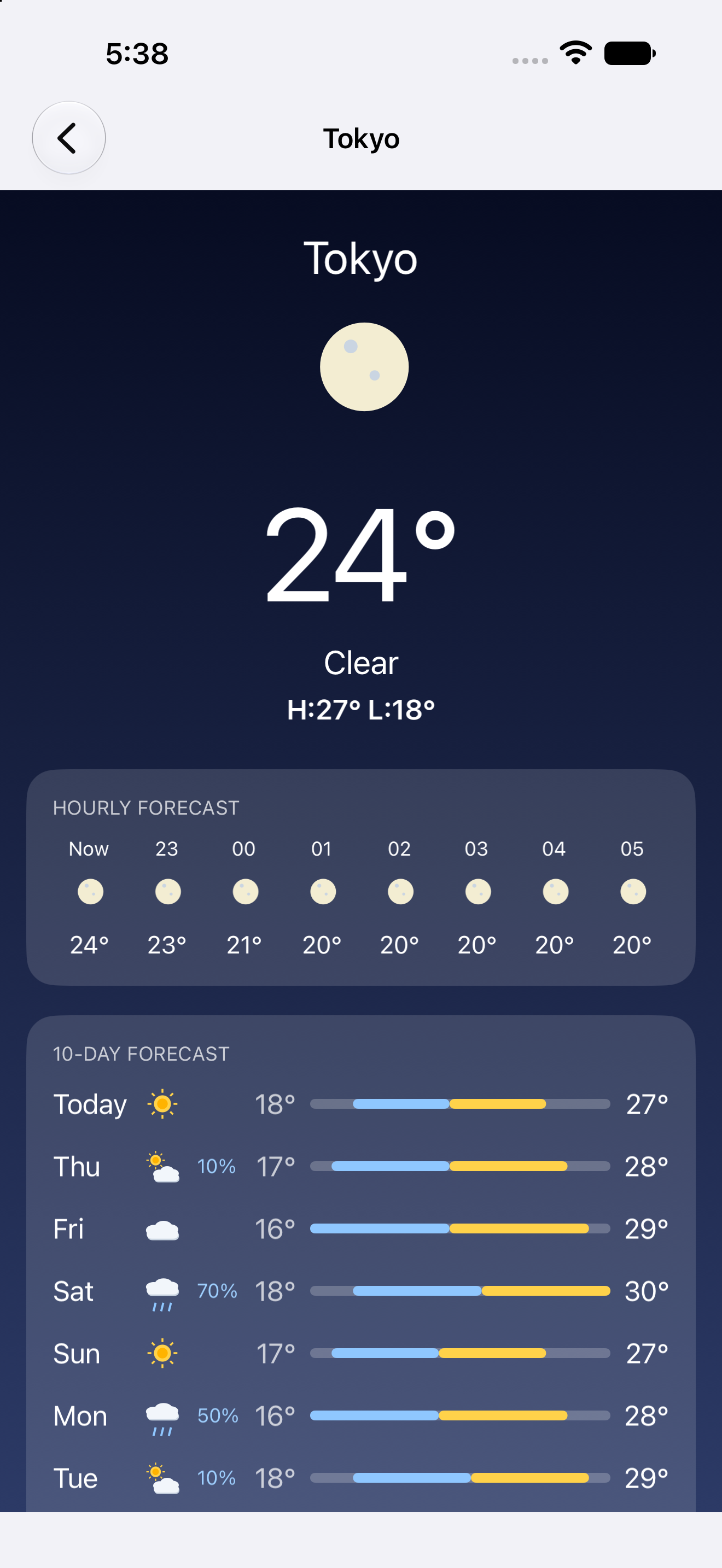
San Francisco on iPhone London on Android Tokyo on iPhone Sydney on Android


Run it in one command
Install the day CLI, then let it clone, build, and launch the app for your desktop:
cargo install day-cli
day launch --git https://github.com/daybrite/Day-Skies.git
That is the whole setup on a Mac with Xcode’s command-line tools. On Linux and Windows,
day doctor lists what the toolkit needs and prints the install command for anything missing. The
launch prints where it put the checkout, so you can open the code and change it.
What you get
Every city opens on the current temperature, the day’s high and low, an hourly strip, a ten-day forecast with a drawn range bar per day, and detail cards for feels-like, humidity, wind, UV, sunrise and sunset, and pressure. The gradient behind all of it follows the conditions: clear, cloudy, fog, rain, snow, or thunderstorms.
San Francisco on macOS, with the city list beside the forecast
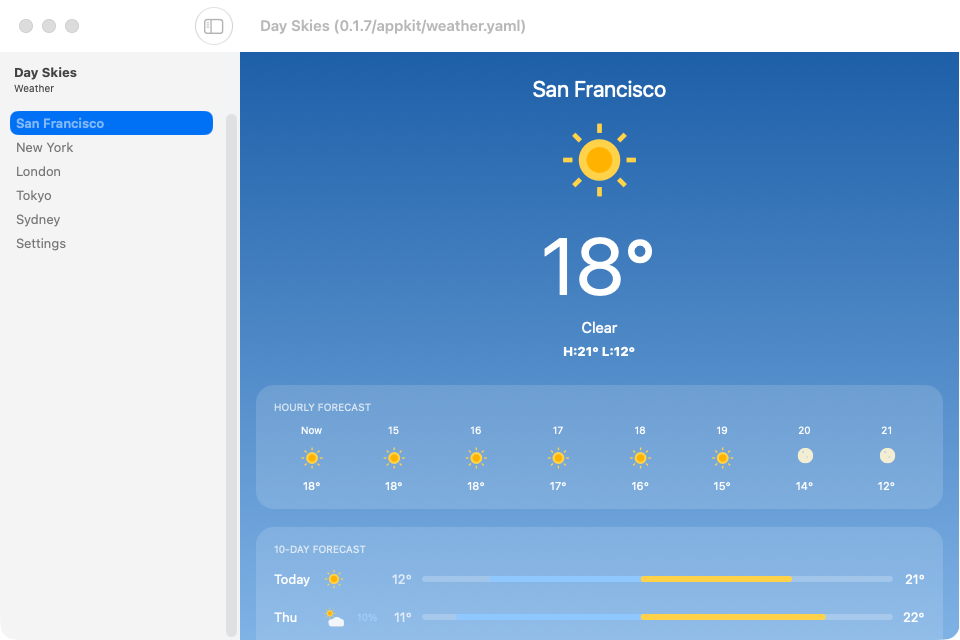
On a desktop the cities sit in a sidebar next to the forecast. On a phone the same list pushes
each city’s screen. Both come from one nav in src/lib.rs, and Day picks the native
container for the window size.
- Add as many cities as you like, by name, by coordinates, or from your current location.
- Switch between Celsius and Fahrenheit and every temperature on screen updates at once.
- Read it in English, French, Arabic, or Simplified Chinese. Arabic lays out right to left.
- Point the app at your own Open-Meteo-compatible server from Settings.
There is nothing to sign in to and nothing is collected. Forecasts come straight from Open-Meteo.
The same code on every platform
These captures come from the app’s own CI, which runs the walkthrough on every target and publishes the results to the gallery.
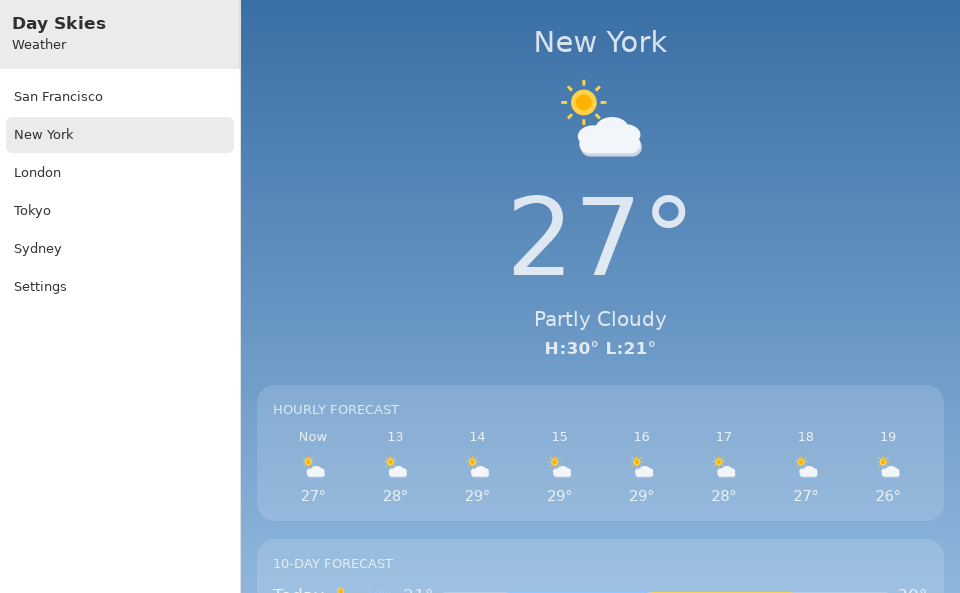
| macOS · AppKit | Windows · XAML | Linux · GTK |
|---|---|---|
| New York on macOS | New York on Windows | New York on GTK |
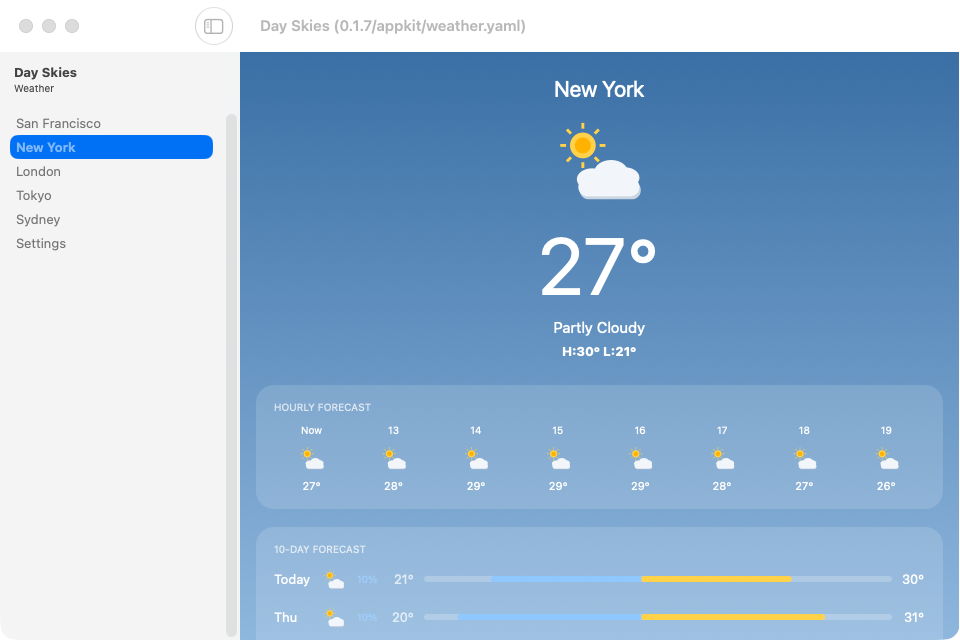

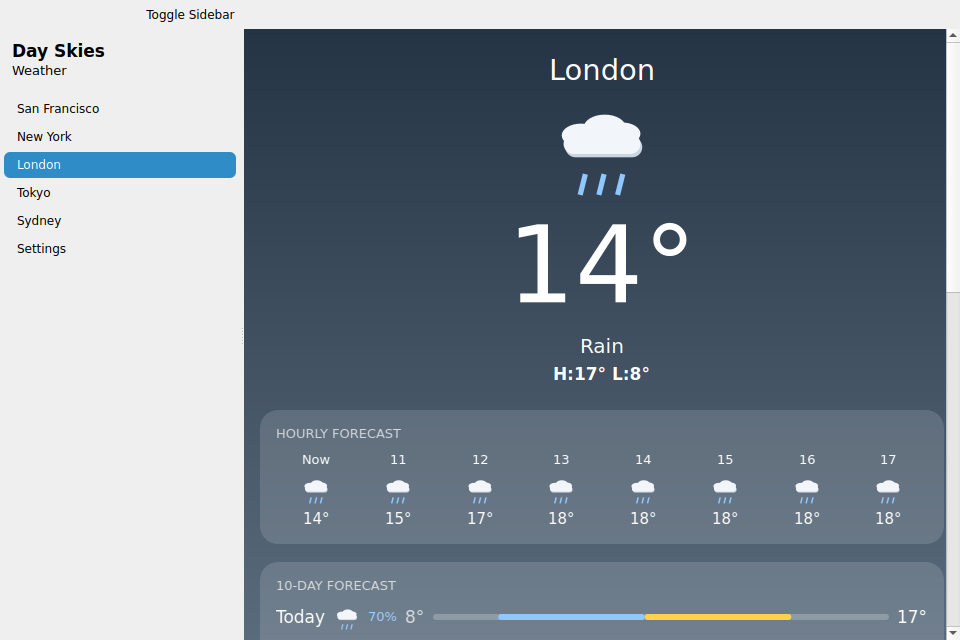
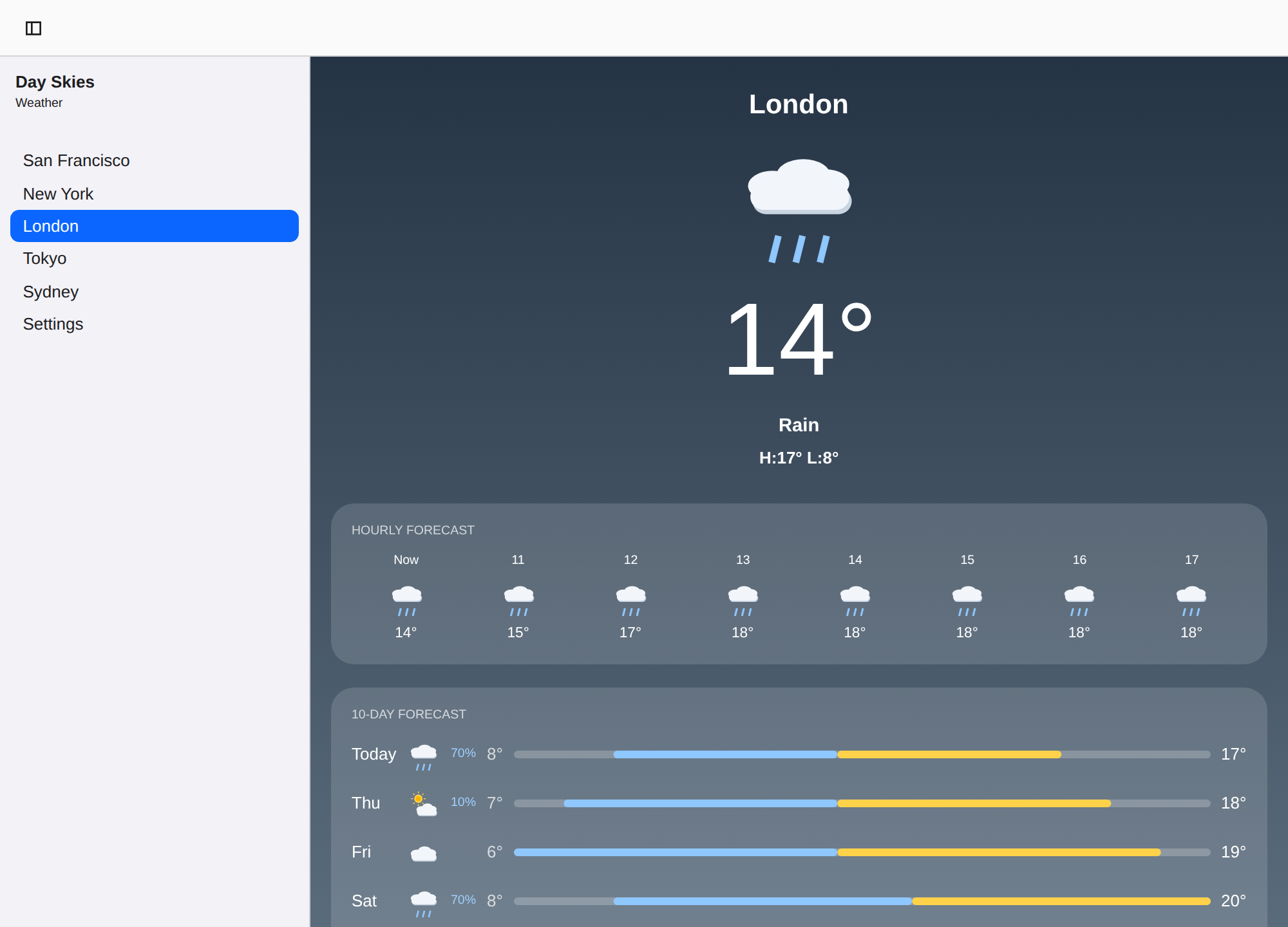
| Linux · Qt | Web · DOM | HarmonyOS · ArkUI |
|---|---|---|
| London on Qt | London in the browser | London on HarmonyOS |

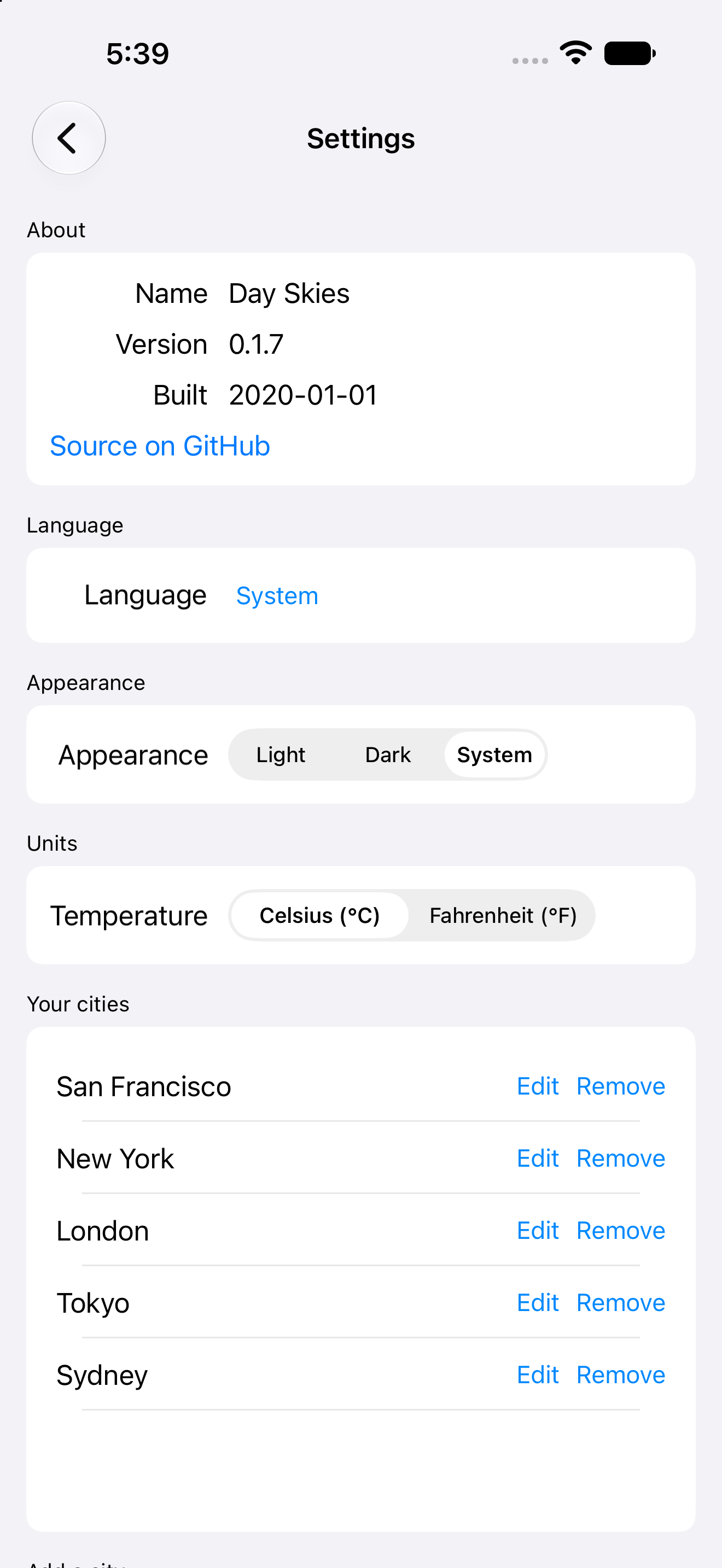
Settings follows each platform’s idiom (a toolbar-tab panel on macOS, grouped pages on the phones), and the Arabic build mirrors the whole layout:
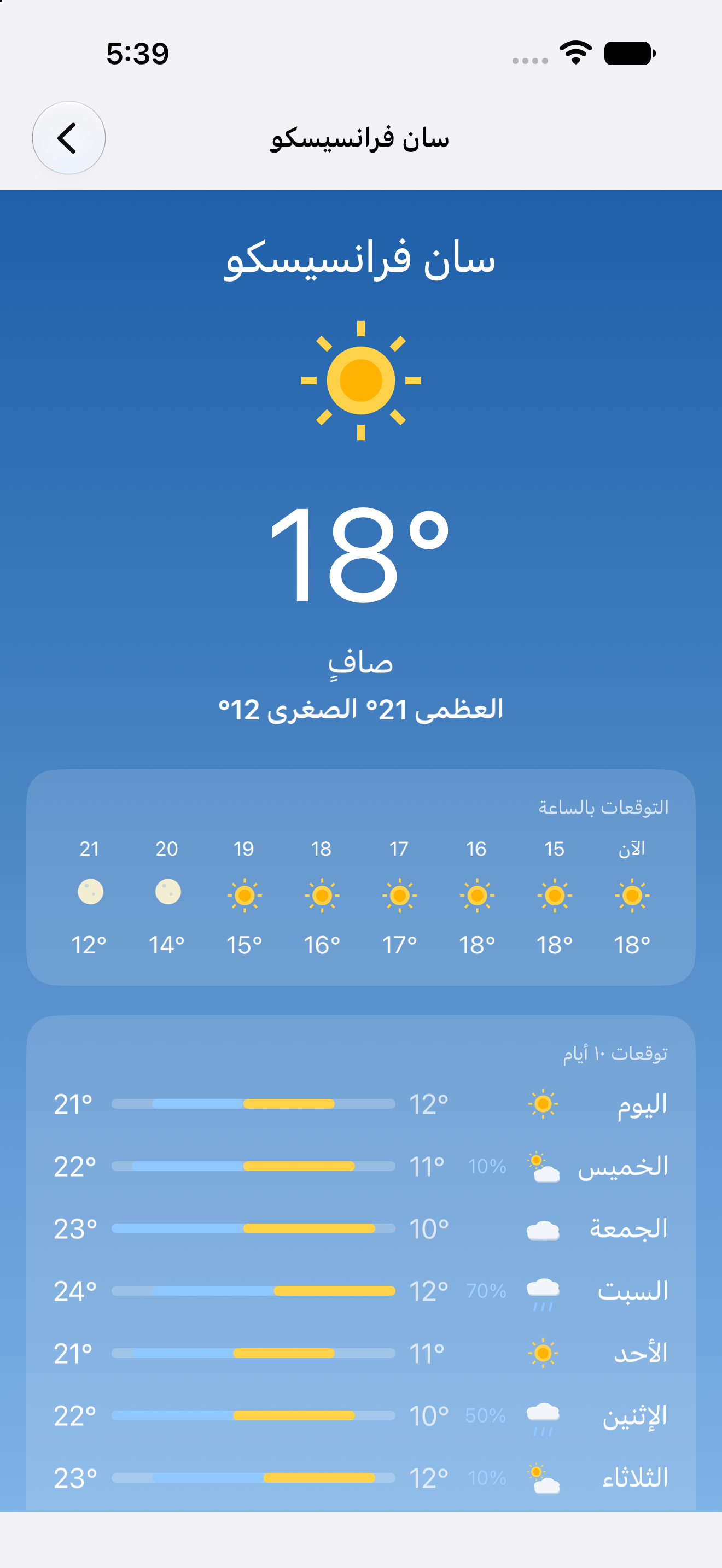
Settings on iPhone Settings on Android San Francisco in Arabic on iPhone Tokyo in Simplified Chinese on Android


Build from a clone
Day compiles one toolkit backend per binary, so name a target when you build or launch. Every
target the app ships is listed in Day.toml.
day doctor                                   # toolchains present and missing, with fixes
day launch -t macos-appkit                   # build + run with live Open-Meteo data
day launch -t macos-appkit -t macos-gtk -t macos-qt   # all three desktop toolkits side by side
day launch -t ios-uikit                      # needs a booted Simulator
day launch -t android-material                    # needs a JDK and a running emulator or device
day launch -t web-dom                        # serves the WebAssembly build locally
Set WEATHER_MOCK=1 to swap live networking for fixed per-city fixtures. Screenshots and tests
use it so every run draws the same skies:
day launch -t macos-appkit --env WEATHER_MOCK=1
The walkthrough
scripts/weather.yaml is a dayscript: it drives the running
app by element id, checks the hero content against Fluent keys so the same script passes in every
language, and screenshots each city. scripts/live-check.yaml confirms a real Open-Meteo fetch
fills the screen.
day launch -t macos-appkit --env WEATHER_MOCK=1 --script scripts/weather.yaml
day launch -t macos-appkit --env WEATHER_MOCK=1 --locale ar --script scripts/weather.yaml
Captures land in build/day/screenshots/<target>/<locale>/. CI runs the same script on all eight
targets in all four locales on every push, and a vX.Y.Z tag attaches the packaged apps to a
GitHub release.
Developing against a local Day checkout
Cargo.toml takes the day crates from git. To build against a checkout next door instead, let
the CLI write and verify the patch table:
day patch --local /path/to/day
Inside the code
src/lib.rssets uproot()and the adaptive shell: anavover cities and the per-city reactive weather store.src/weather.rsis the data layer: the Open-Meteo fetch throughday-part-http, WMO weather-code mapping, and the mock fixtures.src/ui.rsis the weather screen: the sky-gradient backdrop, the hero, the hourly strip, the ten-daygridwith its range-bar column, and the detail-card grid.src/settings.rsdeclares Settings and About (temperature unit, weather server, the city editor as its own group) on the shared settings surface, with the persisted preferences the weather screen reads.src/icons.rsdraws every weather glyph as a group of shapes, so there are no image assets.resource/locales/carries the Fluent strings foren,fr,ar, andzh-CN.platform/holds app-owned Apple host sources and any native resource customizations. Day generates the build projects underbuild/.
day lint checks routes, element ids, and locale coverage.
Weather data by Open-Meteo.com (CC BY 4.0). Day Skies is open source under the Apache-2.0 license.
Generated native projects
Use a Day CLI with automatic native project generation; Apple builds require Xcode 27
or newer. Xcode project documents, Android Gradle files, and HarmonyOS hvigor files are
created under build/ by day prepare, day build, and day launch. Open the selected
project with day open -t <target>; edits to generated files are disposable. Apple Swift
sources, plists and .xcconfig files, and any Android resource overlays, remain app-owned
under platform/. For additional native configuration, use
day project add-target <target> --persist-native-project to create a persistent override.
تنزيل — iOS (UIKit)
حُزمت في آخر تشغيل للتكامل المستمر ووُقّعت للتطوير.
لقطات الشاشة
iOS
iPhone


iPad


الأذونات
iOS
-
الموقع (أثناء الاستخدام)
highShow weather for where you are right now.
المفتاح: NSLocationWhenInUseUsageDescription
حول التطبيق
A weather app that draws each city under a sky that matches its forecast, built with Day in one Rust codebase and rendered with the platform’s own widgets on iPhone, Android, Mac, Windows, Linux, HarmonyOS, and the web.
San Francisco on iPhone London on Android Tokyo on iPhone Sydney on Android
Run it in one command
Install the day CLI, then let it clone, build, and launch the app for your desktop:
cargo install day-cli
day launch --git https://github.com/daybrite/Day-Skies.git
That is the whole setup on a Mac with Xcode’s command-line tools. On Linux and Windows,
day doctor lists what the toolkit needs and prints the install command for anything missing. The
launch prints where it put the checkout, so you can open the code and change it.
What you get
Every city opens on the current temperature, the day’s high and low, an hourly strip, a ten-day forecast with a drawn range bar per day, and detail cards for feels-like, humidity, wind, UV, sunrise and sunset, and pressure. The gradient behind all of it follows the conditions: clear, cloudy, fog, rain, snow, or thunderstorms.
San Francisco on macOS, with the city list beside the forecast
On a desktop the cities sit in a sidebar next to the forecast. On a phone the same list pushes
each city’s screen. Both come from one nav in src/lib.rs, and Day picks the native
container for the window size.
- Add as many cities as you like, by name, by coordinates, or from your current location.
- Switch between Celsius and Fahrenheit and every temperature on screen updates at once.
- Read it in English, French, Arabic, or Simplified Chinese. Arabic lays out right to left.
- Point the app at your own Open-Meteo-compatible server from Settings.
There is nothing to sign in to and nothing is collected. Forecasts come straight from Open-Meteo.
The same code on every platform
These captures come from the app’s own CI, which runs the walkthrough on every target and publishes the results to the gallery.
| macOS · AppKit | Windows · XAML | Linux · GTK |
|---|---|---|
| New York on macOS | New York on Windows | New York on GTK |
| Linux · Qt | Web · DOM | HarmonyOS · ArkUI |
|---|---|---|
| London on Qt | London in the browser | London on HarmonyOS |
Settings follows each platform’s idiom (a toolbar-tab panel on macOS, grouped pages on the phones), and the Arabic build mirrors the whole layout:
Settings on iPhone Settings on Android San Francisco in Arabic on iPhone Tokyo in Simplified Chinese on Android
Build from a clone
Day compiles one toolkit backend per binary, so name a target when you build or launch. Every
target the app ships is listed in Day.toml.
day doctor                                   # toolchains present and missing, with fixes
day launch -t macos-appkit                   # build + run with live Open-Meteo data
day launch -t macos-appkit -t macos-gtk -t macos-qt   # all three desktop toolkits side by side
day launch -t ios-uikit                      # needs a booted Simulator
day launch -t android-material                    # needs a JDK and a running emulator or device
day launch -t web-dom                        # serves the WebAssembly build locally
Set WEATHER_MOCK=1 to swap live networking for fixed per-city fixtures. Screenshots and tests
use it so every run draws the same skies:
day launch -t macos-appkit --env WEATHER_MOCK=1
The walkthrough
scripts/weather.yaml is a dayscript: it drives the running
app by element id, checks the hero content against Fluent keys so the same script passes in every
language, and screenshots each city. scripts/live-check.yaml confirms a real Open-Meteo fetch
fills the screen.
day launch -t macos-appkit --env WEATHER_MOCK=1 --script scripts/weather.yaml
day launch -t macos-appkit --env WEATHER_MOCK=1 --locale ar --script scripts/weather.yaml
Captures land in build/day/screenshots/<target>/<locale>/. CI runs the same script on all eight
targets in all four locales on every push, and a vX.Y.Z tag attaches the packaged apps to a
GitHub release.
Developing against a local Day checkout
Cargo.toml takes the day crates from git. To build against a checkout next door instead, let
the CLI write and verify the patch table:
day patch --local /path/to/day
Inside the code
src/lib.rssets uproot()and the adaptive shell: anavover cities and the per-city reactive weather store.src/weather.rsis the data layer: the Open-Meteo fetch throughday-part-http, WMO weather-code mapping, and the mock fixtures.src/ui.rsis the weather screen: the sky-gradient backdrop, the hero, the hourly strip, the ten-daygridwith its range-bar column, and the detail-card grid.src/settings.rsdeclares Settings and About (temperature unit, weather server, the city editor as its own group) on the shared settings surface, with the persisted preferences the weather screen reads.src/icons.rsdraws every weather glyph as a group of shapes, so there are no image assets.resource/locales/carries the Fluent strings foren,fr,ar, andzh-CN.platform/holds app-owned Apple host sources and any native resource customizations. Day generates the build projects underbuild/.
day lint checks routes, element ids, and locale coverage.
Weather data by Open-Meteo.com (CC BY 4.0). Day Skies is open source under the Apache-2.0 license.
Generated native projects
Use a Day CLI with automatic native project generation; Apple builds require Xcode 27
or newer. Xcode project documents, Android Gradle files, and HarmonyOS hvigor files are
created under build/ by day prepare, day build, and day launch. Open the selected
project with day open -t <target>; edits to generated files are disposable. Apple Swift
sources, plists and .xcconfig files, and any Android resource overlays, remain app-owned
under platform/. For additional native configuration, use
day project add-target <target> --persist-native-project to create a persistent override.
تنزيل — Android (Material)
حُزمت في آخر تشغيل للتكامل المستمر ووُقّعت للتطوير.
لقطات الشاشة
Android
هاتف


جهاز لوحي


الأذونات
Android
-
الموقع التقريبي
highيصل إلى موقعك التقريبي.
المفتاح: android.permission.ACCESS_COARSE_LOCATION
-
الموقع الدقيق
highيصل إلى موقعك الدقيق.
المفتاح: android.permission.ACCESS_FINE_LOCATION
حول التطبيق
A weather app that draws each city under a sky that matches its forecast, built with Day in one Rust codebase and rendered with the platform’s own widgets on iPhone, Android, Mac, Windows, Linux, HarmonyOS, and the web.
San Francisco on iPhone London on Android Tokyo on iPhone Sydney on Android
Run it in one command
Install the day CLI, then let it clone, build, and launch the app for your desktop:
cargo install day-cli
day launch --git https://github.com/daybrite/Day-Skies.git
That is the whole setup on a Mac with Xcode’s command-line tools. On Linux and Windows,
day doctor lists what the toolkit needs and prints the install command for anything missing. The
launch prints where it put the checkout, so you can open the code and change it.
What you get
Every city opens on the current temperature, the day’s high and low, an hourly strip, a ten-day forecast with a drawn range bar per day, and detail cards for feels-like, humidity, wind, UV, sunrise and sunset, and pressure. The gradient behind all of it follows the conditions: clear, cloudy, fog, rain, snow, or thunderstorms.
San Francisco on macOS, with the city list beside the forecast
On a desktop the cities sit in a sidebar next to the forecast. On a phone the same list pushes
each city’s screen. Both come from one nav in src/lib.rs, and Day picks the native
container for the window size.
- Add as many cities as you like, by name, by coordinates, or from your current location.
- Switch between Celsius and Fahrenheit and every temperature on screen updates at once.
- Read it in English, French, Arabic, or Simplified Chinese. Arabic lays out right to left.
- Point the app at your own Open-Meteo-compatible server from Settings.
There is nothing to sign in to and nothing is collected. Forecasts come straight from Open-Meteo.
The same code on every platform
These captures come from the app’s own CI, which runs the walkthrough on every target and publishes the results to the gallery.
| macOS · AppKit | Windows · XAML | Linux · GTK |
|---|---|---|
| New York on macOS | New York on Windows | New York on GTK |
| Linux · Qt | Web · DOM | HarmonyOS · ArkUI |
|---|---|---|
| London on Qt | London in the browser | London on HarmonyOS |
Settings follows each platform’s idiom (a toolbar-tab panel on macOS, grouped pages on the phones), and the Arabic build mirrors the whole layout:
Settings on iPhone Settings on Android San Francisco in Arabic on iPhone Tokyo in Simplified Chinese on Android
Build from a clone
Day compiles one toolkit backend per binary, so name a target when you build or launch. Every
target the app ships is listed in Day.toml.
day doctor                                   # toolchains present and missing, with fixes
day launch -t macos-appkit                   # build + run with live Open-Meteo data
day launch -t macos-appkit -t macos-gtk -t macos-qt   # all three desktop toolkits side by side
day launch -t ios-uikit                      # needs a booted Simulator
day launch -t android-material                    # needs a JDK and a running emulator or device
day launch -t web-dom                        # serves the WebAssembly build locally
Set WEATHER_MOCK=1 to swap live networking for fixed per-city fixtures. Screenshots and tests
use it so every run draws the same skies:
day launch -t macos-appkit --env WEATHER_MOCK=1
The walkthrough
scripts/weather.yaml is a dayscript: it drives the running
app by element id, checks the hero content against Fluent keys so the same script passes in every
language, and screenshots each city. scripts/live-check.yaml confirms a real Open-Meteo fetch
fills the screen.
day launch -t macos-appkit --env WEATHER_MOCK=1 --script scripts/weather.yaml
day launch -t macos-appkit --env WEATHER_MOCK=1 --locale ar --script scripts/weather.yaml
Captures land in build/day/screenshots/<target>/<locale>/. CI runs the same script on all eight
targets in all four locales on every push, and a vX.Y.Z tag attaches the packaged apps to a
GitHub release.
Developing against a local Day checkout
Cargo.toml takes the day crates from git. To build against a checkout next door instead, let
the CLI write and verify the patch table:
day patch --local /path/to/day
Inside the code
src/lib.rssets uproot()and the adaptive shell: anavover cities and the per-city reactive weather store.src/weather.rsis the data layer: the Open-Meteo fetch throughday-part-http, WMO weather-code mapping, and the mock fixtures.src/ui.rsis the weather screen: the sky-gradient backdrop, the hero, the hourly strip, the ten-daygridwith its range-bar column, and the detail-card grid.src/settings.rsdeclares Settings and About (temperature unit, weather server, the city editor as its own group) on the shared settings surface, with the persisted preferences the weather screen reads.src/icons.rsdraws every weather glyph as a group of shapes, so there are no image assets.resource/locales/carries the Fluent strings foren,fr,ar, andzh-CN.platform/holds app-owned Apple host sources and any native resource customizations. Day generates the build projects underbuild/.
day lint checks routes, element ids, and locale coverage.
Weather data by Open-Meteo.com (CC BY 4.0). Day Skies is open source under the Apache-2.0 license.
Generated native projects
Use a Day CLI with automatic native project generation; Apple builds require Xcode 27
or newer. Xcode project documents, Android Gradle files, and HarmonyOS hvigor files are
created under build/ by day prepare, day build, and day launch. Open the selected
project with day open -t <target>; edits to generated files are disposable. Apple Swift
sources, plists and .xcconfig files, and any Android resource overlays, remain app-owned
under platform/. For additional native configuration, use
day project add-target <target> --persist-native-project to create a persistent override.
تنزيل — HarmonyOS (ArkUI)
حُزمت في آخر تشغيل للتكامل المستمر ووُقّعت للتطوير.
لقطات الشاشة
HarmonyOS
هاتف


جهاز لوحي


الأذونات
HarmonyOS
-
الموقع التقريبي
highShow weather for where you are right now.
المفتاح: ohos.permission.APPROXIMATELY_LOCATION
-
الموقع الدقيق
highShow weather for where you are right now.
المفتاح: ohos.permission.LOCATION
حول التطبيق
A weather app that draws each city under a sky that matches its forecast, built with Day in one Rust codebase and rendered with the platform’s own widgets on iPhone, Android, Mac, Windows, Linux, HarmonyOS, and the web.
San Francisco on iPhone London on Android Tokyo on iPhone Sydney on Android
Run it in one command
Install the day CLI, then let it clone, build, and launch the app for your desktop:
cargo install day-cli
day launch --git https://github.com/daybrite/Day-Skies.git
That is the whole setup on a Mac with Xcode’s command-line tools. On Linux and Windows,
day doctor lists what the toolkit needs and prints the install command for anything missing. The
launch prints where it put the checkout, so you can open the code and change it.
What you get
Every city opens on the current temperature, the day’s high and low, an hourly strip, a ten-day forecast with a drawn range bar per day, and detail cards for feels-like, humidity, wind, UV, sunrise and sunset, and pressure. The gradient behind all of it follows the conditions: clear, cloudy, fog, rain, snow, or thunderstorms.
San Francisco on macOS, with the city list beside the forecast
On a desktop the cities sit in a sidebar next to the forecast. On a phone the same list pushes
each city’s screen. Both come from one nav in src/lib.rs, and Day picks the native
container for the window size.
- Add as many cities as you like, by name, by coordinates, or from your current location.
- Switch between Celsius and Fahrenheit and every temperature on screen updates at once.
- Read it in English, French, Arabic, or Simplified Chinese. Arabic lays out right to left.
- Point the app at your own Open-Meteo-compatible server from Settings.
There is nothing to sign in to and nothing is collected. Forecasts come straight from Open-Meteo.
The same code on every platform
These captures come from the app’s own CI, which runs the walkthrough on every target and publishes the results to the gallery.
| macOS · AppKit | Windows · XAML | Linux · GTK |
|---|---|---|
| New York on macOS | New York on Windows | New York on GTK |
| Linux · Qt | Web · DOM | HarmonyOS · ArkUI |
|---|---|---|
| London on Qt | London in the browser | London on HarmonyOS |
Settings follows each platform’s idiom (a toolbar-tab panel on macOS, grouped pages on the phones), and the Arabic build mirrors the whole layout:
Settings on iPhone Settings on Android San Francisco in Arabic on iPhone Tokyo in Simplified Chinese on Android
Build from a clone
Day compiles one toolkit backend per binary, so name a target when you build or launch. Every
target the app ships is listed in Day.toml.
day doctor                                   # toolchains present and missing, with fixes
day launch -t macos-appkit                   # build + run with live Open-Meteo data
day launch -t macos-appkit -t macos-gtk -t macos-qt   # all three desktop toolkits side by side
day launch -t ios-uikit                      # needs a booted Simulator
day launch -t android-material                    # needs a JDK and a running emulator or device
day launch -t web-dom                        # serves the WebAssembly build locally
Set WEATHER_MOCK=1 to swap live networking for fixed per-city fixtures. Screenshots and tests
use it so every run draws the same skies:
day launch -t macos-appkit --env WEATHER_MOCK=1
The walkthrough
scripts/weather.yaml is a dayscript: it drives the running
app by element id, checks the hero content against Fluent keys so the same script passes in every
language, and screenshots each city. scripts/live-check.yaml confirms a real Open-Meteo fetch
fills the screen.
day launch -t macos-appkit --env WEATHER_MOCK=1 --script scripts/weather.yaml
day launch -t macos-appkit --env WEATHER_MOCK=1 --locale ar --script scripts/weather.yaml
Captures land in build/day/screenshots/<target>/<locale>/. CI runs the same script on all eight
targets in all four locales on every push, and a vX.Y.Z tag attaches the packaged apps to a
GitHub release.
Developing against a local Day checkout
Cargo.toml takes the day crates from git. To build against a checkout next door instead, let
the CLI write and verify the patch table:
day patch --local /path/to/day
Inside the code
src/lib.rssets uproot()and the adaptive shell: anavover cities and the per-city reactive weather store.src/weather.rsis the data layer: the Open-Meteo fetch throughday-part-http, WMO weather-code mapping, and the mock fixtures.src/ui.rsis the weather screen: the sky-gradient backdrop, the hero, the hourly strip, the ten-daygridwith its range-bar column, and the detail-card grid.src/settings.rsdeclares Settings and About (temperature unit, weather server, the city editor as its own group) on the shared settings surface, with the persisted preferences the weather screen reads.src/icons.rsdraws every weather glyph as a group of shapes, so there are no image assets.resource/locales/carries the Fluent strings foren,fr,ar, andzh-CN.platform/holds app-owned Apple host sources and any native resource customizations. Day generates the build projects underbuild/.
day lint checks routes, element ids, and locale coverage.
Weather data by Open-Meteo.com (CC BY 4.0). Day Skies is open source under the Apache-2.0 license.
Generated native projects
Use a Day CLI with automatic native project generation; Apple builds require Xcode 27
or newer. Xcode project documents, Android Gradle files, and HarmonyOS hvigor files are
created under build/ by day prepare, day build, and day launch. Open the selected
project with day open -t <target>; edits to generated files are disposable. Apple Swift
sources, plists and .xcconfig files, and any Android resource overlays, remain app-owned
under platform/. For additional native configuration, use
day project add-target <target> --persist-native-project to create a persistent override.
تنزيل — macOS (AppKit)
حُزمت في آخر تشغيل للتكامل المستمر ووُقّعت للتطوير.
لقطات الشاشة
macOS


الأذونات
macOS
-
الموقع
highShow weather for where you are right now.
المفتاح: NSLocationUsageDescription
-
الموقع (أثناء الاستخدام)
highShow weather for where you are right now.
المفتاح: NSLocationWhenInUseUsageDescription
حول التطبيق
A weather app that draws each city under a sky that matches its forecast, built with Day in one Rust codebase and rendered with the platform’s own widgets on iPhone, Android, Mac, Windows, Linux, HarmonyOS, and the web.
San Francisco on iPhone London on Android Tokyo on iPhone Sydney on Android
Run it in one command
Install the day CLI, then let it clone, build, and launch the app for your desktop:
cargo install day-cli
day launch --git https://github.com/daybrite/Day-Skies.git
That is the whole setup on a Mac with Xcode’s command-line tools. On Linux and Windows,
day doctor lists what the toolkit needs and prints the install command for anything missing. The
launch prints where it put the checkout, so you can open the code and change it.
What you get
Every city opens on the current temperature, the day’s high and low, an hourly strip, a ten-day forecast with a drawn range bar per day, and detail cards for feels-like, humidity, wind, UV, sunrise and sunset, and pressure. The gradient behind all of it follows the conditions: clear, cloudy, fog, rain, snow, or thunderstorms.
San Francisco on macOS, with the city list beside the forecast
On a desktop the cities sit in a sidebar next to the forecast. On a phone the same list pushes
each city’s screen. Both come from one nav in src/lib.rs, and Day picks the native
container for the window size.
- Add as many cities as you like, by name, by coordinates, or from your current location.
- Switch between Celsius and Fahrenheit and every temperature on screen updates at once.
- Read it in English, French, Arabic, or Simplified Chinese. Arabic lays out right to left.
- Point the app at your own Open-Meteo-compatible server from Settings.
There is nothing to sign in to and nothing is collected. Forecasts come straight from Open-Meteo.
The same code on every platform
These captures come from the app’s own CI, which runs the walkthrough on every target and publishes the results to the gallery.
| macOS · AppKit | Windows · XAML | Linux · GTK |
|---|---|---|
| New York on macOS | New York on Windows | New York on GTK |
| Linux · Qt | Web · DOM | HarmonyOS · ArkUI |
|---|---|---|
| London on Qt | London in the browser | London on HarmonyOS |
Settings follows each platform’s idiom (a toolbar-tab panel on macOS, grouped pages on the phones), and the Arabic build mirrors the whole layout:
Settings on iPhone Settings on Android San Francisco in Arabic on iPhone Tokyo in Simplified Chinese on Android
Build from a clone
Day compiles one toolkit backend per binary, so name a target when you build or launch. Every
target the app ships is listed in Day.toml.
day doctor                                   # toolchains present and missing, with fixes
day launch -t macos-appkit                   # build + run with live Open-Meteo data
day launch -t macos-appkit -t macos-gtk -t macos-qt   # all three desktop toolkits side by side
day launch -t ios-uikit                      # needs a booted Simulator
day launch -t android-material                    # needs a JDK and a running emulator or device
day launch -t web-dom                        # serves the WebAssembly build locally
Set WEATHER_MOCK=1 to swap live networking for fixed per-city fixtures. Screenshots and tests
use it so every run draws the same skies:
day launch -t macos-appkit --env WEATHER_MOCK=1
The walkthrough
scripts/weather.yaml is a dayscript: it drives the running
app by element id, checks the hero content against Fluent keys so the same script passes in every
language, and screenshots each city. scripts/live-check.yaml confirms a real Open-Meteo fetch
fills the screen.
day launch -t macos-appkit --env WEATHER_MOCK=1 --script scripts/weather.yaml
day launch -t macos-appkit --env WEATHER_MOCK=1 --locale ar --script scripts/weather.yaml
Captures land in build/day/screenshots/<target>/<locale>/. CI runs the same script on all eight
targets in all four locales on every push, and a vX.Y.Z tag attaches the packaged apps to a
GitHub release.
Developing against a local Day checkout
Cargo.toml takes the day crates from git. To build against a checkout next door instead, let
the CLI write and verify the patch table:
day patch --local /path/to/day
Inside the code
src/lib.rssets uproot()and the adaptive shell: anavover cities and the per-city reactive weather store.src/weather.rsis the data layer: the Open-Meteo fetch throughday-part-http, WMO weather-code mapping, and the mock fixtures.src/ui.rsis the weather screen: the sky-gradient backdrop, the hero, the hourly strip, the ten-daygridwith its range-bar column, and the detail-card grid.src/settings.rsdeclares Settings and About (temperature unit, weather server, the city editor as its own group) on the shared settings surface, with the persisted preferences the weather screen reads.src/icons.rsdraws every weather glyph as a group of shapes, so there are no image assets.resource/locales/carries the Fluent strings foren,fr,ar, andzh-CN.platform/holds app-owned Apple host sources and any native resource customizations. Day generates the build projects underbuild/.
day lint checks routes, element ids, and locale coverage.
Weather data by Open-Meteo.com (CC BY 4.0). Day Skies is open source under the Apache-2.0 license.
Generated native projects
Use a Day CLI with automatic native project generation; Apple builds require Xcode 27
or newer. Xcode project documents, Android Gradle files, and HarmonyOS hvigor files are
created under build/ by day prepare, day build, and day launch. Open the selected
project with day open -t <target>; edits to generated files are disposable. Apple Swift
sources, plists and .xcconfig files, and any Android resource overlays, remain app-owned
under platform/. For additional native configuration, use
day project add-target <target> --persist-native-project to create a persistent override.
تنزيل — Linux (GTK 4 / GNOME)
حُزمت في آخر تشغيل للتكامل المستمر ووُقّعت للتطوير.
لقطات الشاشة
GNOME


الأذونات
GNOME
لا توجد أذونات معلنة.
حول التطبيق
A weather app that draws each city under a sky that matches its forecast, built with Day in one Rust codebase and rendered with the platform’s own widgets on iPhone, Android, Mac, Windows, Linux, HarmonyOS, and the web.
San Francisco on iPhone London on Android Tokyo on iPhone Sydney on Android
Run it in one command
Install the day CLI, then let it clone, build, and launch the app for your desktop:
cargo install day-cli
day launch --git https://github.com/daybrite/Day-Skies.git
That is the whole setup on a Mac with Xcode’s command-line tools. On Linux and Windows,
day doctor lists what the toolkit needs and prints the install command for anything missing. The
launch prints where it put the checkout, so you can open the code and change it.
What you get
Every city opens on the current temperature, the day’s high and low, an hourly strip, a ten-day forecast with a drawn range bar per day, and detail cards for feels-like, humidity, wind, UV, sunrise and sunset, and pressure. The gradient behind all of it follows the conditions: clear, cloudy, fog, rain, snow, or thunderstorms.
San Francisco on macOS, with the city list beside the forecast
On a desktop the cities sit in a sidebar next to the forecast. On a phone the same list pushes
each city’s screen. Both come from one nav in src/lib.rs, and Day picks the native
container for the window size.
- Add as many cities as you like, by name, by coordinates, or from your current location.
- Switch between Celsius and Fahrenheit and every temperature on screen updates at once.
- Read it in English, French, Arabic, or Simplified Chinese. Arabic lays out right to left.
- Point the app at your own Open-Meteo-compatible server from Settings.
There is nothing to sign in to and nothing is collected. Forecasts come straight from Open-Meteo.
The same code on every platform
These captures come from the app’s own CI, which runs the walkthrough on every target and publishes the results to the gallery.
| macOS · AppKit | Windows · XAML | Linux · GTK |
|---|---|---|
| New York on macOS | New York on Windows | New York on GTK |
| Linux · Qt | Web · DOM | HarmonyOS · ArkUI |
|---|---|---|
| London on Qt | London in the browser | London on HarmonyOS |
Settings follows each platform’s idiom (a toolbar-tab panel on macOS, grouped pages on the phones), and the Arabic build mirrors the whole layout:
Settings on iPhone Settings on Android San Francisco in Arabic on iPhone Tokyo in Simplified Chinese on Android
Build from a clone
Day compiles one toolkit backend per binary, so name a target when you build or launch. Every
target the app ships is listed in Day.toml.
day doctor                                   # toolchains present and missing, with fixes
day launch -t macos-appkit                   # build + run with live Open-Meteo data
day launch -t macos-appkit -t macos-gtk -t macos-qt   # all three desktop toolkits side by side
day launch -t ios-uikit                      # needs a booted Simulator
day launch -t android-material                    # needs a JDK and a running emulator or device
day launch -t web-dom                        # serves the WebAssembly build locally
Set WEATHER_MOCK=1 to swap live networking for fixed per-city fixtures. Screenshots and tests
use it so every run draws the same skies:
day launch -t macos-appkit --env WEATHER_MOCK=1
The walkthrough
scripts/weather.yaml is a dayscript: it drives the running
app by element id, checks the hero content against Fluent keys so the same script passes in every
language, and screenshots each city. scripts/live-check.yaml confirms a real Open-Meteo fetch
fills the screen.
day launch -t macos-appkit --env WEATHER_MOCK=1 --script scripts/weather.yaml
day launch -t macos-appkit --env WEATHER_MOCK=1 --locale ar --script scripts/weather.yaml
Captures land in build/day/screenshots/<target>/<locale>/. CI runs the same script on all eight
targets in all four locales on every push, and a vX.Y.Z tag attaches the packaged apps to a
GitHub release.
Developing against a local Day checkout
Cargo.toml takes the day crates from git. To build against a checkout next door instead, let
the CLI write and verify the patch table:
day patch --local /path/to/day
Inside the code
src/lib.rssets uproot()and the adaptive shell: anavover cities and the per-city reactive weather store.src/weather.rsis the data layer: the Open-Meteo fetch throughday-part-http, WMO weather-code mapping, and the mock fixtures.src/ui.rsis the weather screen: the sky-gradient backdrop, the hero, the hourly strip, the ten-daygridwith its range-bar column, and the detail-card grid.src/settings.rsdeclares Settings and About (temperature unit, weather server, the city editor as its own group) on the shared settings surface, with the persisted preferences the weather screen reads.src/icons.rsdraws every weather glyph as a group of shapes, so there are no image assets.resource/locales/carries the Fluent strings foren,fr,ar, andzh-CN.platform/holds app-owned Apple host sources and any native resource customizations. Day generates the build projects underbuild/.
day lint checks routes, element ids, and locale coverage.
Weather data by Open-Meteo.com (CC BY 4.0). Day Skies is open source under the Apache-2.0 license.
Generated native projects
Use a Day CLI with automatic native project generation; Apple builds require Xcode 27
or newer. Xcode project documents, Android Gradle files, and HarmonyOS hvigor files are
created under build/ by day prepare, day build, and day launch. Open the selected
project with day open -t <target>; edits to generated files are disposable. Apple Swift
sources, plists and .xcconfig files, and any Android resource overlays, remain app-owned
under platform/. For additional native configuration, use
day project add-target <target> --persist-native-project to create a persistent override.
تنزيل — Linux (Qt 6 / KDE)
حُزمت في آخر تشغيل للتكامل المستمر ووُقّعت للتطوير.
لقطات الشاشة
KDE


الأذونات
KDE
لا توجد أذونات معلنة.
حول التطبيق
A weather app that draws each city under a sky that matches its forecast, built with Day in one Rust codebase and rendered with the platform’s own widgets on iPhone, Android, Mac, Windows, Linux, HarmonyOS, and the web.
San Francisco on iPhone London on Android Tokyo on iPhone Sydney on Android
Run it in one command
Install the day CLI, then let it clone, build, and launch the app for your desktop:
cargo install day-cli
day launch --git https://github.com/daybrite/Day-Skies.git
That is the whole setup on a Mac with Xcode’s command-line tools. On Linux and Windows,
day doctor lists what the toolkit needs and prints the install command for anything missing. The
launch prints where it put the checkout, so you can open the code and change it.
What you get
Every city opens on the current temperature, the day’s high and low, an hourly strip, a ten-day forecast with a drawn range bar per day, and detail cards for feels-like, humidity, wind, UV, sunrise and sunset, and pressure. The gradient behind all of it follows the conditions: clear, cloudy, fog, rain, snow, or thunderstorms.
San Francisco on macOS, with the city list beside the forecast
On a desktop the cities sit in a sidebar next to the forecast. On a phone the same list pushes
each city’s screen. Both come from one nav in src/lib.rs, and Day picks the native
container for the window size.
- Add as many cities as you like, by name, by coordinates, or from your current location.
- Switch between Celsius and Fahrenheit and every temperature on screen updates at once.
- Read it in English, French, Arabic, or Simplified Chinese. Arabic lays out right to left.
- Point the app at your own Open-Meteo-compatible server from Settings.
There is nothing to sign in to and nothing is collected. Forecasts come straight from Open-Meteo.
The same code on every platform
These captures come from the app’s own CI, which runs the walkthrough on every target and publishes the results to the gallery.
| macOS · AppKit | Windows · XAML | Linux · GTK |
|---|---|---|
| New York on macOS | New York on Windows | New York on GTK |
| Linux · Qt | Web · DOM | HarmonyOS · ArkUI |
|---|---|---|
| London on Qt | London in the browser | London on HarmonyOS |
Settings follows each platform’s idiom (a toolbar-tab panel on macOS, grouped pages on the phones), and the Arabic build mirrors the whole layout:
Settings on iPhone Settings on Android San Francisco in Arabic on iPhone Tokyo in Simplified Chinese on Android
Build from a clone
Day compiles one toolkit backend per binary, so name a target when you build or launch. Every
target the app ships is listed in Day.toml.
day doctor                                   # toolchains present and missing, with fixes
day launch -t macos-appkit                   # build + run with live Open-Meteo data
day launch -t macos-appkit -t macos-gtk -t macos-qt   # all three desktop toolkits side by side
day launch -t ios-uikit                      # needs a booted Simulator
day launch -t android-material                    # needs a JDK and a running emulator or device
day launch -t web-dom                        # serves the WebAssembly build locally
Set WEATHER_MOCK=1 to swap live networking for fixed per-city fixtures. Screenshots and tests
use it so every run draws the same skies:
day launch -t macos-appkit --env WEATHER_MOCK=1
The walkthrough
scripts/weather.yaml is a dayscript: it drives the running
app by element id, checks the hero content against Fluent keys so the same script passes in every
language, and screenshots each city. scripts/live-check.yaml confirms a real Open-Meteo fetch
fills the screen.
day launch -t macos-appkit --env WEATHER_MOCK=1 --script scripts/weather.yaml
day launch -t macos-appkit --env WEATHER_MOCK=1 --locale ar --script scripts/weather.yaml
Captures land in build/day/screenshots/<target>/<locale>/. CI runs the same script on all eight
targets in all four locales on every push, and a vX.Y.Z tag attaches the packaged apps to a
GitHub release.
Developing against a local Day checkout
Cargo.toml takes the day crates from git. To build against a checkout next door instead, let
the CLI write and verify the patch table:
day patch --local /path/to/day
Inside the code
src/lib.rssets uproot()and the adaptive shell: anavover cities and the per-city reactive weather store.src/weather.rsis the data layer: the Open-Meteo fetch throughday-part-http, WMO weather-code mapping, and the mock fixtures.src/ui.rsis the weather screen: the sky-gradient backdrop, the hero, the hourly strip, the ten-daygridwith its range-bar column, and the detail-card grid.src/settings.rsdeclares Settings and About (temperature unit, weather server, the city editor as its own group) on the shared settings surface, with the persisted preferences the weather screen reads.src/icons.rsdraws every weather glyph as a group of shapes, so there are no image assets.resource/locales/carries the Fluent strings foren,fr,ar, andzh-CN.platform/holds app-owned Apple host sources and any native resource customizations. Day generates the build projects underbuild/.
day lint checks routes, element ids, and locale coverage.
Weather data by Open-Meteo.com (CC BY 4.0). Day Skies is open source under the Apache-2.0 license.
Generated native projects
Use a Day CLI with automatic native project generation; Apple builds require Xcode 27
or newer. Xcode project documents, Android Gradle files, and HarmonyOS hvigor files are
created under build/ by day prepare, day build, and day launch. Open the selected
project with day open -t <target>; edits to generated files are disposable. Apple Swift
sources, plists and .xcconfig files, and any Android resource overlays, remain app-owned
under platform/. For additional native configuration, use
day project add-target <target> --persist-native-project to create a persistent override.
تنزيل — Windows (WinUI 3)
حُزمت في آخر تشغيل للتكامل المستمر ووُقّعت للتطوير.
لقطات الشاشة
Windows


الأذونات
Windows
لا توجد أذونات معلنة.
حول التطبيق
A weather app that draws each city under a sky that matches its forecast, built with Day in one Rust codebase and rendered with the platform’s own widgets on iPhone, Android, Mac, Windows, Linux, HarmonyOS, and the web.
San Francisco on iPhone London on Android Tokyo on iPhone Sydney on Android
Run it in one command
Install the day CLI, then let it clone, build, and launch the app for your desktop:
cargo install day-cli
day launch --git https://github.com/daybrite/Day-Skies.git
That is the whole setup on a Mac with Xcode’s command-line tools. On Linux and Windows,
day doctor lists what the toolkit needs and prints the install command for anything missing. The
launch prints where it put the checkout, so you can open the code and change it.
What you get
Every city opens on the current temperature, the day’s high and low, an hourly strip, a ten-day forecast with a drawn range bar per day, and detail cards for feels-like, humidity, wind, UV, sunrise and sunset, and pressure. The gradient behind all of it follows the conditions: clear, cloudy, fog, rain, snow, or thunderstorms.
San Francisco on macOS, with the city list beside the forecast
On a desktop the cities sit in a sidebar next to the forecast. On a phone the same list pushes
each city’s screen. Both come from one nav in src/lib.rs, and Day picks the native
container for the window size.
- Add as many cities as you like, by name, by coordinates, or from your current location.
- Switch between Celsius and Fahrenheit and every temperature on screen updates at once.
- Read it in English, French, Arabic, or Simplified Chinese. Arabic lays out right to left.
- Point the app at your own Open-Meteo-compatible server from Settings.
There is nothing to sign in to and nothing is collected. Forecasts come straight from Open-Meteo.
The same code on every platform
These captures come from the app’s own CI, which runs the walkthrough on every target and publishes the results to the gallery.
| macOS · AppKit | Windows · XAML | Linux · GTK |
|---|---|---|
| New York on macOS | New York on Windows | New York on GTK |
| Linux · Qt | Web · DOM | HarmonyOS · ArkUI |
|---|---|---|
| London on Qt | London in the browser | London on HarmonyOS |
Settings follows each platform’s idiom (a toolbar-tab panel on macOS, grouped pages on the phones), and the Arabic build mirrors the whole layout:
Settings on iPhone Settings on Android San Francisco in Arabic on iPhone Tokyo in Simplified Chinese on Android
Build from a clone
Day compiles one toolkit backend per binary, so name a target when you build or launch. Every
target the app ships is listed in Day.toml.
day doctor                                   # toolchains present and missing, with fixes
day launch -t macos-appkit                   # build + run with live Open-Meteo data
day launch -t macos-appkit -t macos-gtk -t macos-qt   # all three desktop toolkits side by side
day launch -t ios-uikit                      # needs a booted Simulator
day launch -t android-material                    # needs a JDK and a running emulator or device
day launch -t web-dom                        # serves the WebAssembly build locally
Set WEATHER_MOCK=1 to swap live networking for fixed per-city fixtures. Screenshots and tests
use it so every run draws the same skies:
day launch -t macos-appkit --env WEATHER_MOCK=1
The walkthrough
scripts/weather.yaml is a dayscript: it drives the running
app by element id, checks the hero content against Fluent keys so the same script passes in every
language, and screenshots each city. scripts/live-check.yaml confirms a real Open-Meteo fetch
fills the screen.
day launch -t macos-appkit --env WEATHER_MOCK=1 --script scripts/weather.yaml
day launch -t macos-appkit --env WEATHER_MOCK=1 --locale ar --script scripts/weather.yaml
Captures land in build/day/screenshots/<target>/<locale>/. CI runs the same script on all eight
targets in all four locales on every push, and a vX.Y.Z tag attaches the packaged apps to a
GitHub release.
Developing against a local Day checkout
Cargo.toml takes the day crates from git. To build against a checkout next door instead, let
the CLI write and verify the patch table:
day patch --local /path/to/day
Inside the code
src/lib.rssets uproot()and the adaptive shell: anavover cities and the per-city reactive weather store.src/weather.rsis the data layer: the Open-Meteo fetch throughday-part-http, WMO weather-code mapping, and the mock fixtures.src/ui.rsis the weather screen: the sky-gradient backdrop, the hero, the hourly strip, the ten-daygridwith its range-bar column, and the detail-card grid.src/settings.rsdeclares Settings and About (temperature unit, weather server, the city editor as its own group) on the shared settings surface, with the persisted preferences the weather screen reads.src/icons.rsdraws every weather glyph as a group of shapes, so there are no image assets.resource/locales/carries the Fluent strings foren,fr,ar, andzh-CN.platform/holds app-owned Apple host sources and any native resource customizations. Day generates the build projects underbuild/.
day lint checks routes, element ids, and locale coverage.
Weather data by Open-Meteo.com (CC BY 4.0). Day Skies is open source under the Apache-2.0 license.
Generated native projects
Use a Day CLI with automatic native project generation; Apple builds require Xcode 27
or newer. Xcode project documents, Android Gradle files, and HarmonyOS hvigor files are
created under build/ by day prepare, day build, and day launch. Open the selected
project with day open -t <target>; edits to generated files are disposable. Apple Swift
sources, plists and .xcconfig files, and any Android resource overlays, remain app-owned
under platform/. For additional native configuration, use
day project add-target <target> --persist-native-project to create a persistent override.
فتح — Web (DOM)
افتحه في أي متصفح
لقطات الشاشة
Web


الأذونات
Web
لا توجد أذونات معلنة.