Day-Trader
Pre-release build of v0.1.7. It may be unstable. Get the 0.1.4 release instead
About
A stock watchlist that opens on the day at a glance, built with Day in one Rust codebase and rendered with the platform’s own widgets on iPhone, Android, Mac, Windows, Linux, HarmonyOS, and the web.
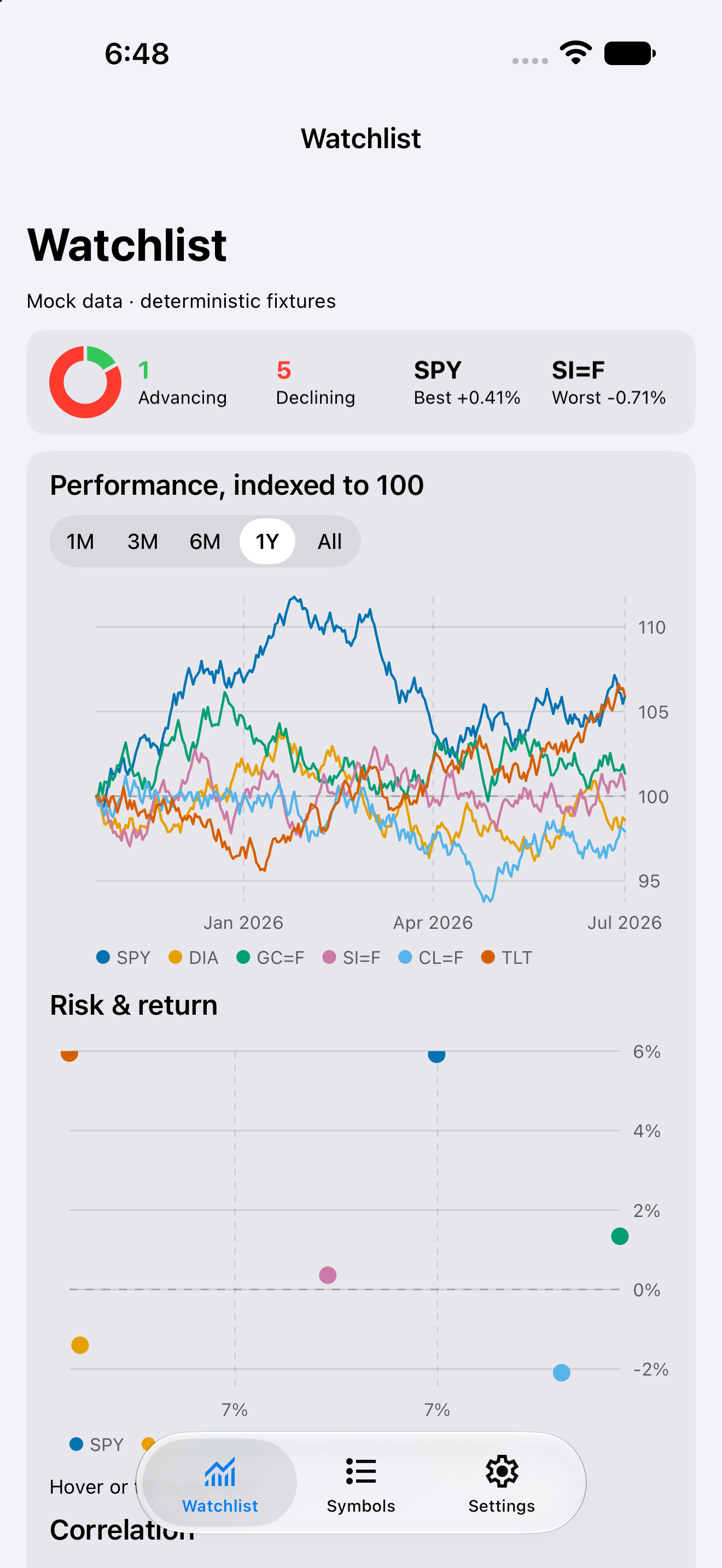
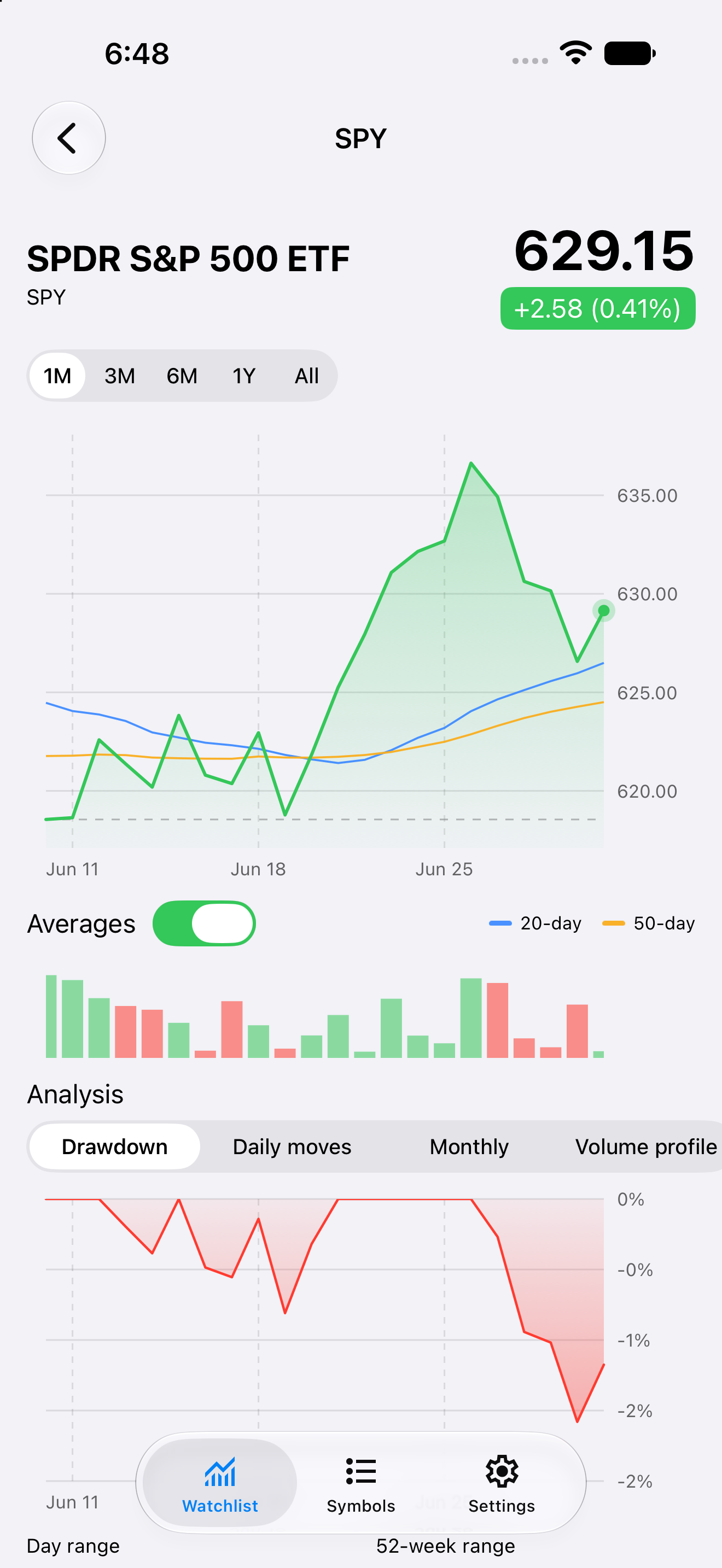
The watchlist on iPhone A symbol's detail on Android One month of a symbol on iPhone Managing the watchlist on Android


Run it in one command
Install the day CLI, then let it clone, build, and launch the app for your desktop:
cargo install day-cli
day launch --git https://github.com/daybrite/Day-Trader.git
day doctor lists what your platform’s toolkit needs and prints the install command for anything
missing. The launch prints where it put the checkout, so you can open the code and change it.
What you get
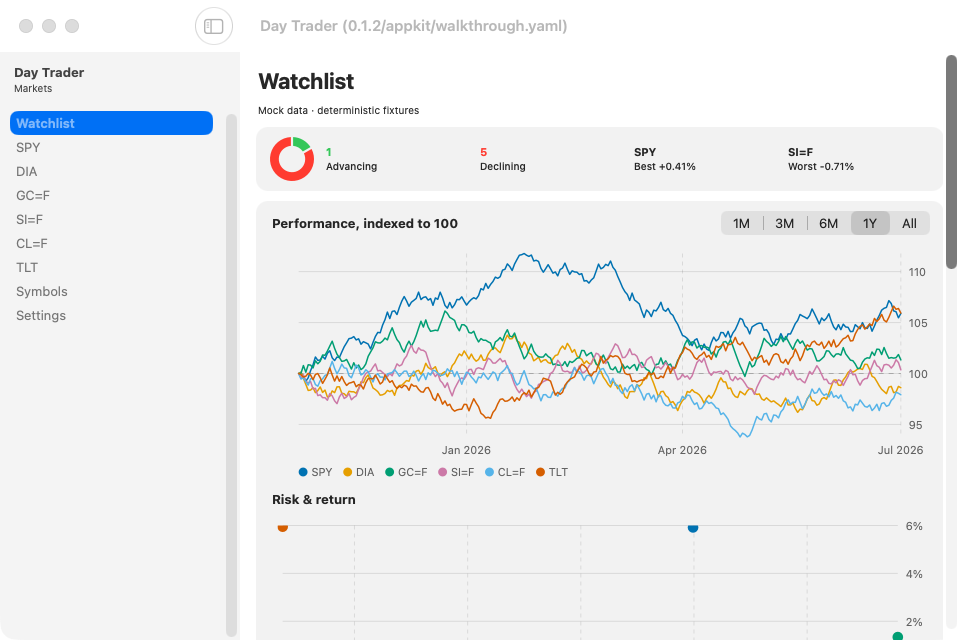
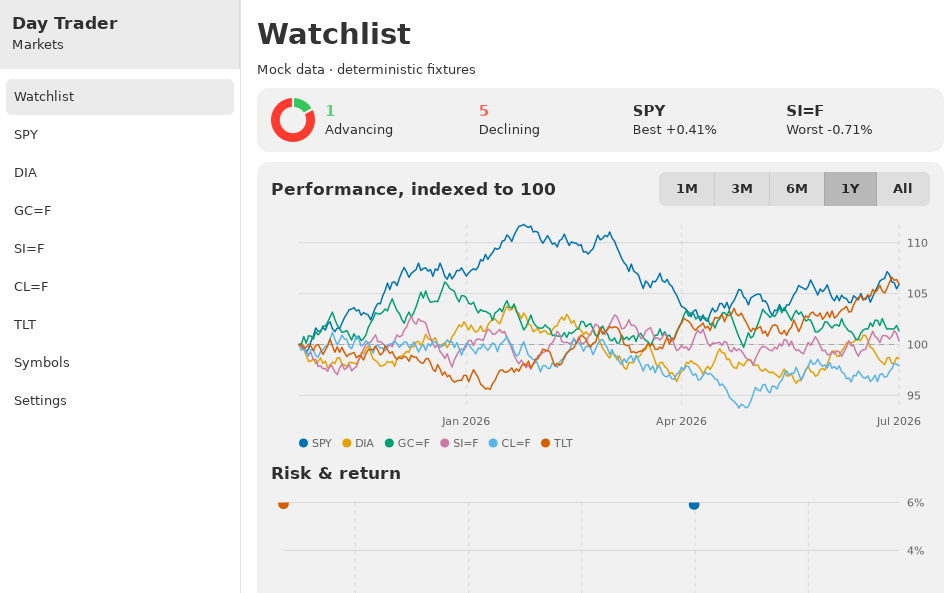
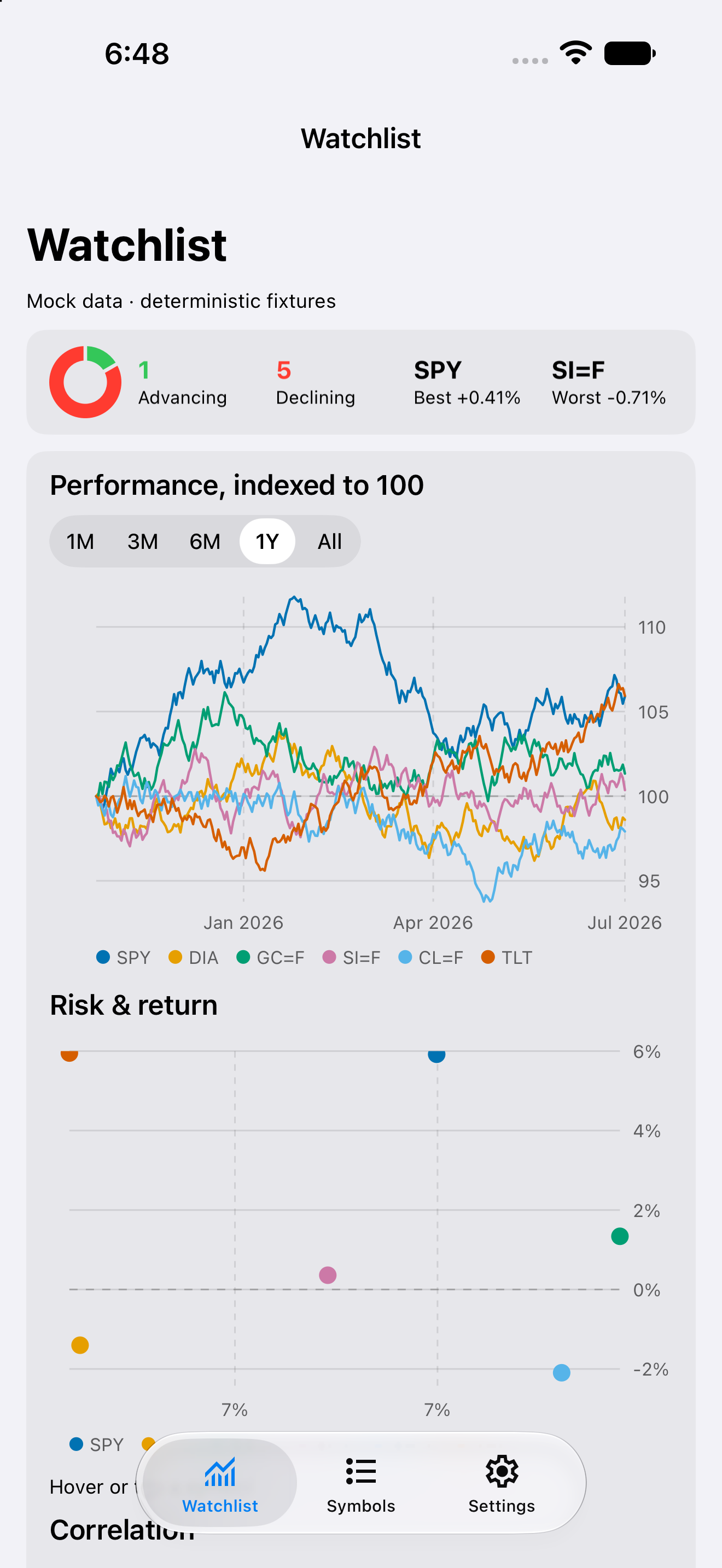
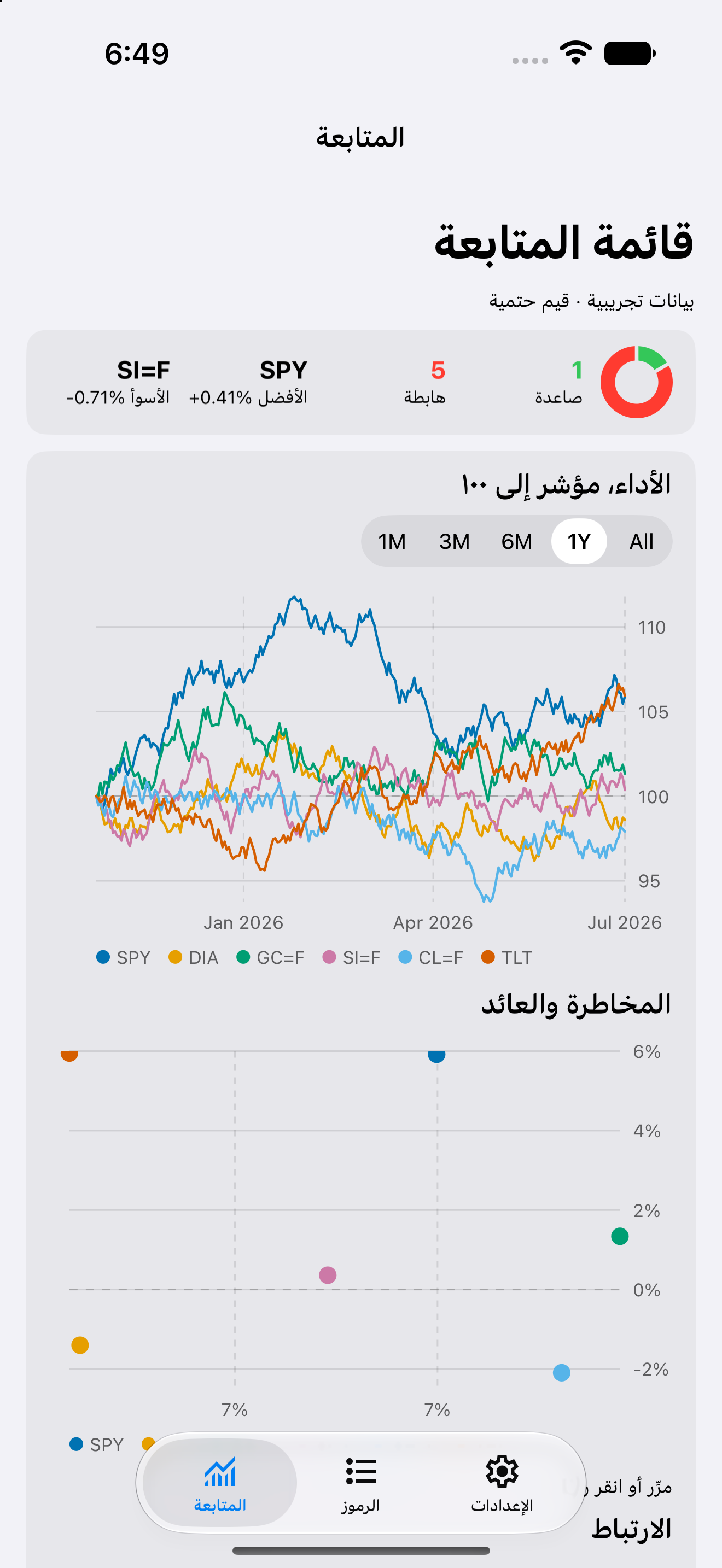
The list opens on a summary of the day: how many of your symbols are up, how many are down, drawn as a ring, and the best and worst movers by name. Below it, every symbol’s move over the chosen range on one chart, each indexed to 100 at the start, so a gold future and a currency pair read against each other on one axis. Every symbol gets a card with a sparkline of recent movement, the price, and a change chip. Tap the chip to cycle it between the change, the percentage, or both, and sort the list by your own order, by name, or by today’s move.
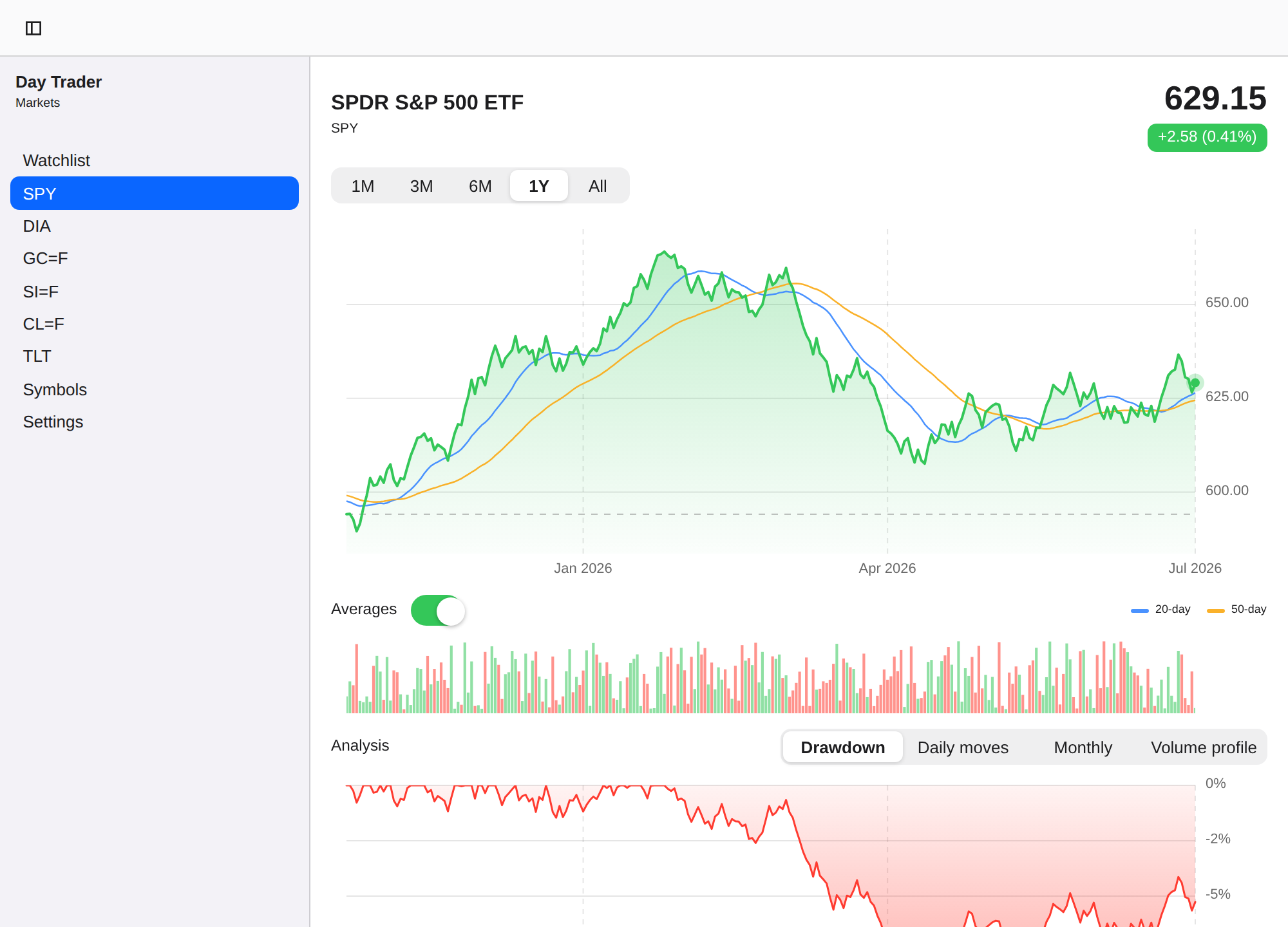
A symbol's detail on macOS, with the watchlist in the sidebar
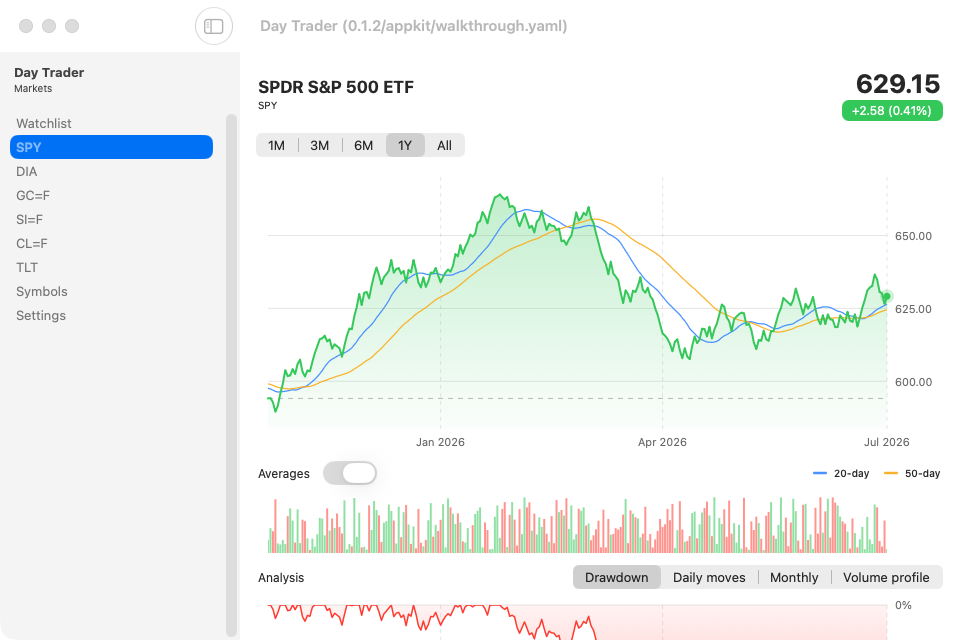
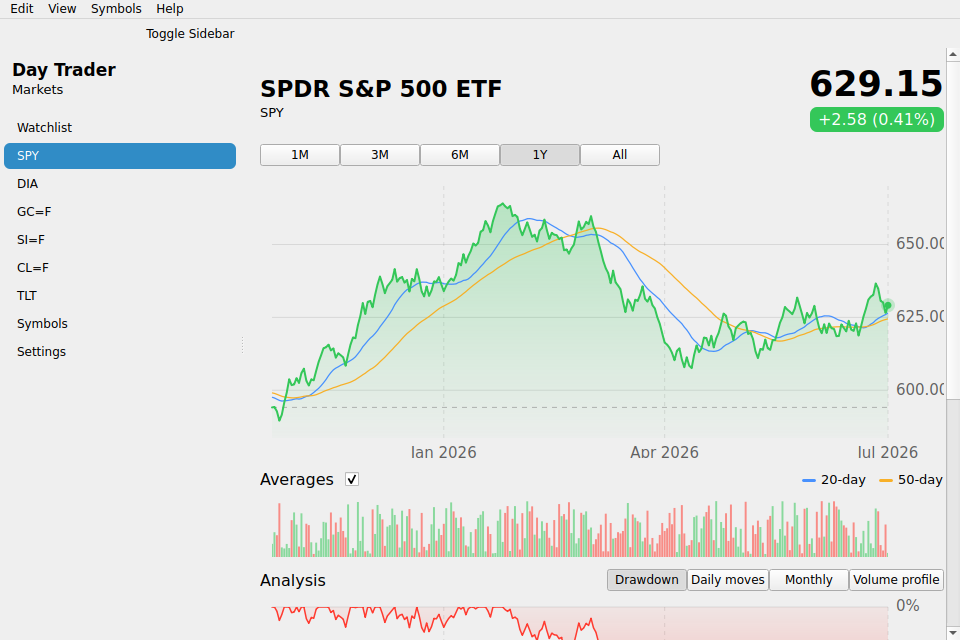
Tap a symbol for the full picture: a price chart with 20-day and 50-day moving averages you can switch off, a volume strip beneath it, and range bars that show where the price sits inside today’s high and low and inside the year’s. Five ranges run from a month to everything the source has. An analysis panel gives three more readings of the same history: how far the price sits below its peak, how its one-session moves are distributed, and a calendar of monthly returns colored around zero.
Every chart is a composition from day-piece-charts, a grammar-of-graphics piece that draws on Day’s canvas, so the same chart code renders on all seven platforms.
- Stocks, ETFs, commodity futures, and currency pairs, added by ticker or picked from suggestions.
- Reorder the watchlist by dragging and remove a symbol by swiping its row away.
- English, French, Arabic, and Simplified Chinese, with right-to-left layout in Arabic.
- Light and dark, following the system or set by hand.
Quotes are Yahoo Finance’s free end-of-day data, so this is a watchlist rather than a trading terminal. There is no account and no brokerage connection.
The same code on every platform
These captures come from the app’s own CI, which runs the walkthrough on every target and publishes the results to the gallery.
| macOS · AppKit | Windows · XAML | Linux · GTK |
|---|---|---|
| Watchlist on macOS | Watchlist on Windows | Watchlist on GTK |

| Linux · Qt | Web · DOM | HarmonyOS · ArkUI |
|---|---|---|
| Detail on Qt | Detail in the browser | Detail on HarmonyOS |

The sorted list, the absolute-change chips, and the Arabic layout:
Watchlist sorted by today's move, on iPhone Absolute-change chips on Android The watchlist in Arabic on iPhone Settings in French on Android


Build from a clone
Day compiles one toolkit backend per binary, so name a target when you build or launch. Every
target the app ships is listed in Day.toml.
day doctor                       # toolchains present and missing, with fixes
day launch -t macos-appkit       # build + run
day launch -t windows-winui      # on a Windows host
day launch -t ios-uikit          # needs a booted Simulator
day launch -t android-material        # needs a JDK and a running emulator or device
day launch -t web-dom            # serves the WebAssembly build locally
A bare cargo build uses the crate’s default mock backend, which is what lets rust-analyzer and
cargo check work with no flags. To pick a toolkit from plain cargo, turn the default off first:
cargo build --no-default-features --features appkit # or gtk / qt / uikit / material / xaml / dom
Set TRADER_MOCK=1 to replace the Yahoo Finance fetch with a deterministic generated series, so
screenshots and assertions come out the same every run:
day launch -t macos-appkit --env TRADER_MOCK=1 --script dayscript/walkthrough.yaml
That dayscript walks the whole app, and it is the script CI runs on every target and locale to produce the gallery.
TRADER_DEMO=1 reads the snapshots bundled under resource/assets/demo/ instead, which is what
the browser build shows while no proxy is set:
day launch -t macos-appkit --env TRADER_DEMO=1 --script dayscript/demo-data.yaml
Those files are real v8/chart responses trimmed to the fields the app reads, so the charts carry
a year of market history with no request at all. That second dayscript is the check that each
target finds them in its own bundle.
To build against a local day checkout instead of the pinned git revision, let the CLI write and
verify the patch table:
day patch --local /path/to/day
Inside the code
src/lib.rsisroot(): a sidebarnavwith one row per tracked symbol (a tab bar on a phone), and the shared settings surface: General (appearance, language) and Data (proxy, demo data, refresh) as a Settings entry on every platform, the App menu’s Settings… and About windows on desktop.src/quotes.rsis the data layer: the persisted watchlist, the Yahoo Finance fetch, and one memoized reactiveResourceper symbol.src/charts.rscomposes every chart from day-piece-charts: the price chart with its overlays, the volume strip, the drawdown, histogram and monthly heat map, the sparklines, the performance comparison, the breadth ring, and the range tracks.src/pages/watchlist.rs,detail.rs, andmanage.rsare the three screens.resource/locales/carries the Fluent strings foren,fr,ar, andzh-CN.platform/holds app-owned Apple host sources and any native resource customizations. Day generates the build projects underbuild/.
day lint checks routes, element ids, and locale coverage.
Data by Yahoo Finance. Day Trader is open source under the Apache-2.0 license.
Deterministic HTTP tests
TRADER_MOCK=1 still selects the stable prices used by the CI walkthrough, but now sends the
ordinary quote request through an isolated day-part-http interception session. A synthetic
Yahoo-shaped JSON response passes through the same HTTP status handling and quote parser as
live data. Unit tests verify price/date parity and the HTTP 429 error path. TRADER_DEMO=1
remains a separate bundled-resource packaging test; it does not contact a market-data service.
Generated native projects
Use a Day CLI with automatic native project generation; Apple builds require Xcode 27
or newer. Xcode project documents, Android Gradle files, and HarmonyOS hvigor files are
created under build/ by day prepare, day build, and day launch. Open the selected
project with day open -t <target>; edits to generated files are disposable. Apple Swift
sources, plists and .xcconfig files, and any Android resource overlays, remain app-owned
under platform/. For additional native configuration, use
day project add-target <target> --persist-native-project to create a persistent override.
Download — iOS (UIKit)
Screenshots
iOS
iPhone


iPad


Permissions
iOS
No declared permissions.
About
A stock watchlist that opens on the day at a glance, built with Day in one Rust codebase and rendered with the platform’s own widgets on iPhone, Android, Mac, Windows, Linux, HarmonyOS, and the web.
The watchlist on iPhone A symbol's detail on Android One month of a symbol on iPhone Managing the watchlist on Android
Run it in one command
Install the day CLI, then let it clone, build, and launch the app for your desktop:
cargo install day-cli
day launch --git https://github.com/daybrite/Day-Trader.git
day doctor lists what your platform’s toolkit needs and prints the install command for anything
missing. The launch prints where it put the checkout, so you can open the code and change it.
What you get
The list opens on a summary of the day: how many of your symbols are up, how many are down, drawn as a ring, and the best and worst movers by name. Below it, every symbol’s move over the chosen range on one chart, each indexed to 100 at the start, so a gold future and a currency pair read against each other on one axis. Every symbol gets a card with a sparkline of recent movement, the price, and a change chip. Tap the chip to cycle it between the change, the percentage, or both, and sort the list by your own order, by name, or by today’s move.
A symbol's detail on macOS, with the watchlist in the sidebar
Tap a symbol for the full picture: a price chart with 20-day and 50-day moving averages you can switch off, a volume strip beneath it, and range bars that show where the price sits inside today’s high and low and inside the year’s. Five ranges run from a month to everything the source has. An analysis panel gives three more readings of the same history: how far the price sits below its peak, how its one-session moves are distributed, and a calendar of monthly returns colored around zero.
Every chart is a composition from day-piece-charts, a grammar-of-graphics piece that draws on Day’s canvas, so the same chart code renders on all seven platforms.
- Stocks, ETFs, commodity futures, and currency pairs, added by ticker or picked from suggestions.
- Reorder the watchlist by dragging and remove a symbol by swiping its row away.
- English, French, Arabic, and Simplified Chinese, with right-to-left layout in Arabic.
- Light and dark, following the system or set by hand.
Quotes are Yahoo Finance’s free end-of-day data, so this is a watchlist rather than a trading terminal. There is no account and no brokerage connection.
The same code on every platform
These captures come from the app’s own CI, which runs the walkthrough on every target and publishes the results to the gallery.
| macOS · AppKit | Windows · XAML | Linux · GTK |
|---|---|---|
| Watchlist on macOS | Watchlist on Windows | Watchlist on GTK |
| Linux · Qt | Web · DOM | HarmonyOS · ArkUI |
|---|---|---|
| Detail on Qt | Detail in the browser | Detail on HarmonyOS |
The sorted list, the absolute-change chips, and the Arabic layout:
Watchlist sorted by today's move, on iPhone Absolute-change chips on Android The watchlist in Arabic on iPhone Settings in French on Android
Build from a clone
Day compiles one toolkit backend per binary, so name a target when you build or launch. Every
target the app ships is listed in Day.toml.
day doctor                       # toolchains present and missing, with fixes
day launch -t macos-appkit       # build + run
day launch -t windows-winui      # on a Windows host
day launch -t ios-uikit          # needs a booted Simulator
day launch -t android-material        # needs a JDK and a running emulator or device
day launch -t web-dom            # serves the WebAssembly build locally
A bare cargo build uses the crate’s default mock backend, which is what lets rust-analyzer and
cargo check work with no flags. To pick a toolkit from plain cargo, turn the default off first:
cargo build --no-default-features --features appkit # or gtk / qt / uikit / material / xaml / dom
Set TRADER_MOCK=1 to replace the Yahoo Finance fetch with a deterministic generated series, so
screenshots and assertions come out the same every run:
day launch -t macos-appkit --env TRADER_MOCK=1 --script dayscript/walkthrough.yaml
That dayscript walks the whole app, and it is the script CI runs on every target and locale to produce the gallery.
TRADER_DEMO=1 reads the snapshots bundled under resource/assets/demo/ instead, which is what
the browser build shows while no proxy is set:
day launch -t macos-appkit --env TRADER_DEMO=1 --script dayscript/demo-data.yaml
Those files are real v8/chart responses trimmed to the fields the app reads, so the charts carry
a year of market history with no request at all. That second dayscript is the check that each
target finds them in its own bundle.
To build against a local day checkout instead of the pinned git revision, let the CLI write and
verify the patch table:
day patch --local /path/to/day
Inside the code
src/lib.rsisroot(): a sidebarnavwith one row per tracked symbol (a tab bar on a phone), and the shared settings surface: General (appearance, language) and Data (proxy, demo data, refresh) as a Settings entry on every platform, the App menu’s Settings… and About windows on desktop.src/quotes.rsis the data layer: the persisted watchlist, the Yahoo Finance fetch, and one memoized reactiveResourceper symbol.src/charts.rscomposes every chart from day-piece-charts: the price chart with its overlays, the volume strip, the drawdown, histogram and monthly heat map, the sparklines, the performance comparison, the breadth ring, and the range tracks.src/pages/watchlist.rs,detail.rs, andmanage.rsare the three screens.resource/locales/carries the Fluent strings foren,fr,ar, andzh-CN.platform/holds app-owned Apple host sources and any native resource customizations. Day generates the build projects underbuild/.
day lint checks routes, element ids, and locale coverage.
Data by Yahoo Finance. Day Trader is open source under the Apache-2.0 license.
Deterministic HTTP tests
TRADER_MOCK=1 still selects the stable prices used by the CI walkthrough, but now sends the
ordinary quote request through an isolated day-part-http interception session. A synthetic
Yahoo-shaped JSON response passes through the same HTTP status handling and quote parser as
live data. Unit tests verify price/date parity and the HTTP 429 error path. TRADER_DEMO=1
remains a separate bundled-resource packaging test; it does not contact a market-data service.
Generated native projects
Use a Day CLI with automatic native project generation; Apple builds require Xcode 27
or newer. Xcode project documents, Android Gradle files, and HarmonyOS hvigor files are
created under build/ by day prepare, day build, and day launch. Open the selected
project with day open -t <target>; edits to generated files are disposable. Apple Swift
sources, plists and .xcconfig files, and any Android resource overlays, remain app-owned
under platform/. For additional native configuration, use
day project add-target <target> --persist-native-project to create a persistent override.
Permissions
Android
No declared permissions.
About
A stock watchlist that opens on the day at a glance, built with Day in one Rust codebase and rendered with the platform’s own widgets on iPhone, Android, Mac, Windows, Linux, HarmonyOS, and the web.
The watchlist on iPhone A symbol's detail on Android One month of a symbol on iPhone Managing the watchlist on Android
Run it in one command
Install the day CLI, then let it clone, build, and launch the app for your desktop:
cargo install day-cli
day launch --git https://github.com/daybrite/Day-Trader.git
day doctor lists what your platform’s toolkit needs and prints the install command for anything
missing. The launch prints where it put the checkout, so you can open the code and change it.
What you get
The list opens on a summary of the day: how many of your symbols are up, how many are down, drawn as a ring, and the best and worst movers by name. Below it, every symbol’s move over the chosen range on one chart, each indexed to 100 at the start, so a gold future and a currency pair read against each other on one axis. Every symbol gets a card with a sparkline of recent movement, the price, and a change chip. Tap the chip to cycle it between the change, the percentage, or both, and sort the list by your own order, by name, or by today’s move.
A symbol's detail on macOS, with the watchlist in the sidebar
Tap a symbol for the full picture: a price chart with 20-day and 50-day moving averages you can switch off, a volume strip beneath it, and range bars that show where the price sits inside today’s high and low and inside the year’s. Five ranges run from a month to everything the source has. An analysis panel gives three more readings of the same history: how far the price sits below its peak, how its one-session moves are distributed, and a calendar of monthly returns colored around zero.
Every chart is a composition from day-piece-charts, a grammar-of-graphics piece that draws on Day’s canvas, so the same chart code renders on all seven platforms.
- Stocks, ETFs, commodity futures, and currency pairs, added by ticker or picked from suggestions.
- Reorder the watchlist by dragging and remove a symbol by swiping its row away.
- English, French, Arabic, and Simplified Chinese, with right-to-left layout in Arabic.
- Light and dark, following the system or set by hand.
Quotes are Yahoo Finance’s free end-of-day data, so this is a watchlist rather than a trading terminal. There is no account and no brokerage connection.
The same code on every platform
These captures come from the app’s own CI, which runs the walkthrough on every target and publishes the results to the gallery.
| macOS · AppKit | Windows · XAML | Linux · GTK |
|---|---|---|
| Watchlist on macOS | Watchlist on Windows | Watchlist on GTK |
| Linux · Qt | Web · DOM | HarmonyOS · ArkUI |
|---|---|---|
| Detail on Qt | Detail in the browser | Detail on HarmonyOS |
The sorted list, the absolute-change chips, and the Arabic layout:
Watchlist sorted by today's move, on iPhone Absolute-change chips on Android The watchlist in Arabic on iPhone Settings in French on Android
Build from a clone
Day compiles one toolkit backend per binary, so name a target when you build or launch. Every
target the app ships is listed in Day.toml.
day doctor                       # toolchains present and missing, with fixes
day launch -t macos-appkit       # build + run
day launch -t windows-winui      # on a Windows host
day launch -t ios-uikit          # needs a booted Simulator
day launch -t android-material        # needs a JDK and a running emulator or device
day launch -t web-dom            # serves the WebAssembly build locally
A bare cargo build uses the crate’s default mock backend, which is what lets rust-analyzer and
cargo check work with no flags. To pick a toolkit from plain cargo, turn the default off first:
cargo build --no-default-features --features appkit # or gtk / qt / uikit / material / xaml / dom
Set TRADER_MOCK=1 to replace the Yahoo Finance fetch with a deterministic generated series, so
screenshots and assertions come out the same every run:
day launch -t macos-appkit --env TRADER_MOCK=1 --script dayscript/walkthrough.yaml
That dayscript walks the whole app, and it is the script CI runs on every target and locale to produce the gallery.
TRADER_DEMO=1 reads the snapshots bundled under resource/assets/demo/ instead, which is what
the browser build shows while no proxy is set:
day launch -t macos-appkit --env TRADER_DEMO=1 --script dayscript/demo-data.yaml
Those files are real v8/chart responses trimmed to the fields the app reads, so the charts carry
a year of market history with no request at all. That second dayscript is the check that each
target finds them in its own bundle.
To build against a local day checkout instead of the pinned git revision, let the CLI write and
verify the patch table:
day patch --local /path/to/day
Inside the code
src/lib.rsisroot(): a sidebarnavwith one row per tracked symbol (a tab bar on a phone), and the shared settings surface: General (appearance, language) and Data (proxy, demo data, refresh) as a Settings entry on every platform, the App menu’s Settings… and About windows on desktop.src/quotes.rsis the data layer: the persisted watchlist, the Yahoo Finance fetch, and one memoized reactiveResourceper symbol.src/charts.rscomposes every chart from day-piece-charts: the price chart with its overlays, the volume strip, the drawdown, histogram and monthly heat map, the sparklines, the performance comparison, the breadth ring, and the range tracks.src/pages/watchlist.rs,detail.rs, andmanage.rsare the three screens.resource/locales/carries the Fluent strings foren,fr,ar, andzh-CN.platform/holds app-owned Apple host sources and any native resource customizations. Day generates the build projects underbuild/.
day lint checks routes, element ids, and locale coverage.
Data by Yahoo Finance. Day Trader is open source under the Apache-2.0 license.
Deterministic HTTP tests
TRADER_MOCK=1 still selects the stable prices used by the CI walkthrough, but now sends the
ordinary quote request through an isolated day-part-http interception session. A synthetic
Yahoo-shaped JSON response passes through the same HTTP status handling and quote parser as
live data. Unit tests verify price/date parity and the HTTP 429 error path. TRADER_DEMO=1
remains a separate bundled-resource packaging test; it does not contact a market-data service.
Generated native projects
Use a Day CLI with automatic native project generation; Apple builds require Xcode 27
or newer. Xcode project documents, Android Gradle files, and HarmonyOS hvigor files are
created under build/ by day prepare, day build, and day launch. Open the selected
project with day open -t <target>; edits to generated files are disposable. Apple Swift
sources, plists and .xcconfig files, and any Android resource overlays, remain app-owned
under platform/. For additional native configuration, use
day project add-target <target> --persist-native-project to create a persistent override.
Download — HarmonyOS (ArkUI)
Screenshots
HarmonyOS
Handset


Tablet


Permissions
HarmonyOS
No declared permissions.
About
A stock watchlist that opens on the day at a glance, built with Day in one Rust codebase and rendered with the platform’s own widgets on iPhone, Android, Mac, Windows, Linux, HarmonyOS, and the web.
The watchlist on iPhone A symbol's detail on Android One month of a symbol on iPhone Managing the watchlist on Android
Run it in one command
Install the day CLI, then let it clone, build, and launch the app for your desktop:
cargo install day-cli
day launch --git https://github.com/daybrite/Day-Trader.git
day doctor lists what your platform’s toolkit needs and prints the install command for anything
missing. The launch prints where it put the checkout, so you can open the code and change it.
What you get
The list opens on a summary of the day: how many of your symbols are up, how many are down, drawn as a ring, and the best and worst movers by name. Below it, every symbol’s move over the chosen range on one chart, each indexed to 100 at the start, so a gold future and a currency pair read against each other on one axis. Every symbol gets a card with a sparkline of recent movement, the price, and a change chip. Tap the chip to cycle it between the change, the percentage, or both, and sort the list by your own order, by name, or by today’s move.
A symbol's detail on macOS, with the watchlist in the sidebar
Tap a symbol for the full picture: a price chart with 20-day and 50-day moving averages you can switch off, a volume strip beneath it, and range bars that show where the price sits inside today’s high and low and inside the year’s. Five ranges run from a month to everything the source has. An analysis panel gives three more readings of the same history: how far the price sits below its peak, how its one-session moves are distributed, and a calendar of monthly returns colored around zero.
Every chart is a composition from day-piece-charts, a grammar-of-graphics piece that draws on Day’s canvas, so the same chart code renders on all seven platforms.
- Stocks, ETFs, commodity futures, and currency pairs, added by ticker or picked from suggestions.
- Reorder the watchlist by dragging and remove a symbol by swiping its row away.
- English, French, Arabic, and Simplified Chinese, with right-to-left layout in Arabic.
- Light and dark, following the system or set by hand.
Quotes are Yahoo Finance’s free end-of-day data, so this is a watchlist rather than a trading terminal. There is no account and no brokerage connection.
The same code on every platform
These captures come from the app’s own CI, which runs the walkthrough on every target and publishes the results to the gallery.
| macOS · AppKit | Windows · XAML | Linux · GTK |
|---|---|---|
| Watchlist on macOS | Watchlist on Windows | Watchlist on GTK |
| Linux · Qt | Web · DOM | HarmonyOS · ArkUI |
|---|---|---|
| Detail on Qt | Detail in the browser | Detail on HarmonyOS |
The sorted list, the absolute-change chips, and the Arabic layout:
Watchlist sorted by today's move, on iPhone Absolute-change chips on Android The watchlist in Arabic on iPhone Settings in French on Android
Build from a clone
Day compiles one toolkit backend per binary, so name a target when you build or launch. Every
target the app ships is listed in Day.toml.
day doctor                       # toolchains present and missing, with fixes
day launch -t macos-appkit       # build + run
day launch -t windows-winui      # on a Windows host
day launch -t ios-uikit          # needs a booted Simulator
day launch -t android-material        # needs a JDK and a running emulator or device
day launch -t web-dom            # serves the WebAssembly build locally
A bare cargo build uses the crate’s default mock backend, which is what lets rust-analyzer and
cargo check work with no flags. To pick a toolkit from plain cargo, turn the default off first:
cargo build --no-default-features --features appkit # or gtk / qt / uikit / material / xaml / dom
Set TRADER_MOCK=1 to replace the Yahoo Finance fetch with a deterministic generated series, so
screenshots and assertions come out the same every run:
day launch -t macos-appkit --env TRADER_MOCK=1 --script dayscript/walkthrough.yaml
That dayscript walks the whole app, and it is the script CI runs on every target and locale to produce the gallery.
TRADER_DEMO=1 reads the snapshots bundled under resource/assets/demo/ instead, which is what
the browser build shows while no proxy is set:
day launch -t macos-appkit --env TRADER_DEMO=1 --script dayscript/demo-data.yaml
Those files are real v8/chart responses trimmed to the fields the app reads, so the charts carry
a year of market history with no request at all. That second dayscript is the check that each
target finds them in its own bundle.
To build against a local day checkout instead of the pinned git revision, let the CLI write and
verify the patch table:
day patch --local /path/to/day
Inside the code
src/lib.rsisroot(): a sidebarnavwith one row per tracked symbol (a tab bar on a phone), and the shared settings surface: General (appearance, language) and Data (proxy, demo data, refresh) as a Settings entry on every platform, the App menu’s Settings… and About windows on desktop.src/quotes.rsis the data layer: the persisted watchlist, the Yahoo Finance fetch, and one memoized reactiveResourceper symbol.src/charts.rscomposes every chart from day-piece-charts: the price chart with its overlays, the volume strip, the drawdown, histogram and monthly heat map, the sparklines, the performance comparison, the breadth ring, and the range tracks.src/pages/watchlist.rs,detail.rs, andmanage.rsare the three screens.resource/locales/carries the Fluent strings foren,fr,ar, andzh-CN.platform/holds app-owned Apple host sources and any native resource customizations. Day generates the build projects underbuild/.
day lint checks routes, element ids, and locale coverage.
Data by Yahoo Finance. Day Trader is open source under the Apache-2.0 license.
Deterministic HTTP tests
TRADER_MOCK=1 still selects the stable prices used by the CI walkthrough, but now sends the
ordinary quote request through an isolated day-part-http interception session. A synthetic
Yahoo-shaped JSON response passes through the same HTTP status handling and quote parser as
live data. Unit tests verify price/date parity and the HTTP 429 error path. TRADER_DEMO=1
remains a separate bundled-resource packaging test; it does not contact a market-data service.
Generated native projects
Use a Day CLI with automatic native project generation; Apple builds require Xcode 27
or newer. Xcode project documents, Android Gradle files, and HarmonyOS hvigor files are
created under build/ by day prepare, day build, and day launch. Open the selected
project with day open -t <target>; edits to generated files are disposable. Apple Swift
sources, plists and .xcconfig files, and any Android resource overlays, remain app-owned
under platform/. For additional native configuration, use
day project add-target <target> --persist-native-project to create a persistent override.
Download — macOS (AppKit)
Install and run from a terminal
Screenshots
macOS


Permissions
macOS
No declared permissions.
About
A stock watchlist that opens on the day at a glance, built with Day in one Rust codebase and rendered with the platform’s own widgets on iPhone, Android, Mac, Windows, Linux, HarmonyOS, and the web.
The watchlist on iPhone A symbol's detail on Android One month of a symbol on iPhone Managing the watchlist on Android
Run it in one command
Install the day CLI, then let it clone, build, and launch the app for your desktop:
cargo install day-cli
day launch --git https://github.com/daybrite/Day-Trader.git
day doctor lists what your platform’s toolkit needs and prints the install command for anything
missing. The launch prints where it put the checkout, so you can open the code and change it.
What you get
The list opens on a summary of the day: how many of your symbols are up, how many are down, drawn as a ring, and the best and worst movers by name. Below it, every symbol’s move over the chosen range on one chart, each indexed to 100 at the start, so a gold future and a currency pair read against each other on one axis. Every symbol gets a card with a sparkline of recent movement, the price, and a change chip. Tap the chip to cycle it between the change, the percentage, or both, and sort the list by your own order, by name, or by today’s move.
A symbol's detail on macOS, with the watchlist in the sidebar
Tap a symbol for the full picture: a price chart with 20-day and 50-day moving averages you can switch off, a volume strip beneath it, and range bars that show where the price sits inside today’s high and low and inside the year’s. Five ranges run from a month to everything the source has. An analysis panel gives three more readings of the same history: how far the price sits below its peak, how its one-session moves are distributed, and a calendar of monthly returns colored around zero.
Every chart is a composition from day-piece-charts, a grammar-of-graphics piece that draws on Day’s canvas, so the same chart code renders on all seven platforms.
- Stocks, ETFs, commodity futures, and currency pairs, added by ticker or picked from suggestions.
- Reorder the watchlist by dragging and remove a symbol by swiping its row away.
- English, French, Arabic, and Simplified Chinese, with right-to-left layout in Arabic.
- Light and dark, following the system or set by hand.
Quotes are Yahoo Finance’s free end-of-day data, so this is a watchlist rather than a trading terminal. There is no account and no brokerage connection.
The same code on every platform
These captures come from the app’s own CI, which runs the walkthrough on every target and publishes the results to the gallery.
| macOS · AppKit | Windows · XAML | Linux · GTK |
|---|---|---|
| Watchlist on macOS | Watchlist on Windows | Watchlist on GTK |
| Linux · Qt | Web · DOM | HarmonyOS · ArkUI |
|---|---|---|
| Detail on Qt | Detail in the browser | Detail on HarmonyOS |
The sorted list, the absolute-change chips, and the Arabic layout:
Watchlist sorted by today's move, on iPhone Absolute-change chips on Android The watchlist in Arabic on iPhone Settings in French on Android
Build from a clone
Day compiles one toolkit backend per binary, so name a target when you build or launch. Every
target the app ships is listed in Day.toml.
day doctor                       # toolchains present and missing, with fixes
day launch -t macos-appkit       # build + run
day launch -t windows-winui      # on a Windows host
day launch -t ios-uikit          # needs a booted Simulator
day launch -t android-material        # needs a JDK and a running emulator or device
day launch -t web-dom            # serves the WebAssembly build locally
A bare cargo build uses the crate’s default mock backend, which is what lets rust-analyzer and
cargo check work with no flags. To pick a toolkit from plain cargo, turn the default off first:
cargo build --no-default-features --features appkit # or gtk / qt / uikit / material / xaml / dom
Set TRADER_MOCK=1 to replace the Yahoo Finance fetch with a deterministic generated series, so
screenshots and assertions come out the same every run:
day launch -t macos-appkit --env TRADER_MOCK=1 --script dayscript/walkthrough.yaml
That dayscript walks the whole app, and it is the script CI runs on every target and locale to produce the gallery.
TRADER_DEMO=1 reads the snapshots bundled under resource/assets/demo/ instead, which is what
the browser build shows while no proxy is set:
day launch -t macos-appkit --env TRADER_DEMO=1 --script dayscript/demo-data.yaml
Those files are real v8/chart responses trimmed to the fields the app reads, so the charts carry
a year of market history with no request at all. That second dayscript is the check that each
target finds them in its own bundle.
To build against a local day checkout instead of the pinned git revision, let the CLI write and
verify the patch table:
day patch --local /path/to/day
Inside the code
src/lib.rsisroot(): a sidebarnavwith one row per tracked symbol (a tab bar on a phone), and the shared settings surface: General (appearance, language) and Data (proxy, demo data, refresh) as a Settings entry on every platform, the App menu’s Settings… and About windows on desktop.src/quotes.rsis the data layer: the persisted watchlist, the Yahoo Finance fetch, and one memoized reactiveResourceper symbol.src/charts.rscomposes every chart from day-piece-charts: the price chart with its overlays, the volume strip, the drawdown, histogram and monthly heat map, the sparklines, the performance comparison, the breadth ring, and the range tracks.src/pages/watchlist.rs,detail.rs, andmanage.rsare the three screens.resource/locales/carries the Fluent strings foren,fr,ar, andzh-CN.platform/holds app-owned Apple host sources and any native resource customizations. Day generates the build projects underbuild/.
day lint checks routes, element ids, and locale coverage.
Data by Yahoo Finance. Day Trader is open source under the Apache-2.0 license.
Deterministic HTTP tests
TRADER_MOCK=1 still selects the stable prices used by the CI walkthrough, but now sends the
ordinary quote request through an isolated day-part-http interception session. A synthetic
Yahoo-shaped JSON response passes through the same HTTP status handling and quote parser as
live data. Unit tests verify price/date parity and the HTTP 429 error path. TRADER_DEMO=1
remains a separate bundled-resource packaging test; it does not contact a market-data service.
Generated native projects
Use a Day CLI with automatic native project generation; Apple builds require Xcode 27
or newer. Xcode project documents, Android Gradle files, and HarmonyOS hvigor files are
created under build/ by day prepare, day build, and day launch. Open the selected
project with day open -t <target>; edits to generated files are disposable. Apple Swift
sources, plists and .xcconfig files, and any Android resource overlays, remain app-owned
under platform/. For additional native configuration, use
day project add-target <target> --persist-native-project to create a persistent override.
Download — Linux (GTK 4 / GNOME)
Install and run from a terminal
Screenshots
GNOME


Permissions
GNOME
No declared permissions.
About
A stock watchlist that opens on the day at a glance, built with Day in one Rust codebase and rendered with the platform’s own widgets on iPhone, Android, Mac, Windows, Linux, HarmonyOS, and the web.
The watchlist on iPhone A symbol's detail on Android One month of a symbol on iPhone Managing the watchlist on Android
Run it in one command
Install the day CLI, then let it clone, build, and launch the app for your desktop:
cargo install day-cli
day launch --git https://github.com/daybrite/Day-Trader.git
day doctor lists what your platform’s toolkit needs and prints the install command for anything
missing. The launch prints where it put the checkout, so you can open the code and change it.
What you get
The list opens on a summary of the day: how many of your symbols are up, how many are down, drawn as a ring, and the best and worst movers by name. Below it, every symbol’s move over the chosen range on one chart, each indexed to 100 at the start, so a gold future and a currency pair read against each other on one axis. Every symbol gets a card with a sparkline of recent movement, the price, and a change chip. Tap the chip to cycle it between the change, the percentage, or both, and sort the list by your own order, by name, or by today’s move.
A symbol's detail on macOS, with the watchlist in the sidebar
Tap a symbol for the full picture: a price chart with 20-day and 50-day moving averages you can switch off, a volume strip beneath it, and range bars that show where the price sits inside today’s high and low and inside the year’s. Five ranges run from a month to everything the source has. An analysis panel gives three more readings of the same history: how far the price sits below its peak, how its one-session moves are distributed, and a calendar of monthly returns colored around zero.
Every chart is a composition from day-piece-charts, a grammar-of-graphics piece that draws on Day’s canvas, so the same chart code renders on all seven platforms.
- Stocks, ETFs, commodity futures, and currency pairs, added by ticker or picked from suggestions.
- Reorder the watchlist by dragging and remove a symbol by swiping its row away.
- English, French, Arabic, and Simplified Chinese, with right-to-left layout in Arabic.
- Light and dark, following the system or set by hand.
Quotes are Yahoo Finance’s free end-of-day data, so this is a watchlist rather than a trading terminal. There is no account and no brokerage connection.
The same code on every platform
These captures come from the app’s own CI, which runs the walkthrough on every target and publishes the results to the gallery.
| macOS · AppKit | Windows · XAML | Linux · GTK |
|---|---|---|
| Watchlist on macOS | Watchlist on Windows | Watchlist on GTK |
| Linux · Qt | Web · DOM | HarmonyOS · ArkUI |
|---|---|---|
| Detail on Qt | Detail in the browser | Detail on HarmonyOS |
The sorted list, the absolute-change chips, and the Arabic layout:
Watchlist sorted by today's move, on iPhone Absolute-change chips on Android The watchlist in Arabic on iPhone Settings in French on Android
Build from a clone
Day compiles one toolkit backend per binary, so name a target when you build or launch. Every
target the app ships is listed in Day.toml.
day doctor                       # toolchains present and missing, with fixes
day launch -t macos-appkit       # build + run
day launch -t windows-winui      # on a Windows host
day launch -t ios-uikit          # needs a booted Simulator
day launch -t android-material        # needs a JDK and a running emulator or device
day launch -t web-dom            # serves the WebAssembly build locally
A bare cargo build uses the crate’s default mock backend, which is what lets rust-analyzer and
cargo check work with no flags. To pick a toolkit from plain cargo, turn the default off first:
cargo build --no-default-features --features appkit # or gtk / qt / uikit / material / xaml / dom
Set TRADER_MOCK=1 to replace the Yahoo Finance fetch with a deterministic generated series, so
screenshots and assertions come out the same every run:
day launch -t macos-appkit --env TRADER_MOCK=1 --script dayscript/walkthrough.yaml
That dayscript walks the whole app, and it is the script CI runs on every target and locale to produce the gallery.
TRADER_DEMO=1 reads the snapshots bundled under resource/assets/demo/ instead, which is what
the browser build shows while no proxy is set:
day launch -t macos-appkit --env TRADER_DEMO=1 --script dayscript/demo-data.yaml
Those files are real v8/chart responses trimmed to the fields the app reads, so the charts carry
a year of market history with no request at all. That second dayscript is the check that each
target finds them in its own bundle.
To build against a local day checkout instead of the pinned git revision, let the CLI write and
verify the patch table:
day patch --local /path/to/day
Inside the code
src/lib.rsisroot(): a sidebarnavwith one row per tracked symbol (a tab bar on a phone), and the shared settings surface: General (appearance, language) and Data (proxy, demo data, refresh) as a Settings entry on every platform, the App menu’s Settings… and About windows on desktop.src/quotes.rsis the data layer: the persisted watchlist, the Yahoo Finance fetch, and one memoized reactiveResourceper symbol.src/charts.rscomposes every chart from day-piece-charts: the price chart with its overlays, the volume strip, the drawdown, histogram and monthly heat map, the sparklines, the performance comparison, the breadth ring, and the range tracks.src/pages/watchlist.rs,detail.rs, andmanage.rsare the three screens.resource/locales/carries the Fluent strings foren,fr,ar, andzh-CN.platform/holds app-owned Apple host sources and any native resource customizations. Day generates the build projects underbuild/.
day lint checks routes, element ids, and locale coverage.
Data by Yahoo Finance. Day Trader is open source under the Apache-2.0 license.
Deterministic HTTP tests
TRADER_MOCK=1 still selects the stable prices used by the CI walkthrough, but now sends the
ordinary quote request through an isolated day-part-http interception session. A synthetic
Yahoo-shaped JSON response passes through the same HTTP status handling and quote parser as
live data. Unit tests verify price/date parity and the HTTP 429 error path. TRADER_DEMO=1
remains a separate bundled-resource packaging test; it does not contact a market-data service.
Generated native projects
Use a Day CLI with automatic native project generation; Apple builds require Xcode 27
or newer. Xcode project documents, Android Gradle files, and HarmonyOS hvigor files are
created under build/ by day prepare, day build, and day launch. Open the selected
project with day open -t <target>; edits to generated files are disposable. Apple Swift
sources, plists and .xcconfig files, and any Android resource overlays, remain app-owned
under platform/. For additional native configuration, use
day project add-target <target> --persist-native-project to create a persistent override.
Download — Linux (Qt 6 / KDE)
Install and run from a terminal
Screenshots
KDE


Permissions
KDE
No declared permissions.
About
A stock watchlist that opens on the day at a glance, built with Day in one Rust codebase and rendered with the platform’s own widgets on iPhone, Android, Mac, Windows, Linux, HarmonyOS, and the web.
The watchlist on iPhone A symbol's detail on Android One month of a symbol on iPhone Managing the watchlist on Android
Run it in one command
Install the day CLI, then let it clone, build, and launch the app for your desktop:
cargo install day-cli
day launch --git https://github.com/daybrite/Day-Trader.git
day doctor lists what your platform’s toolkit needs and prints the install command for anything
missing. The launch prints where it put the checkout, so you can open the code and change it.
What you get
The list opens on a summary of the day: how many of your symbols are up, how many are down, drawn as a ring, and the best and worst movers by name. Below it, every symbol’s move over the chosen range on one chart, each indexed to 100 at the start, so a gold future and a currency pair read against each other on one axis. Every symbol gets a card with a sparkline of recent movement, the price, and a change chip. Tap the chip to cycle it between the change, the percentage, or both, and sort the list by your own order, by name, or by today’s move.
A symbol's detail on macOS, with the watchlist in the sidebar
Tap a symbol for the full picture: a price chart with 20-day and 50-day moving averages you can switch off, a volume strip beneath it, and range bars that show where the price sits inside today’s high and low and inside the year’s. Five ranges run from a month to everything the source has. An analysis panel gives three more readings of the same history: how far the price sits below its peak, how its one-session moves are distributed, and a calendar of monthly returns colored around zero.
Every chart is a composition from day-piece-charts, a grammar-of-graphics piece that draws on Day’s canvas, so the same chart code renders on all seven platforms.
- Stocks, ETFs, commodity futures, and currency pairs, added by ticker or picked from suggestions.
- Reorder the watchlist by dragging and remove a symbol by swiping its row away.
- English, French, Arabic, and Simplified Chinese, with right-to-left layout in Arabic.
- Light and dark, following the system or set by hand.
Quotes are Yahoo Finance’s free end-of-day data, so this is a watchlist rather than a trading terminal. There is no account and no brokerage connection.
The same code on every platform
These captures come from the app’s own CI, which runs the walkthrough on every target and publishes the results to the gallery.
| macOS · AppKit | Windows · XAML | Linux · GTK |
|---|---|---|
| Watchlist on macOS | Watchlist on Windows | Watchlist on GTK |
| Linux · Qt | Web · DOM | HarmonyOS · ArkUI |
|---|---|---|
| Detail on Qt | Detail in the browser | Detail on HarmonyOS |
The sorted list, the absolute-change chips, and the Arabic layout:
Watchlist sorted by today's move, on iPhone Absolute-change chips on Android The watchlist in Arabic on iPhone Settings in French on Android
Build from a clone
Day compiles one toolkit backend per binary, so name a target when you build or launch. Every
target the app ships is listed in Day.toml.
day doctor                       # toolchains present and missing, with fixes
day launch -t macos-appkit       # build + run
day launch -t windows-winui      # on a Windows host
day launch -t ios-uikit          # needs a booted Simulator
day launch -t android-material        # needs a JDK and a running emulator or device
day launch -t web-dom            # serves the WebAssembly build locally
A bare cargo build uses the crate’s default mock backend, which is what lets rust-analyzer and
cargo check work with no flags. To pick a toolkit from plain cargo, turn the default off first:
cargo build --no-default-features --features appkit # or gtk / qt / uikit / material / xaml / dom
Set TRADER_MOCK=1 to replace the Yahoo Finance fetch with a deterministic generated series, so
screenshots and assertions come out the same every run:
day launch -t macos-appkit --env TRADER_MOCK=1 --script dayscript/walkthrough.yaml
That dayscript walks the whole app, and it is the script CI runs on every target and locale to produce the gallery.
TRADER_DEMO=1 reads the snapshots bundled under resource/assets/demo/ instead, which is what
the browser build shows while no proxy is set:
day launch -t macos-appkit --env TRADER_DEMO=1 --script dayscript/demo-data.yaml
Those files are real v8/chart responses trimmed to the fields the app reads, so the charts carry
a year of market history with no request at all. That second dayscript is the check that each
target finds them in its own bundle.
To build against a local day checkout instead of the pinned git revision, let the CLI write and
verify the patch table:
day patch --local /path/to/day
Inside the code
src/lib.rsisroot(): a sidebarnavwith one row per tracked symbol (a tab bar on a phone), and the shared settings surface: General (appearance, language) and Data (proxy, demo data, refresh) as a Settings entry on every platform, the App menu’s Settings… and About windows on desktop.src/quotes.rsis the data layer: the persisted watchlist, the Yahoo Finance fetch, and one memoized reactiveResourceper symbol.src/charts.rscomposes every chart from day-piece-charts: the price chart with its overlays, the volume strip, the drawdown, histogram and monthly heat map, the sparklines, the performance comparison, the breadth ring, and the range tracks.src/pages/watchlist.rs,detail.rs, andmanage.rsare the three screens.resource/locales/carries the Fluent strings foren,fr,ar, andzh-CN.platform/holds app-owned Apple host sources and any native resource customizations. Day generates the build projects underbuild/.
day lint checks routes, element ids, and locale coverage.
Data by Yahoo Finance. Day Trader is open source under the Apache-2.0 license.
Deterministic HTTP tests
TRADER_MOCK=1 still selects the stable prices used by the CI walkthrough, but now sends the
ordinary quote request through an isolated day-part-http interception session. A synthetic
Yahoo-shaped JSON response passes through the same HTTP status handling and quote parser as
live data. Unit tests verify price/date parity and the HTTP 429 error path. TRADER_DEMO=1
remains a separate bundled-resource packaging test; it does not contact a market-data service.
Generated native projects
Use a Day CLI with automatic native project generation; Apple builds require Xcode 27
or newer. Xcode project documents, Android Gradle files, and HarmonyOS hvigor files are
created under build/ by day prepare, day build, and day launch. Open the selected
project with day open -t <target>; edits to generated files are disposable. Apple Swift
sources, plists and .xcconfig files, and any Android resource overlays, remain app-owned
under platform/. For additional native configuration, use
day project add-target <target> --persist-native-project to create a persistent override.
Download — Windows (WinUI 3)
Install and run from a terminal
Screenshots
Windows


Permissions
Windows
No declared permissions.
About
A stock watchlist that opens on the day at a glance, built with Day in one Rust codebase and rendered with the platform’s own widgets on iPhone, Android, Mac, Windows, Linux, HarmonyOS, and the web.
The watchlist on iPhone A symbol's detail on Android One month of a symbol on iPhone Managing the watchlist on Android
Run it in one command
Install the day CLI, then let it clone, build, and launch the app for your desktop:
cargo install day-cli
day launch --git https://github.com/daybrite/Day-Trader.git
day doctor lists what your platform’s toolkit needs and prints the install command for anything
missing. The launch prints where it put the checkout, so you can open the code and change it.
What you get
The list opens on a summary of the day: how many of your symbols are up, how many are down, drawn as a ring, and the best and worst movers by name. Below it, every symbol’s move over the chosen range on one chart, each indexed to 100 at the start, so a gold future and a currency pair read against each other on one axis. Every symbol gets a card with a sparkline of recent movement, the price, and a change chip. Tap the chip to cycle it between the change, the percentage, or both, and sort the list by your own order, by name, or by today’s move.
A symbol's detail on macOS, with the watchlist in the sidebar
Tap a symbol for the full picture: a price chart with 20-day and 50-day moving averages you can switch off, a volume strip beneath it, and range bars that show where the price sits inside today’s high and low and inside the year’s. Five ranges run from a month to everything the source has. An analysis panel gives three more readings of the same history: how far the price sits below its peak, how its one-session moves are distributed, and a calendar of monthly returns colored around zero.
Every chart is a composition from day-piece-charts, a grammar-of-graphics piece that draws on Day’s canvas, so the same chart code renders on all seven platforms.
- Stocks, ETFs, commodity futures, and currency pairs, added by ticker or picked from suggestions.
- Reorder the watchlist by dragging and remove a symbol by swiping its row away.
- English, French, Arabic, and Simplified Chinese, with right-to-left layout in Arabic.
- Light and dark, following the system or set by hand.
Quotes are Yahoo Finance’s free end-of-day data, so this is a watchlist rather than a trading terminal. There is no account and no brokerage connection.
The same code on every platform
These captures come from the app’s own CI, which runs the walkthrough on every target and publishes the results to the gallery.
| macOS · AppKit | Windows · XAML | Linux · GTK |
|---|---|---|
| Watchlist on macOS | Watchlist on Windows | Watchlist on GTK |
| Linux · Qt | Web · DOM | HarmonyOS · ArkUI |
|---|---|---|
| Detail on Qt | Detail in the browser | Detail on HarmonyOS |
The sorted list, the absolute-change chips, and the Arabic layout:
Watchlist sorted by today's move, on iPhone Absolute-change chips on Android The watchlist in Arabic on iPhone Settings in French on Android
Build from a clone
Day compiles one toolkit backend per binary, so name a target when you build or launch. Every
target the app ships is listed in Day.toml.
day doctor                       # toolchains present and missing, with fixes
day launch -t macos-appkit       # build + run
day launch -t windows-winui      # on a Windows host
day launch -t ios-uikit          # needs a booted Simulator
day launch -t android-material        # needs a JDK and a running emulator or device
day launch -t web-dom            # serves the WebAssembly build locally
A bare cargo build uses the crate’s default mock backend, which is what lets rust-analyzer and
cargo check work with no flags. To pick a toolkit from plain cargo, turn the default off first:
cargo build --no-default-features --features appkit # or gtk / qt / uikit / material / xaml / dom
Set TRADER_MOCK=1 to replace the Yahoo Finance fetch with a deterministic generated series, so
screenshots and assertions come out the same every run:
day launch -t macos-appkit --env TRADER_MOCK=1 --script dayscript/walkthrough.yaml
That dayscript walks the whole app, and it is the script CI runs on every target and locale to produce the gallery.
TRADER_DEMO=1 reads the snapshots bundled under resource/assets/demo/ instead, which is what
the browser build shows while no proxy is set:
day launch -t macos-appkit --env TRADER_DEMO=1 --script dayscript/demo-data.yaml
Those files are real v8/chart responses trimmed to the fields the app reads, so the charts carry
a year of market history with no request at all. That second dayscript is the check that each
target finds them in its own bundle.
To build against a local day checkout instead of the pinned git revision, let the CLI write and
verify the patch table:
day patch --local /path/to/day
Inside the code
src/lib.rsisroot(): a sidebarnavwith one row per tracked symbol (a tab bar on a phone), and the shared settings surface: General (appearance, language) and Data (proxy, demo data, refresh) as a Settings entry on every platform, the App menu’s Settings… and About windows on desktop.src/quotes.rsis the data layer: the persisted watchlist, the Yahoo Finance fetch, and one memoized reactiveResourceper symbol.src/charts.rscomposes every chart from day-piece-charts: the price chart with its overlays, the volume strip, the drawdown, histogram and monthly heat map, the sparklines, the performance comparison, the breadth ring, and the range tracks.src/pages/watchlist.rs,detail.rs, andmanage.rsare the three screens.resource/locales/carries the Fluent strings foren,fr,ar, andzh-CN.platform/holds app-owned Apple host sources and any native resource customizations. Day generates the build projects underbuild/.
day lint checks routes, element ids, and locale coverage.
Data by Yahoo Finance. Day Trader is open source under the Apache-2.0 license.
Deterministic HTTP tests
TRADER_MOCK=1 still selects the stable prices used by the CI walkthrough, but now sends the
ordinary quote request through an isolated day-part-http interception session. A synthetic
Yahoo-shaped JSON response passes through the same HTTP status handling and quote parser as
live data. Unit tests verify price/date parity and the HTTP 429 error path. TRADER_DEMO=1
remains a separate bundled-resource packaging test; it does not contact a market-data service.
Generated native projects
Use a Day CLI with automatic native project generation; Apple builds require Xcode 27
or newer. Xcode project documents, Android Gradle files, and HarmonyOS hvigor files are
created under build/ by day prepare, day build, and day launch. Open the selected
project with day open -t <target>; edits to generated files are disposable. Apple Swift
sources, plists and .xcconfig files, and any Android resource overlays, remain app-owned
under platform/. For additional native configuration, use
day project add-target <target> --persist-native-project to create a persistent override.
Open — Web (DOM)
Open it in any browser
Screenshots
Web


Permissions
Web
No declared permissions.